
Category: IT Tips
Claude Code Model Switching & Effort Settings, Fully Explained - How to Choose Between Opus 5 / Sonnet 5 / Fable 5.1 🎛️
 Author: Mojangcam
This post was translated from the Korean original.
Contents11 sections
Hi there! It's Mojangcam 😎
Back in July, when I covered the Claude Opus 5 launch, I briefly introduced the /model and /effort commands. Since then, looking at the search terms that bring people to this blog, I keep seeing queries like 'change Claude Code model' and 'Claude effort difference'. But there was no post covering just that, so today I've put together a dedicated guide that digs into only these two things.
Here's what you'll learn in this post.
- What model and effort each change (two dials that are easy to mix up)
- The September 2026 lineup (Fable 5.1 / Opus 5 / Sonnet 5 / Haiku 4.5) and each plan's default model
- Switch with
/model→ adjust with/effort→ lock it in withsettings.json - Which one to pick for your work — how to choose and recommended setups by plan
- Common mistakes (like why your change reverts in the next session)
Why does this matter? On the Pro plan the default is Sonnet 5, and on the Max plan it's Opus 5, so even though everyone uses the same Claude Code, different people are running different models. On top of that, effort alone can change token usage several-fold. Whether you keep hitting your usage limits or, on the other hand, feel the answers are "way too lazy," you'll usually find the fix in these two settings 🙌
📌 What You'll Need
- Claude Code v2.1.278 (latest on npm as of 2026-09-21) — minimum versions: Opus 5 → v2.1.219+, Sonnet 5 → v2.1.197+, Fable 5.1 → v2.1.257+
- A Claude subscription (Pro, Max, or Team) or an Anthropic API key
- If you use an API key, only put it in the
ANTHROPIC_API_KEYenvironment variable. Never hardcode the key in a settings file or your code!
Let's start by getting the version right.
claude update
claude --version
💬 This post is based on connecting directly via the Anthropic API / a claude.ai subscription. On Amazon Bedrock, Google Cloud, and Microsoft Foundry, aliases point to different versions, so I've noted those separately in the table below.
🧠 Model vs. Effort — What's the Difference?
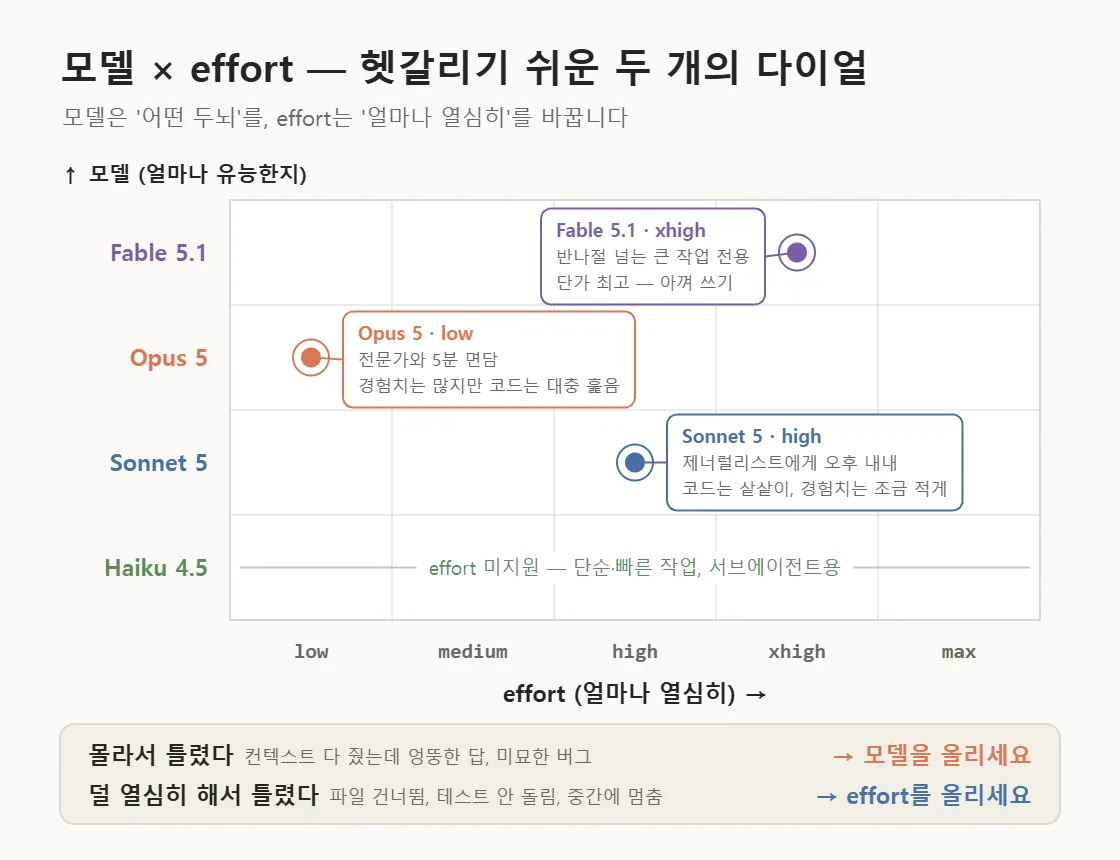
Claude Code has two settings that "seem to make the answers better." But they do completely different things. Here's the explanation from Anthropic's official blog, summarized in one table.
| Setting | What it changes | Analogy |
|---|---|---|
| Model (model) | Which brain (weights) answers → how capable it is + the per-token price | Calling in a specialist vs. a generalist |
| effort | How hard that brain works → not just thinking length, but how many files it reads, how often it verifies, and how many steps it pushes through without checking in | A 5-minute consultation vs. keeping them all afternoon |
The key point is that effort isn't just "thinking time." When you raise effort, Claude reads more files, runs more tests, and goes further on its own before coming back to ask you. Lower it, and it saves tokens but asks "How should I handle this?" more often.
So here's the official rule of thumb for which dial to turn when something goes wrong 💡
- Wrong because it didn't know (you gave it all the context but it confidently gave a wrong answer, subtle bugs, an unfamiliar domain) → move up a model
- Wrong because it didn't try hard enough (skipped files, didn't run the tests, stopped a refactor halfway) → raise effort
- But before that: check that your prompt isn't vague and that your
CLAUDE.mdand tools are set up properly. Far more often, the problem is context, not the dials.
🧩 Model Lineup as of September 2026
According to the official Models overview, there are 4 models you can choose from right now.
| Model | API model ID | Price (input / output, per 1M tokens) | Context / max output | Default effort | In a nutshell |
|---|---|---|---|---|---|
| Claude Fable 5.1 | claude-fable-5-1 |
$10 / $50 | 1M / 128K | high | Specialist for the hardest, longest tasks. Not the default on any plan; you have to pick it yourself |
| Claude Opus 5 | claude-opus-5 |
$5 / $25 | 1M / 128K | high | Complex agentic coding. The official docs recommend "start here for most tasks" |
| Claude Sonnet 5 | claude-sonnet-5 |
$2 / $10 | 1M / 128K | high | A balance of speed and intelligence. For everyday coding |
| Claude Haiku 4.5 | claude-haiku-4-5-20251001 |
$1 / $5 | 200K / 64K | effort not supported | Simple, fast tasks; for subagents |
The prices in the table are pay-as-you-go API rates. Pro and Max subscriptions are flat-rate, but pricier models still burn through your usage limits faster, so the same intuition applies. By the way, Sonnet 5 always runs with 1M context on the API, and there's no extra charge past 200K tokens.
And which model loads when you haven't touched anything (default) depends on your plan. This is where a lot of people get confused.
| Account / plan | Default model |
|---|---|
| Max, Team Premium, Enterprise, Anthropic API | Opus 5 |
| Pro, Team Standard | Sonnet 5 |
| Claude Platform on AWS, Amazon Bedrock, Google Cloud Agent Platform | Opus 5 (but the sonnet alias points to Sonnet 4.6 / 4.5) |
| Microsoft Foundry | Sonnet 4.5 (opus is Opus 4.6) |
| Fable 5.1 / Fable 5 | Not the default on any plan. Select it yourself with /model fable. Depending on your plan or seat, it may be billed as usage credits |
In other words, Max starts on Opus 5 and Pro starts on Sonnet 5 right out of the box. If you're on Pro and wondered, "Why isn't my Claude Code on Opus?" — that's normal 😅
📌 Step 1 - Switch Models with /model
You can switch right in the middle of a session. Type it without arguments and the picker (selection screen) opens.
/model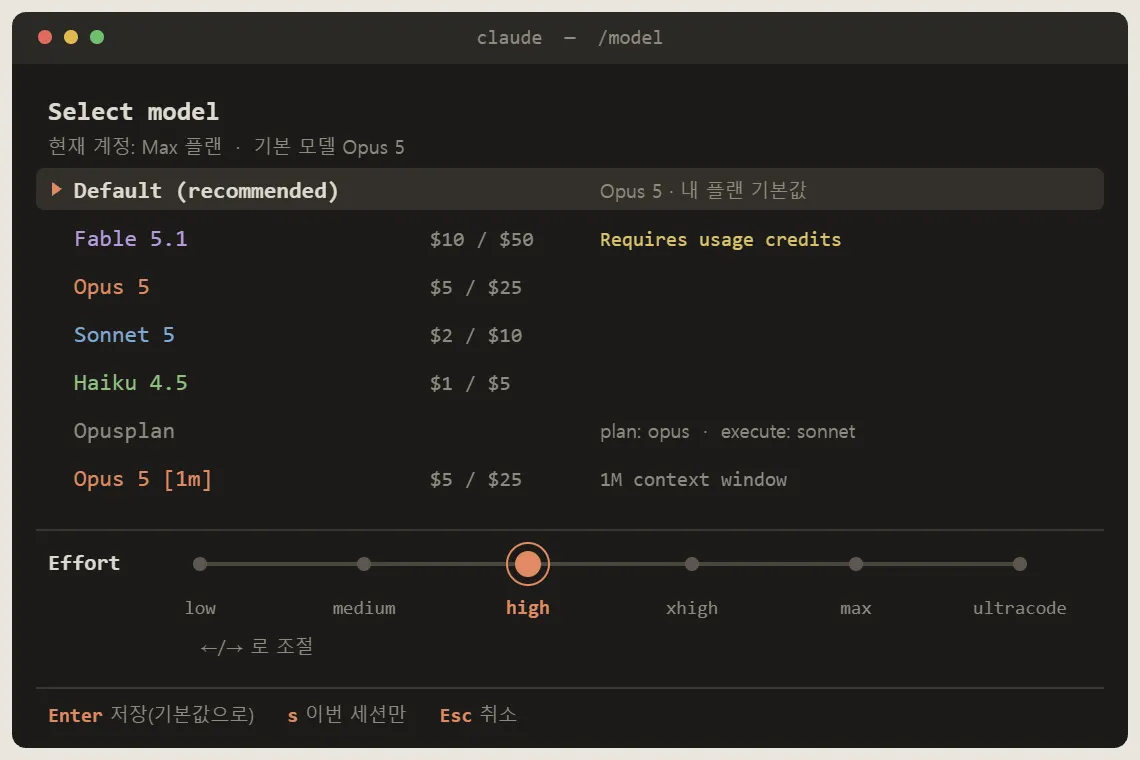
One key in the picker matters a lot 💡
- Enter : switches the model and saves it as your default going forward (writes the
modelvalue in your user settings file) - s : switches for this session only and leaves your saved default alone
- ←/→ arrow keys : adjust the effort slider on the same screen
You can also type the name directly. That works the same as pressing Enter, so it saves the default too.
/model opus
/model sonnet
/model fable
/model claude-opus-5
Here's a rundown of the aliases you'll use most.
| Alias | What it does |
|---|---|
default |
Clears the model override and goes back to your plan's default model |
opus |
Latest Opus → currently Opus 5 |
sonnet |
Latest Sonnet → currently Sonnet 5 |
haiku |
The light, fast Haiku model — currently Haiku 4.5 |
fable |
Fable 5.1 (v2.1.257+). For the hardest, longest tasks. In Claude app gateway sessions it points to Fable 5, so specify /model claude-fable-5-1 directly there |
best |
Same as fable if you have Fable access, otherwise opus |
opusplan |
A hybrid that automatically switches to opus in plan mode and sonnet in the execution phase |
opus[1m] / sonnet[1m] |
1M-token context versions. Sonnet 5 is already 1M, so sonnet[1m] has no effect |
opusplan is a hidden gem. The smart model handles the design (planning) and the fast model cranks out the code, so your costs drop noticeably.
If you want to set it from the start, pass it as a flag. This applies only to that session and doesn't touch your default. It's perfect when you want two terminals running different models.
claude --model sonnetAnd when several methods overlap, there's a priority order. The higher on the list, the stronger it is.
/modelduring a sessionclaude --modelat startup- The
ANTHROPIC_MODELenvironment variable - The
modelkey in your settings file (where values saved with/modelgo) - The
ANTHROPIC_DEFAULT_MODELenvironment variable (a startup default used only when nothing else is specified, v2.1.236+)
You can check what's currently running with /status, and the model name also shows up in the session start header. If a project setting or managed setting chose the model, the header even shows which file set it, so keep that in mind.
📌 Step 2 - Which Model Should You Use When? (How to Choose)
Here's the official guidance mapped to task types.
| If your task is... | Recommended model | Why |
|---|---|---|
| Typo fixes, short functions, mechanical edits you can describe exactly ("change it like this"), questions about code already in context | Sonnet 5 (haiku if it's really simple) |
Dropping routine work to a smaller model costs nothing in quality and only gains you speed and money |
| Features and refactors spanning multiple files, tracking down the cause of a bug, code review, tasks with vague requirements | Opus 5 | The bigger model has the "I've seen this problem before" experience. It sorts out ambiguity on its own |
Big jobs taking more than half a day, root-cause investigations, incident debugging, architecture decisions, problems Opus 5 can't crack even at xhigh |
Fable 5.1 | Sustains long autonomous sessions without losing the thread, and does more investigation and verification before acting. But it has the highest per-token price |
| Smart design, cheap implementation | opusplan |
Opus only in plan mode, Sonnet for everything else |
The official blog has a fun analogy, so I'll pass it along as-is. Using Opus at low effort is like a 5-minute consultation with an expert who knows your problem well, while using Sonnet at high effort is like giving a smart generalist the whole afternoon. The first has plenty of experience but only skims your code; the second reads your code thoroughly but has less "I've seen this before." And Fable is the specialist who can glance at a problem everyone else is stuck on and put a finger on it, so the official stance is to save it for the tasks that truly need it.
💡 One cost tip. Bigger models cost more per token, but on hard tasks they need fewer iterations, so the total cost per task can actually come out lower. While a small model burns tokens grinding away at its limits, a big model wraps up in a few steps. On the flip side, dropping to a smaller model for routine stretches is a pure win.
Here are the tips the official docs give for using Fable 5.1, in brief.
- Describe the outcome, not the steps. It'll plan the path itself
- Hand over ambiguous problems whole. It earns its keep on root-cause investigations, incident debugging, and architecture decisions
- Drop reminders like "make sure to run the tests" or "verify it." It verifies on its own without being told, so adding them actually leads to over-verification
- Don't break the work into tiny pieces. You can hand over work you'd normally split up as one chunk
Subagents (the ones handling exploration and search) don't need an expensive model. You can set them separately with an environment variable like CLAUDE_CODE_SUBAGENT_MODEL=haiku. I'll show an example in Step 4.
📌 Step 3 - Control Thinking Depth with /effort
/effort
/effort medium
/effort auto
Let's break these down one by one 💡
/effort: Without arguments, a slider appears. You can adjust the same slider with the arrow keys inside the/modelpicker too/effort medium: Sets the level directly. You can type it even mid-task, and it applies from the next request/effort auto: Clears the level saved for the current model (resets to the model default)
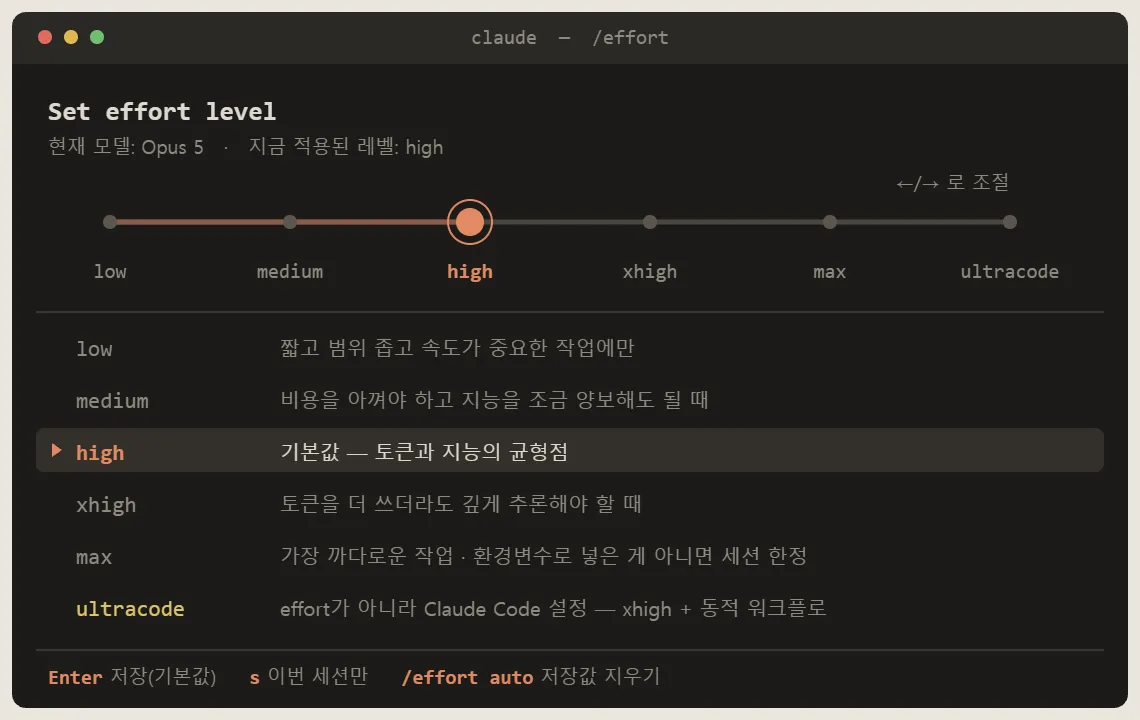
Here's how to pick a level.
| Level | When to use it |
|---|---|
low |
Only for short, narrowly scoped, latency-sensitive tasks that don't require much thinking |
medium |
Tasks where you need to save cost and can give up a bit of intelligence |
high |
The default. The balance point between tokens and intelligence (only Opus 4.7 defaults to xhigh) |
xhigh |
When you need deep reasoning, even if it costs more tokens |
max |
The toughest tasks. But it tends to overthink, so test it before adopting it. Unless you set it via an environment variable, it applies to the current session only |
ultracode |
Not an effort level but a Claude Code setting. Sends requests at xhigh and builds a dynamic workflow for each big task (--effort ultracode needs v2.1.203+) |
Supported ranges differ by model. Fable 5.1, Fable 5, Opus 5, Sonnet 5, Opus 4.8, and 4.7 support everything from low to max, Opus 4.6 and Sonnet 4.6 lack xhigh, and Haiku 4.5 doesn't support effort at all. If you specify an unsupported level, it's automatically lowered to the highest supported level below it (e.g., xhigh → high on Opus 4.6). Also, even the same high is calibrated per model, so when the model changes, the same level name doesn't mean the same intensity.
It also helps to know how levels get saved.
- Enter on the slider, or typing
/effort 레벨(the level name) directly → saved as your default, kept in the next session too - s on the slider → this session only (v2.1.257+)
- Levels are saved per model. Even if you save
mediumon Opus 5, switching to Sonnet 5 uses Sonnet 5's saved value (or the defaulthighif there isn't one). It's recorded in themodelSettingskey of your settings file maxis current-session only unless you set it via an environment variable
If you want deeper thinking for just one turn, you don't need to touch the session settings — just put ultrathink anywhere in your prompt. Claude Code recognizes this keyword and attaches an instruction to reason more deeply for that turn only (the effort value sent to the API stays the same). On the other hand, phrases like "think hard" or "think more" are treated as ordinary sentences, so keep that in mind 😉
So how big is the difference? In an example chart on the official blog, running the same prompt at high used roughly 7x more tokens than low to reach a more confident answer (it's an illustrative figure). But effort is about "how far it's willing to go," not "it always spends that much," so simple tasks wrap up quickly on their own even at high. That's why the official guide recommends leaving most tasks at the default (high) and setting it once to match your working style (thoroughness vs. speed) rather than adjusting it per task.
The currently applied level shows in the session header as something like "with low effort," and it briefly appears at the bottom when you start and when you change it. If you're unsure, check the header first.
📌 Step 4 - Lock It In with settings.json
If typing it every time is a hassle, bake it into a settings file. There are three places for settings files.
~/.claude/settings.json              ← 사용자 설정 (내 PC 전체)
                                       윈도우는 C:\Users\<계정>\.claude\settings.json
<프로젝트>/.claude/settings.json        ← 프로젝트 공유 설정 (git에 커밋해서 팀 전체 적용)
<프로젝트>/.claude/settings.local.json  ← 프로젝트 로컬 설정 (나만, .gitignore 권장)
The precedence order is managed settings > command line (--settings) > project local > project shared > user settings. (In the block above, from top to bottom: user settings for your whole PC, which live in the .claude folder under your user folder on Windows; project shared settings, committed to git so they apply to the whole team; and project local settings just for you, with .gitignore recommended.) Values saved with /model and /effort go into user settings, so if a project setting pins model, the project setting wins again the next time you launch. This is the usual culprit behind "I changed it, so why does it keep reverting?"
Here's a user settings example. Copy-paste friendly 👇
{
  "model": "opus",
  "effortLevel": "high",
  "modelSettings": {
    "claude-opus-5": { "effortLevel": "medium" }
  },
  "fallbackModel": ["claude-sonnet-5", "claude-haiku-4-5"]
}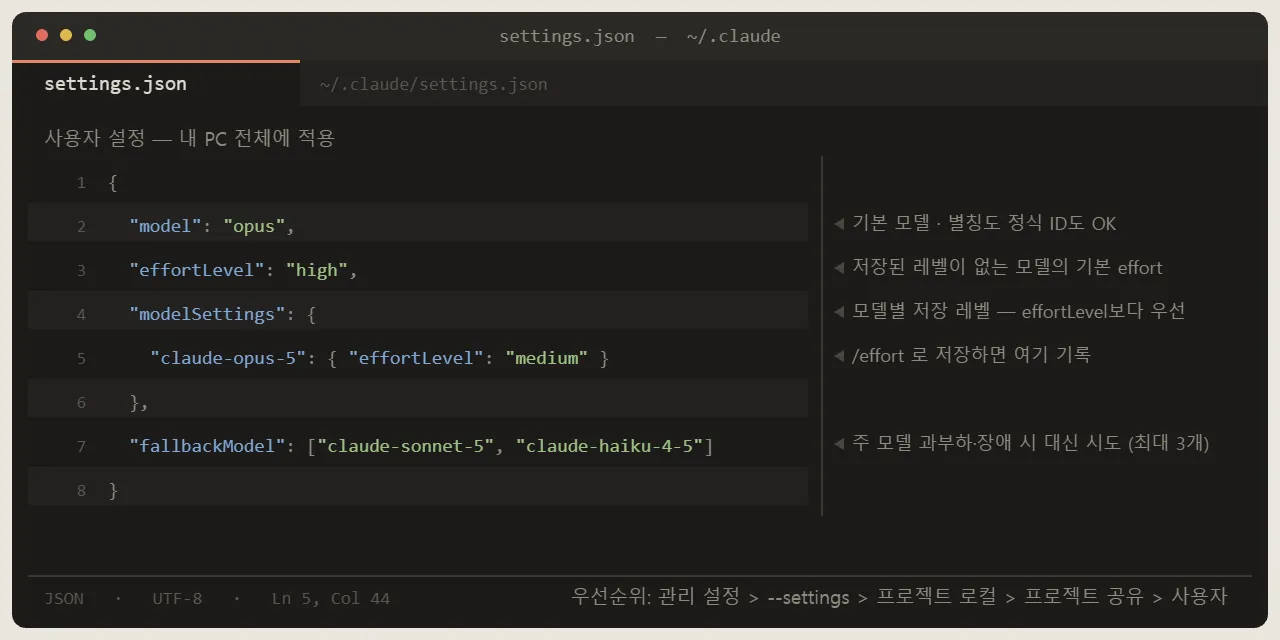
Let's break it down one by one 💡
- model : The default model. Accepts either an alias (
opus·sonnet·fable·opusplan) or a full ID (claude-opus-5). Saving with Enter in/modelchanges this value - effortLevel : The default effort for models without a separately saved level. Only
low·medium·high·xhighare allowed — you can't putmaxorultracodein the settings file (ultracodeuses its own separateultracodekey) - modelSettings : Per-model saved levels. Saving with
/effortrecords them here under the full ID. The example above means "medium for Opus 5 only, everything else uses its own default." Within the same file, this takes precedence overeffortLevel. If you only want a ceiling for one model, addmaxEffortLevelto that entry - fallbackModel : A list of models (up to 3) to try when the main model is overloaded or down. It only stands in for that turn; the next message tries the main model first again. It doesn't apply to authentication, billing, or limit errors
If you want to enforce it for a project, put it in <프로젝트>/.claude/settings.json (your project folder). For example, if "this repo is a collection of lightweight scripts, so Sonnet only":
{
  "model": "sonnet"
}
Environment variables work too. They apply only to that terminal session, which makes them handy for "just for today" setups.
# Windows PowerShell — valid only in this terminal window
$env:ANTHROPIC_MODEL = "sonnet"
$env:CLAUDE_CODE_EFFORT_LEVEL = "medium"
$env:CLAUDE_CODE_SUBAGENT_MODEL = "haiku"
claude# macOS / Linux
export ANTHROPIC_MODEL=sonnet
export CLAUDE_CODE_EFFORT_LEVEL=medium
export CLAUDE_CODE_SUBAGENT_MODEL=haiku
claude- ANTHROPIC_MODEL : The model for this session. Takes precedence over the value saved with
/model - CLAUDE_CODE_EFFORT_LEVEL : Effort. It's in the same top-priority group as
--effortand/effort, so it beats every settings file and model default. It's even stronger thaneffortin skill or subagent frontmatter. The value is a level name orauto, andultracodeisn't allowed - CLAUDE_CODE_SUBAGENT_MODEL : The default model for subagents and agent teams. Dropping exploration tasks to
haikusaves a lot of your limits - ANTHROPIC_DEFAULT_MODEL : The "new session starting model," used only when no model is specified anywhere (v2.1.236+)
- ANTHROPIC_DEFAULT_OPUS_MODEL / ANTHROPIC_DEFAULT_SONNET_MODEL : Pin the exact version the
opus·sonnetaliases point to. For when you don't want an alias moving to a new version
💡 Recommended Setups by Plan
These are my own recipes. They're not the one right answer, so use them as a starting point.
- Pro : Keep the default Sonnet 5 · high. Only for problems you're stuck on, press s in the
/modelpicker to turn on Opus 5 for that session only. If design is a big part of the work,opusplan. Opus 1M context requires usage credits, so be careful withopus[1m] - Max : Default Opus 5 · high. For typo fixes and simple repetitive stretches, press s in the
/modelpicker to drop to Sonnet 5 (session only) and save your limits. For big all-day tasks,/model fable— if the credit billing consent prompt appears, review it before proceeding - API pay-as-you-go : You see the costs directly, so use
opusas your main model,CLAUDE_CODE_SUBAGENT_MODEL=haikufor subagents, andfallbackModelto prepare for overloads - Everyone : Start without touching effort → if "it skipped files" or "it didn't run the tests" keeps happening, go up one level. Conversely, for a project with only simple tasks, put
"effortLevel": "medium"in that project's settings
📌 Common Errors and Mistakes
1. I switched with /model, but a new session loads a different model
- Cause : ① You pressed
sin the picker or launched with--model(session only) ② The project or managed settings'model, the shell'sANTHROPIC_MODEL, or your organization's default model takes priority ③ Your usersettings.jsonis read-only, so saving failed ④claude --resume/--continuerestores the model that session was using - Fix : Check "which settings file set it" in the startup header → edit the
modelkey in that file, or save again with Enter in/model
2. Model "xxx" is not a recognized model id.
- Cause : A string that's neither an alias nor a full ID starting with
claude-(usually a typo) - Fix : Re-enter it as an alias like
opus·sonnet·fableor a full ID likeclaude-opus-5. The session keeps the existing model, so just type it again
3. Picking Fable 5.1 says "Claude Code does not support this model"
- Cause : Claude Code is older than v2.1.257
- Fix : Run
claude updateand restart
4. I ran /effort xhigh, but the header says "with high effort"
- Cause : The current model doesn't support
xhigh(Opus 4.6, Sonnet 4.6), or amaxEffortLevelor organization effort cap is in place - Fix : Check the model with
/status→ switch to Opus 5/Sonnet 5, and checkmaxEffortLevelin your settings file
5. Raising it with /effort doesn't take effect (and picking ultracode even shows an "environment variable takes precedence" warning)
- Cause : If
CLAUDE_CODE_EFFORT_LEVELis set to a level other thanxhigh, requests go out at that level and ultracode runs with its workflow orchestration turned off. In that case, picking ultracode shows a warning that "the environment variable overrides the session effort." It can also be amaxEffortLevelor organization effort cap - Fix : Clear the environment variable (
$env:CLAUDE_CODE_EFFORT_LEVEL = $null/unset CLAUDE_CODE_EFFORT_LEVEL) and restart
6. The Fable row shows "Requires usage credits" and asks for billing consent
- Cause : On your plan or seat, Fable usage is billed as usage credits rather than against your subscription limits
- Fix : If you don't want it, just close the prompt and your current model stays as is. If you decide to use it, you only need to agree once and it won't ask again. Enterprise plans that use organization billing never see this prompt at all
7. The model suddenly changes in a security- or biology-related codebase
- Cause : Fable and Opus 5 have safety classifiers, so requests classified mainly as cybersecurity or biology are re-run on a different model, and the session stays on that model. Where it goes depends on the category — Fable 5.1 and 5: biology → Opus 5, cybersecurity → Opus 4.8 / Opus 5: cybersecurity → Opus 4.8, while biology has no fallback model, so it ends in a refusal. It can trigger even on the very first request (because
CLAUDE.mdand git status are sent along with it). Per-category fallback requires v2.1.219+ - Fix : Go back to your original model with
/model. To see whether your own customizations are the cause, launch once withclaude --safe-mode(starts with CLAUDE.md, skills, MCP, and hooks turned off). To be asked every time instead, turn off Switch models when a message is flagged in/config(in the settings file:switchModelsOnFlag: false)
🙌 Wrapping Up
Here's a recap of today's post.
- Model = how capable it is (which brain), effort = how hard it works (files, verification, number of steps). Wrong because it didn't know → model ↑; wrong because it didn't try hard enough → effort ↑
- The September 2026 lineup is Fable 5.1 ($10/$50) · Opus 5 ($5/$25) · Sonnet 5 ($2/$10) · Haiku 4.5 ($1/$5). Max defaults to Opus 5, Pro defaults to Sonnet 5, and Fable always has to be selected manually
/modelis Enter (save) vs. s (session only), and/effortfollows the same rule. Saved values go intomodelandmodelSettingsin your usersettings.json- Project settings and environment variables beat user settings. If "I changed it but it keeps reverting," check the startup header first
- Mostly keep the default (high), and adjust it once to match your working style, not per task
The next post will be back with Discord Bot Tutorial series #31, and I'm also preparing a full roundup of the new features in the official release timed for Python 3.15's official release on October 1. Stay tuned 🙌
Which model and effort combo are you using? Let me know in the comments and I'll reflect it in the next post!
📚 Related Posts
- Claude Opus 5 Is Here! Claude Code's Default Model Changes - A Complete Guide to Using /model and /effort
- Getting Started with Claude Code - From Installation to First Run! The Complete Guide to the Terminal AI Coding Agent
- How to Write Great AI Coding Prompts - A Practical Guide to Vibe Coding
- Best Developer Laptops for H2 2026 - The Criteria Have Changed in the Age of AI and Vibe Coding
- Claude Sonnet 5 Is Here - Claude Code's Default Model Changes: What's New and How to Use It
