
Category: Discord Bot Tutorials
Discord API Changes for Bot Developers, September 2026 - 20 MiB Files, Multi-line Slash Command Input, Age Assurance, Invite Target Users, Required shard, and How to Handle Them with discord.py 2.7.1 (Python Examples) 🗞️
 Author: Mojangcam
This post was translated from the Korean original.
At a glance
The 7 changes posted to the Discord developer changelog from late August through September 2026, sorted from a bot developer's view into what you must fix and what you can leave alone. Features missing from discord.py 2.7.1 are handled by calling the endpoints directly.
- discord.py 2.7.1 · Python 3.13 · based on the official changelog as of 2026-09-30 (examples only syntax/import-checked; verify on a real server)
- Only two things must be fixed: the shard query for large bot sharding apps (9/15) and prune permissions on PRUNE_REQUIRES_ADMIN servers (8/27)
- The default file limit is now 20 MiB, but guild.filesize_limit in discord.py 2.7.1 still returns 10 MiB → trust interaction.filesize_limit
- String options may now contain newlines, so use splitlines(); call the invite target user endpoints via bot.http.request(Route(...))
Contents15 sections
Hi there! Mojangcam here 😎
In part #24, we got ahead of the channel obfuscation change that lands on November 16. Since then, the Discord developer changelog has picked up 7 more major announcements in just one month. Each one is short, but once you put them side by side, it gets confusing to figure out "what do I actually need to fix in my bot?"
So today, instead of building a new feature, we'll go through every change from late August to September 2026 in one pass, from a bot developer's point of view. For each item, I answer "does this affect my bot?" and "do I need to change code?" first, then add handling code based on discord.py 2.7.1. For features the library doesn't support yet, I filled the gap by calling the endpoints directly 🛠️
What you'll learn in this post
- How to see all 7 September changes in one table (what to fix / what you can leave alone)
- The trap where the file limit went up to 20 MiB but the library still says 10 MiB
- How to handle slash command string options now that line breaks can show up in them
- Calling the invite target user endpoints, which discord.py doesn't have, directly with
Route - The
shardquery for large bot sharding apps, and thePRUNE_REQUIRES_ADMINpermission check - Safely reading custom statuses when they don't show up because of Age Assurance and private profiles
📌 At a glance - 7 changes in September
| Date | Change | Affects my bot? | Code change? |
|---|---|---|---|
| 8/27 | Guild feature PRUNE_REQUIRES_ADMIN (Breaking) |
Only bots that use member pruning | Add a permission check |
| 9/3 | Default file upload limit 10 MiB → 20 MiB | Every bot that sends files (in a good way) | Only if you have limit-calculation code |
| 9/11 | Slash commands: multi-line input for string options, fuzzy command search, commands remembered when switching channels | Every bot that takes string options | Just newline handling |
| 9/15 | Large bot sharding apps must pass shard to GET /users/@me/guilds (Breaking) |
Large bot sharding apps only | Required (if it applies) |
| 9/17 | Custom status dropped from Presence when the profile is set to private | Bots that read statuses | Check your None handling |
| 9/18 | 4 new invite target user endpoints | Bots that create invite links (optional) | If you want to use them |
| 9/22 | Age Assurance rolls out worldwide | None (just watch for behavior changes) | None |
Bottom line: there are only two things you really have to fix. The shard query for apps using large bot sharding, and the permission check for bots with a member prune feature. The rest are changes you just need to know about, or changes that actually make life easier for your bot 😌
📌 What you need
- Python 3.8 or later (the examples were syntax-checked on Python 3.13)
- discord.py 2.7.1 — the latest version as of 2026-09-30. There hasn't been a new release since March, so the September changes covered today are not in the library yet
- python-dotenv — needed to keep your token in a separate .env file
- A test server your bot has joined (admin permission makes things easier)
pip install discord.py==2.7.1 python-dotenvCreate a .env file in your project folder and put your token in it.
DISCORD_TOKEN=여기에_봇_토큰💡 Always add .env to .gitignore. If your token ends up on GitHub, Discord detects it automatically and revokes the token 😱
Because today's example reads custom statuses, you need to turn on Server Members Intent and Presence Intent in the Developer Portal → Bot tab. If you don't need to read statuses, delete the intents.presences = True line and skip the portal setting too.
📌 1. Default file upload limit is now 20 MiB (9/3)
What changed: The default file upload limit went up from 10 MiB to 20 MiB. It applies equally to bots, webhooks, and interaction responses, not just users.
Affects my bot?: If your bot sends files, this is simply good news. On servers without boosts, a 15 MB log file or image can now be uploaded.
But there's a trap. Open the discord.py 2.7.1 source and the default limit is still the old value.
# discord/utils.py (2.7.1)
DEFAULT_FILE_SIZE_LIMIT_BYTES = 10485760   # 10 MiB
That means guild.filesize_limit and ctx.filesize_limit still return 10 MiB on servers without boosts. If you wrote defensive code like "don't send if it's bigger than the limit" using this value, your bot is rejecting files it could actually send 😅
The right answer is to use the value Discord sends along with every interaction.
@bot.tree.command(name="파일한도", description="Shows the file size this bot can upload in this server")
async def file_limit(interaction: discord.Interaction):
    live = interaction.filesize_limit          # the value Discord sent with this interaction
    cached = interaction.guild.filesize_limit if interaction.guild else None  # library table
    msg = f"Limit reported by Discord: **{live / MIB:.0f} MiB**"
    if cached is not None:
        msg += f"\nPer discord.py table (guild.filesize_limit): {cached / MIB:.0f} MiB"
    await interaction.response.send_message(msg, ephemeral=True)
Let's break it down 💡
- interaction.filesize_limit: An attribute added in discord.py 2.6. It holds the
attachment_size_limitvalue from the interaction payload as is, so it's the limit Discord's servers are reporting right now, not the library's table. The 20 MiB change shows up here immediately. - guild.filesize_limit: Looks at a per-boost-tier table hardcoded in the library. In 2.7.1, tiers 0 and 1 are 10 MiB, tier 2 is 50 MiB, and tier 3 is 100 MiB. Until it's fixed in the next version, treat it as reference only.
- MIB = 1024 * 1024: Discord's docs use MiB (1,048,576 bytes), not MB. If you calculate with 20 MB (20,000,000 bytes), you lose about 1 MB.
📌 2. Slash command improvements - multi-line input and fuzzy search (9/11)
What changed: three things.
- String options accept multi-line input. Users can send line breaks with Shift+Enter.
- The command picker supports fuzzy search. Just typing
/r abrings up/role add. - The command you were picking is remembered even when you switch channels.
Affects my bot?: #1 is the key one. Until now you could assume string options were a single line, but now values with \n mixed in will arrive. If you have code that drops option values straight into an embed title, uses them as file names or DB keys, or writes them as one-line logs, the formatting may break.
The fix is simple. You just need to get into the habit of splitting input into lines.
@bot.tree.command(name="여러줄", description="Splits multi-line text into lines and shows them back")
@app_commands.describe(text="Try pressing Shift+Enter to add line breaks")
async def multiline(interaction: discord.Interaction, text: app_commands.Range[str, 1, 1000]):
    lines = [line.strip() for line in text.splitlines() if line.strip()]
    if not lines:
        await interaction.response.send_message("The text is empty!", ephemeral=True)
        return
    body = "\n".join(f"{i}. {line}" for i, line in enumerate(lines, start=1))
    await interaction.response.send_message(f"Got **{len(lines)} lines** in total.\n{body}")
Let's break it down 💡
- text.splitlines(): Splits into lines whether you get
\nor\r\n. Safer thansplit("\n"). - if line.strip(): Throws away empty lines. Once multi-line input exists, someone will always hit Enter twice.
- app_commands.Range[str, 1, 1000]: An upper limit on string length. Long text is easier to send now that multiple lines are allowed, so it's good to set an explicit limit. A single Discord message can be up to 2,000 characters, so capping at 1,000 keeps you safe even after adding numbers to each line.
- Places that must be one line: For values used as titles, file names, or keys, flatten them into one line with
text.replace("\n", " ").
#2, fuzzy search, is a client-side feature for picking command names. The option autocomplete callback we built in part #22 doesn't magically turn into fuzzy search. That said, users will get used to "it finds it even if I type sloppily," so instead of keeping your autocomplete filter strict like startswith, I recommend keeping it loose with in (partial match), like in #22 🔍
📌 3. Large bot sharding apps must pass the shard query (9/15, Breaking)
What changed: Apps that use large bot sharding must always include the shard query when calling GET /users/@me/guilds (the list of servers your bot is in). Without it, you get 400 Bad Request. The value runs from 0 to max_concurrency - 1, and max_concurrency is in the session_start_limit of the Get Gateway Bot response.
Affects my bot?: Large bot sharding is something Discord approves separately for bots in a very large number of servers. Bots at the scale we build in this series aren't affected. The official docs also state clearly that "apps not using large bot sharding are not affected." You can relax 😌
Still, here it is for those it does apply to. discord.py 2.7.1's client.fetch_guilds() has no shard parameter (internally it only sends limit, before, after, and with_counts), so you have to call the endpoint directly.
async def fetch_all_guilds_by_shard(client: discord.Client) -> list:
    """For apps using large bot sharding. Regular bots can just use client.fetch_guilds()."""
    _, _, start_limit = await client.http.get_bot_gateway()
    max_concurrency = start_limit["max_concurrency"]
    guilds = []
    for shard in range(max_concurrency):
        route = Route("GET", "/users/@me/guilds")
        data = await client.http.request(route, params={"shard": shard, "limit": 200})
        guilds.extend(data)
    return guilds
Let's break it down 💡
- client.http.get_bot_gateway(): Calls
GET /gateway/botand returns three values:(shards, url, session_start_limit). Themax_concurrencyin the third dictionary is the value you need. - Route("GET", "/users/@me/guilds"):
discord.http.Routeis the class the library uses for every request. Import it withfrom discord.http import Route. - client.http.request(route, params=...): Pass the query string through
params. The library handles rate limits for you. The return value is parsed JSON (a list of server dictionaries). - What the docs say: If you need the full list, loop over every shard value and merge the results. That's why we loop with
range(max_concurrency).
⚠️ bot.http is not a public API but an internal library object. Its signature may change in the next version, so switch over once discord.py adds an official method.
📌 4. Hidden custom statuses (9/17) + Age Assurance (9/22)
I grouped these two because the result is the same. Both come down to "user info your bot used to see stops showing up one day."
What changed on 9/17: If a user's profile visibility is set to friends only, or friends and small servers and the server has more than 200 members, the custom status is removed from activities in Presence Updates sent to that server. Other activities like Playing, Streaming, Listening, Watching, and Competing stay as they are.
What changed on 9/22: Age Assurance is rolling out worldwide. To quote the official docs directly, "apps will continue to work," but four things may look different.
- For users with private profiles, custom statuses may not be visible in Presence (the same story as 9/17 above)
- Age-restricted Activities may ask users to verify their age group
- Some purchases may fail because of spending limits set by parents
- DMs sent through the Social SDK are more often sorted into message requests
Affects my bot?: There's nothing to fix in code. But if you have code that pulls a custom status out of member.activities, you need to treat it being missing as a normal case. You used to be able to assume "if someone set a status, it's always there," but not anymore.
@bot.tree.command(name="상태보기", description="Reads a member's custom status (it may not be visible)")
async def show_status(interaction: discord.Interaction, member: discord.Member):
    custom = next((a for a in member.activities if isinstance(a, discord.CustomActivity)), None)
    if custom is None:
        text = "No custom status, or it's hidden from the bot by private profile settings."
    else:
        text = f"{custom.emoji or ''} {custom.name or ''}".strip() or "(emoji-only status)"
    await interaction.response.send_message(f"{member.display_name}: {text}", ephemeral=True)
Let's break it down 💡
- member.activities: It's a tuple. Custom statuses, games, and Spotify are mixed together, so we pick it out with
isinstance(a, discord.CustomActivity).member.activity(singular) only gives you the first one, so don't use it when looking for a custom status. - next(..., None): Gives None if nothing is found. This None now means both "not set" and "hidden," and the bot has no way to tell them apart. That's why the message covers both.
- custom.name / custom.emoji: Both are Optional. Some statuses only have an emoji, so they're wrapped with
or ''. - Presence Intent: For
member.activitiesto be filled in, bothintents.presences = Trueand the Presence Intent in the Developer Portal must be on. If they're off, it's always an empty tuple and you can't tell it apart from "hidden."
📌 5. Invite target user endpoints (9/18)
What changed: There are 4 new endpoints that attach a "only these people can use it" list to an invite link.
| Action | Method and path | Body |
|---|---|---|
| Add a target | PUT /invites/{invite.code}/target-users/{user.id} |
None |
| Remove a target | DELETE /invites/{invite.code}/target-users/{user.id} |
None |
| Add many | POST /invites/{invite.code}/target-users/bulk-add |
user_ids array (up to 1,000 users) |
| Remove many | POST /invites/{invite.code}/target-users/bulk-delete |
user_ids array (up to 1,000 users) |
All four require you to be the invite's creator or have the MANAGE_GUILD (Manage Server) permission, and on success they return 204 (no body). The changelog also says you can pass a target_user_ids array when creating the invite in the first place.
Affects my bot?: Nothing breaks if you don't use it. But when you build an "only invited people can join" feature like the party room in part #33, where you used to lock it down with channel permission overwrites, you can now make the invite link itself exclusive to specific people.
discord.py 2.7.1's create_invite() doesn't have this option. (There is a parameter called target_user, but that's a different feature meaning the streamer for a stream invite. Super easy to mix up 😅) So we create the invite as usual and call only the target assignment directly.
@bot.tree.command(name="초대대상", description="Creates an invite link only a specific person can use")
@app_commands.describe(member="The member who will be allowed to use the invite link")
async def invite_target(interaction: discord.Interaction, member: discord.Member):
    channel = interaction.channel
    if not isinstance(channel, discord.TextChannel):
        await interaction.response.send_message("Please use this in a text channel!", ephemeral=True)
        return

    await interaction.response.defer(ephemeral=True)
    invite = await channel.create_invite(max_age=3600, max_uses=1, unique=True,
                                         reason=f"Invite only for {member}")

    # discord.py 2.7.1 has no method for this yet, so we call the endpoint directly
    route = Route("PUT", "/invites/{code}/target-users/{user_id}",
                  code=invite.code, user_id=member.id)
    await bot.http.request(route)   # 204 (no body) on success

    await interaction.followup.send(
        f"Created an invite link only for {member.mention} (1 hour, 1 use): {invite.url}", ephemeral=True
    )
Let's break it down 💡
- channel.create_invite(max_age=3600, max_uses=1, unique=True): A one-time invite that lasts 1 hour. Because of
unique=True, it creates a new invite instead of reusing an existing one. Since our bot created this invite, the bot is "the invite's creator" and gets permission to set targets. - Route("PUT", "/invites/{code}/target-users/{user_id}", code=..., user_id=...): The
{code}and{user_id}in the path are filled in by keyword arguments. The URL the code above builds ishttps://discord.com/api/v10/invites/<코드>/target-users/<유저ID>. (I printed it out to confirm.) - await bot.http.request(route): A PUT with no body. For multiple users, pass
json={"user_ids": [id1, id2]}toRoute("POST", "/invites/{code}/target-users/bulk-add", code=...). - defer first: Creating the invite plus setting the target means two HTTP requests, which can take longer than 3 seconds. We reply with
followup.send()afterdefer().
📌 6. Admin permission for member pruning (8/27, Breaking)
This is a September post, but since it was a change from the last week of August, we'll cover it too. It's an easy Breaking Change to miss.
What changed: Server owners can now turn on a guild feature called PRUNE_REQUIRES_ADMIN. On servers with it on, Get Guild Prune Count (the estimated number of members to prune) and Begin Guild Prune (actually pruning) require the ADMINISTRATOR permission. Servers without it still need MANAGE_GUILD + KICK_MEMBERS, same as before.
Affects my bot?: Only bots that use guild.prune_members() or guild.estimate_pruned_members(). If you suddenly started getting 403 Forbidden one day, the server owner turned this feature on.
@bot.tree.command(name="정리예상", description="Counts members with no activity in 30 days (doesn't actually kick anyone)")
@app_commands.describe(days="How many days without activity counts as a target (1-30)")
async def prune_estimate(interaction: discord.Interaction, days: app_commands.Range[int, 1, 30] = 30):
    guild = interaction.guild
    if guild is None:
        await interaction.response.send_message("Please use this inside a server!", ephemeral=True)
        return

    perms = guild.me.guild_permissions
    if "PRUNE_REQUIRES_ADMIN" in guild.features:
        if not perms.administrator:
            await interaction.response.send_message(
                "This server has **PRUNE_REQUIRES_ADMIN** turned on, so the bot needs the Administrator permission.",
                ephemeral=True,
            )
            return
    elif not (perms.kick_members and perms.manage_guild):
        await interaction.response.send_message(
            "The bot needs **Kick Members + Manage Server** permissions to calculate this.", ephemeral=True
        )
        return

    await interaction.response.defer(ephemeral=True)
    count = await guild.estimate_pruned_members(days=days)
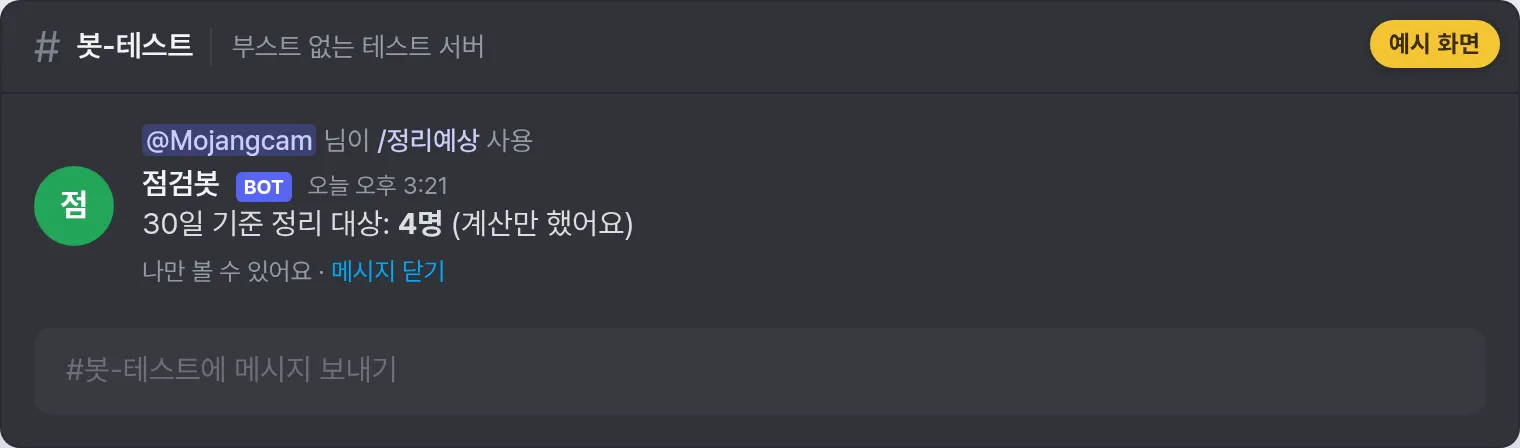
    await interaction.followup.send(f"Prune targets over {days} days: **{count} members** (calculated only)", ephemeral=True)
Let's break it down 💡
- guild.features: A list of strings naming the features the server has turned on. It contains values like
"COMMUNITY"and"NEWS", and now"PRUNE_REQUIRES_ADMIN"has been added. Even if the library doesn't know the new value, it arrives as a plain string, so you can check it right away in 2.7.1. - guild.me.guild_permissions: Our bot's final permissions inside the server. We check
administrator,kick_members, andmanage_guildhere. - estimate_pruned_members(days=...): Returns just a number without actually kicking anyone. The example deliberately uses only this one.
prune_members(), which really kicks people, can't be undone, so I recommend adding one more confirmation button. - Why check in advance: Calling it directly will still fail with a 403. But telling the user the exact reason, like "please give the bot Administrator permission," is completely different from just showing "an error occurred."
💡 Things you may have missed in August
- 8/12 channel obfuscation — Starting 11/16, channels your bot can't see will be hidden. Covered in detail in part #24.
- 8/5
file_typeson attachment options —ATTACHMENToptions and the file upload component got a filter for "only accept these extensions." It's not in discord.py 2.7.1 yet (there's nofile_typesin the source), so you'll have to wait for a library update. - 8/5 a channel's
application_idcan be null — If you have code that assumes a channel object'sapplication_idis always an ID, add None handling.
📌 Full code (copy-paste OK)
A single sept_check.py file runs all 5 commands above. Copy it and use it as is!
# discord.py 2.7.1 / Python 3.8+
# September 2026 Discord API change check bot (sept_check.py)
import os

import discord
from discord import app_commands
from discord.ext import commands
from discord.http import Route
from dotenv import load_dotenv

load_dotenv()
TOKEN = os.getenv("DISCORD_TOKEN")
if not TOKEN:
    raise SystemExit("❌ DISCORD_TOKEN is missing from your .env file!")

intents = discord.Intents.default()
intents.members = True      # member info (must be turned on in the Developer Portal)
intents.presences = True    # for checking custom statuses (must be turned on in the Developer Portal)
bot = commands.Bot(command_prefix="!", intents=intents)

MIB = 1024 * 1024


@bot.event
async def on_ready():
    await bot.tree.sync()
    print(f"✅ Logged in: {bot.user} / discord.py {discord.__version__}")


# ① 9/11 - Multi-line input for string options
@bot.tree.command(name="여러줄", description="Splits multi-line text into lines and shows them back")
@app_commands.describe(text="Try pressing Shift+Enter to add line breaks")
async def multiline(interaction: discord.Interaction, text: app_commands.Range[str, 1, 1000]):
    lines = [line.strip() for line in text.splitlines() if line.strip()]
    if not lines:
        await interaction.response.send_message("The text is empty!", ephemeral=True)
        return
    body = "\n".join(f"{i}. {line}" for i, line in enumerate(lines, start=1))
    await interaction.response.send_message(f"Got **{len(lines)} lines** in total.\n{body}")


# ② 9/3 - Default file upload limit 20 MiB
@bot.tree.command(name="파일한도", description="Shows the file size this bot can upload in this server")
async def file_limit(interaction: discord.Interaction):
    live = interaction.filesize_limit          # the value Discord sent with this interaction
    cached = interaction.guild.filesize_limit if interaction.guild else None  # library table
    msg = f"Limit reported by Discord: **{live / MIB:.0f} MiB**"
    if cached is not None:
        msg += f"\nPer discord.py table (guild.filesize_limit): {cached / MIB:.0f} MiB"
    await interaction.response.send_message(msg, ephemeral=True)


# ③ 8/27 - PRUNE_REQUIRES_ADMIN guild feature
@bot.tree.command(name="정리예상", description="Counts members with no activity in 30 days (doesn't actually kick anyone)")
@app_commands.describe(days="How many days without activity counts as a target (1-30)")
async def prune_estimate(interaction: discord.Interaction, days: app_commands.Range[int, 1, 30] = 30):
    guild = interaction.guild
    if guild is None:
        await interaction.response.send_message("Please use this inside a server!", ephemeral=True)
        return

    perms = guild.me.guild_permissions
    if "PRUNE_REQUIRES_ADMIN" in guild.features:
        if not perms.administrator:
            await interaction.response.send_message(
                "This server has **PRUNE_REQUIRES_ADMIN** turned on, so the bot needs the Administrator permission.",
                ephemeral=True,
            )
            return
    elif not (perms.kick_members and perms.manage_guild):
        await interaction.response.send_message(
            "The bot needs **Kick Members + Manage Server** permissions to calculate this.", ephemeral=True
        )
        return

    await interaction.response.defer(ephemeral=True)
    count = await guild.estimate_pruned_members(days=days)
    await interaction.followup.send(f"Prune targets over {days} days: **{count} members** (calculated only)", ephemeral=True)


# ④ 9/18 - Invite target user endpoints
@bot.tree.command(name="초대대상", description="Creates an invite link only a specific person can use")
@app_commands.describe(member="The member who will be allowed to use the invite link")
async def invite_target(interaction: discord.Interaction, member: discord.Member):
    channel = interaction.channel
    if not isinstance(channel, discord.TextChannel):
        await interaction.response.send_message("Please use this in a text channel!", ephemeral=True)
        return

    await interaction.response.defer(ephemeral=True)
    invite = await channel.create_invite(max_age=3600, max_uses=1, unique=True,
                                         reason=f"Invite only for {member}")

    # discord.py 2.7.1 has no method for this yet, so we call the endpoint directly
    route = Route("PUT", "/invites/{code}/target-users/{user_id}",
                  code=invite.code, user_id=member.id)
    await bot.http.request(route)   # 204 (no body) on success

    await interaction.followup.send(
        f"Created an invite link only for {member.mention} (1 hour, 1 use): {invite.url}", ephemeral=True
    )


# ⑤ 9/17 and 9/22 - Custom statuses may not be visible
@bot.tree.command(name="상태보기", description="Reads a member's custom status (it may not be visible)")
async def show_status(interaction: discord.Interaction, member: discord.Member):
    custom = next((a for a in member.activities if isinstance(a, discord.CustomActivity)), None)
    if custom is None:
        text = "No custom status, or it's hidden from the bot by private profile settings."
    else:
        text = f"{custom.emoji or ''} {custom.name or ''}".strip() or "(emoji-only status)"
    await interaction.response.send_message(f"{member.display_name}: {text}", ephemeral=True)


# ⑥ 9/15 - Large bot sharding apps must pass the shard query
async def fetch_all_guilds_by_shard(client: discord.Client) -> list:
    """For apps using large bot sharding. Regular bots can just use client.fetch_guilds()."""
    _, _, start_limit = await client.http.get_bot_gateway()
    max_concurrency = start_limit["max_concurrency"]
    guilds = []
    for shard in range(max_concurrency):
        route = Route("GET", "/users/@me/guilds")
        data = await client.http.request(route, params={"shard": shard, "limit": 200})
        guilds.extend(data)
    return guilds


bot.run(TOKEN)
💡 If you're using the cogs/ structure from part #19, you can move just the command parts into cogs/sept_check.py and it works exactly the same.
📌 Results
python sept_check.pyOnce the bot is up, try the commands one by one in your server. Every reply is visible only to you (ephemeral), so your test server won't get cluttered.
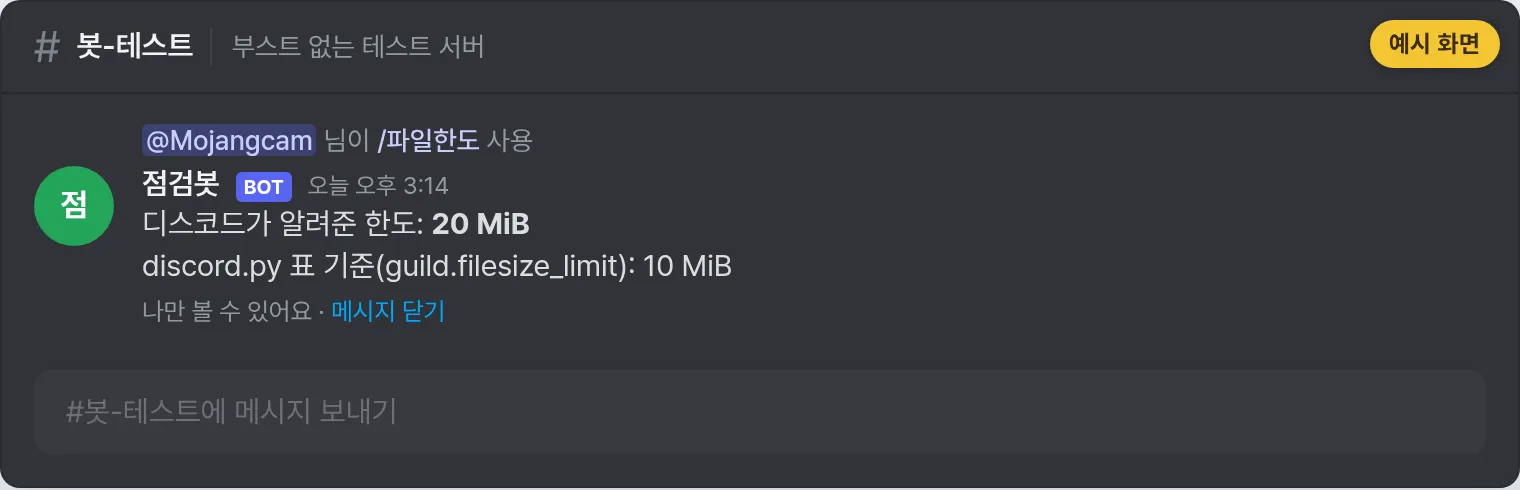
On a server without boosts, /파일한도 (file limit) should show two different numbers like above. The top line (20 MiB) is the real limit, and the bottom line (10 MiB) is proof that the library's table is outdated.
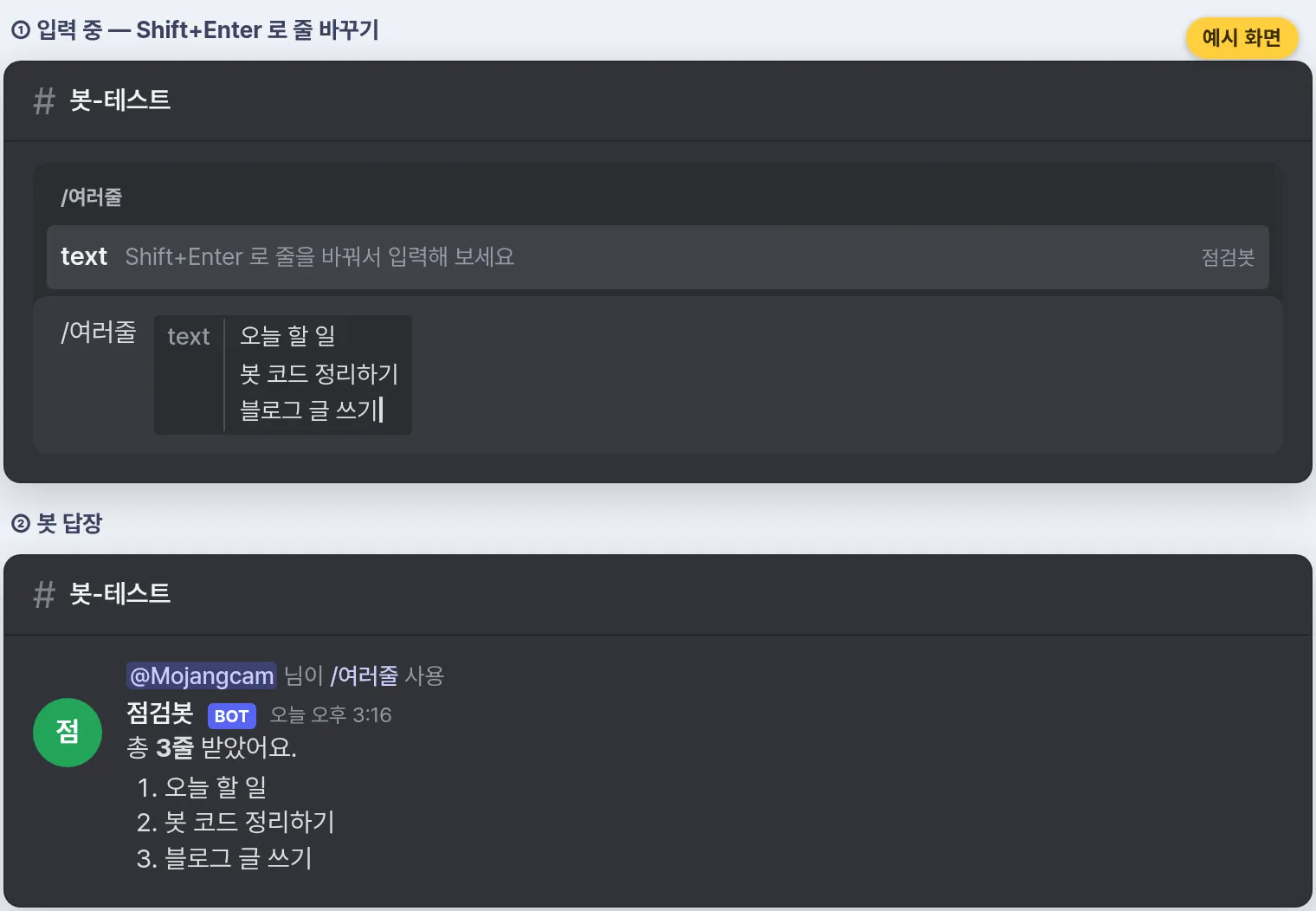
For /여러줄 (multi-line), press Shift+Enter in the input box to add line breaks. The bot counts the lines and sends them back numbered.
For /초대대상 (invite target), you only really know it works by opening the link with an account that isn't the target. If it's not the target, joining should be blocked.
⚠️ To be honest, the code in this post was only checked on Python 3.13 for syntax, imports, and Route URL building, and I haven't actually run the commands on a real server. /초대대상 in particular uses endpoints that were only added on 9/18, so be sure to check the real responses. If something doesn't work, let me know through the contact page rather than in comments, and I'll fix the post.
📌 Common errors
1. discord.errors.Forbidden: 403 Forbidden (error code: 50013): Missing Permissions — /정리예상
- Cause: The server turned on
PRUNE_REQUIRES_ADMINbut the bot doesn't have Administrator, or on a server without it, the bot is missing the Kick Members or Manage Server permission. - Fix: Check
guild.featuresfirst like in the code above and tell the user which permission is needed. Give the bot's role the required permissions and try again.
2. discord.errors.Forbidden: 403 — PUT request from /초대대상
- Cause: Setting target users requires being the invite's creator or having the Manage Server permission. It fails if you passed an invite code someone else created, or if the bot doesn't have the Create Invite permission.
- Fix: Only attach targets to invites the bot created itself, like in the example, or give the bot's role the Manage Server permission.
3. discord.errors.HTTPException: 400 Bad Request — GET /users/@me/guilds
- Cause: A large bot sharding app requested the server list without the
shardquery. Since 9/15, this returns 400. - Fix: Like
fetch_all_guilds_by_shard(), includeparams={"shard": n}and loop from0tomax_concurrency - 1. Regular bots won't hit this error.
4. /상태보기 always says "No custom status, or..."
- Cause: You didn't add
intents.presences = True, or you didn't turn on Presence Intent in the Developer Portal. In that casemember.activitiesis always an empty tuple. - Fix: Turn on both the code and the portal setting, then restart the bot. If it still doesn't show with both on, that user has a private profile (9/17) and the bot can't see it. That's expected.
5. Sent a file and got 413 Payload Too Large / Request entity too large
- Cause: 20 MiB is the default for servers without boosts. Anything bigger still won't go through, and if you mix MB (1,000,000) and MiB (1,048,576) in your math, you'll bounce right at the boundary.
- Fix: Before sending, compare
os.path.getsize()withinteraction.filesize_limit. Don't compare againstguild.filesize_limit(10 MiB as of 2.7.1), because it rejects files you could actually send.
6. discord.errors.NotFound: 404 (error code: 10062): Unknown interaction from /초대대상
- Cause: The bot couldn't respond within 3 seconds. Two HTTP requests can make it slow.
- Fix: Call
await interaction.response.defer()before the heavy work, and send withinteraction.followup.send()after that.
💬 3 things to remember today
- Only two things to fix. The
shardquery for large bot sharding apps, and thePRUNE_REQUIRES_ADMINpermission check for prune bots. For the rest, just knowing about them is enough. - For the file limit, use
interaction.filesize_limit. The library's table (guild.filesize_limit) is still stuck at 10 MiB. - String options can contain line breaks now. Read them with
splitlines(), and flatten them where you need a single line. And custom statuses being missing is now a normal case.
📌 Wrapping up
Today, instead of a new feature, we went through a whole month of September Discord API changes in one go 🗞️
To sum up: the file limit got roomier at 20 MiB (don't trust the library's value), slash command strings can now contain multiple lines, and there are new endpoints for making invite links exclusive to specific people. Because of Age Assurance and private profiles, custom statuses are hidden more often, large bot sharding apps need the shard query, and prune bots need to handle PRUNE_REQUIRES_ADMIN. discord.py 2.7.1 hasn't had a new release since March, so we covered the new endpoints by calling them directly with Route ✅
And don't forget: the November 16 channel obfuscation is the biggest change of all. If you haven't run /채널점검 (channel check) from part #24 yet, give it a run this weekend 💣
Next in the Discord Bot Tutorial series, after the #33 party room, we plan to cover deploying your bot with Docker (planned). Stay tuned! 🙌
📚 Related posts
- See the full Discord Bot Tutorial series (category)
- #1 - Mastering Slash Commands
- #2 - Adding Options (Arguments) to Slash Commands
- #22 - Building Slash Command Autocomplete
- #24 - Handling Channel Obfuscation
- #33 - Expanding Temporary Voice Channels: Building Party Rooms
- Top 10 Common discord.py Errors
