
Category: Minecraft Plugins
Building a Minecraft Server with an AI Team#11 AI Team Lead + 15 Team Members Building an MMORPG Plugin! 🤖
 Author: Mojangcam
This post was translated from the Korean original.
At a glance
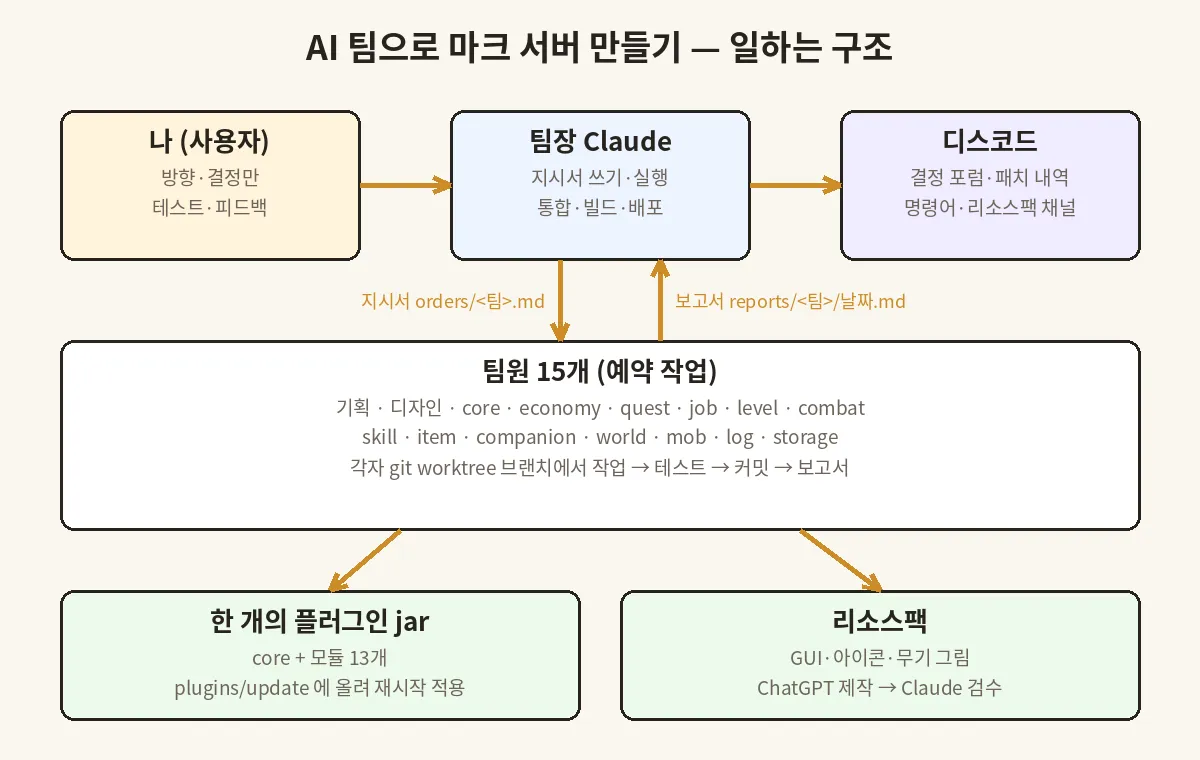
While building a Minecraft MMORPG server, I made one Claude the team lead and ran 15 teams (planning, design, and per-module dev) as scheduled tasks. The key: the human only sets direction and makes decisions; everything else runs on order files and reports.
- Paper 1.21.11 · 1 Java plugin (core + 13 modules) · real development log, 2026-09-23 to 09-30
- Orders go only in the 'current run' section of each order file, never in chat — that leaves a record, and reruns do the same job
- Each team works only on its own branch (git worktree); only the team lead merges, builds, and deploys
- The most common reason the AI team quietly stalled: 'waiting for human approval'
Contents10 sections
Hi there! It's Mojangcam 😎
These days I'm building a Minecraft MMORPG server with some friends. Levels, stats, classes, skills, quests, shops, mobs, even pets — everything runs on plugins we made ourselves. The problem was that I had to build almost all of it on my own.
So I changed my approach. I made one AI (Claude) the "dev team lead" and put 15 teams under it — planning, design, and one dev team per module — all running as AI scheduled tasks. I set the direction, jump into the game to test, and make the decisions.
This series is the record of what we built that way over one week. In #1, I'll start with the structure: "how the AI team works."
- 🧑💼 What the 1 team lead and 15 team members each do
- 📄 What the orders and reports look like
- 🔀 How we merge when several teams touch the code at once
- 🧯 Incidents where the team actually stalled
📌 Why Split It into an "AI Team"? 🧠
At first, I built everything in a single AI chat window. But as the number of modules grew, problems started showing up.
- Context overflows — while fixing the combat formula, it forgets the quest code.
- No parallel work — only one thing moves at a time.
- No record — it's hard to dig up "why did we decide it this way back then?"
So I split things up like a real company. Team members look only at their own module folder, and the team lead looks only at the big picture and merging.
| Role | Who | What they do |
|---|---|---|
| User | Me | Direction and decisions, in-game testing, feedback |
| Team lead | Claude (chat) | Writing orders, running teams, reading reports, merging/building/deploying, organizing Discord |
| Planning team | Scheduled task | Numbers, XP curves, world lore, command docs, simulations |
| Design team | Scheduled task | Image prompts, resource pack specs |
| 13 dev teams | Scheduled tasks | core · economy · quest · job · level · combat · skill · item · companion · world · mob · log · storage |
📌 Step 1 - Orders: Write Them in a File, Don't Say Them
Team members (scheduled tasks) start fresh, with no memory, every single time. So I write everything they need to do in a file. Each team has an orders/<팀>.md file, and there are exactly three rules.
- The
## 이번 실행(this run) section at the very top is what to do this time - Older orders just get renamed to
## (이전 실행)(previous run) and pushed down (never deleted) - When the team lead runs a team, it doesn't add any extra words. Orders live only in the file
Here's what an actual order file looks like (partly trimmed).
## 이번 실행 — 2026-09-30 #9 — 퀘스트 GUI 그림 연결
근거: 사용자 요청. 슬롯 배치 정본 = design/prompts-for-user_v7.md ① §3 표.
1. 배경: 창 제목 = 음수 공백 + 배경 글리프 + 흰 제목 (오르벨 메뉴와 같은 방식)
2. 아이콘 = item_model myserver:gui/quest/<id>, 설명은 전부 툴팁으로
3. 일지: 탭 0-1 메인 · 2-3 서브 · 4-5 일일 · 6-7 완료, 9-44 목록 36칸 …
9. 테스트: 슬롯 배치 단위 테스트, quest/ 밖 파일 수정 금지
시간: 11:45 전에 끝나면 오늘 테스트 빌드에 넣음
Let's break it down piece by piece 💡
- Basis (근거) : who asked for this and why. Later, it becomes the answer to "why did we do it this way?"
- Numbered list : team members use it as-is as their checklist.
- Tests and scope : I write fences like "don't touch anything outside your own folder" every time.
- Time (시간) : for urgent work, I write something like "if it's done by X o'clock it goes into this build, otherwise the next one," so nobody rushes and breaks things.
Because orders live in a file instead of in chat, rerunning the same task gives nearly the same result, and the full history of orders stays intact. That turned out to be the biggest advantage.
📌 Step 2 - Reports: Readable by the Team Lead in 3 Minutes
When team members finish, they leave a report at reports/<팀>/YYYY-MM-DD_HHMM.md. The format is fixed, so the team lead can read it quickly.
| No. | Contents |
|---|---|
| ① | Assumptions — things they decided on their own because the order didn't say |
| ② | Files created or changed, commits |
| ③ | Feature requests for core |
| ④ | Test results (how many passed) |
| ⑤ | In-game checklist — things a human needs to check directly |
| ⑥ | Requests to other teams |
| ⑦ | For the team lead — commits to merge, user decision needed |
① and ⑦ matter most. AI tends to just make up a plausible answer when it doesn't know something, but making it write those down separately as "assumptions" let me review them all at once later.
📌 Step 3 - Merging: Teams on Branches, Only the Team Lead on main
With 13 modules being touched at the same time, code conflicts were my biggest worry. Here are the rules I set.
- Each team gets its own working folder + its own branch (
module/<팀>) viagit worktree - Team members don't change files outside their own module folder — if they need something from core, they only write it down as a "core request"
- Only the team lead merges into main, builds, and deploys to the server
- Before merging, the team lead mechanically checks two things
- Whether the branch touched anything outside its own folder
- Whether permission node names follow the rule (
myserver.<모듈>.…)
# Did this branch change folders outside its own module? (passes only if the output is empty)
git diff --name-only main...module/quest | cut -d/ -f1 | sort -u | grep -vx quest
I'll explain why the second check exists in #2. (There was an incident where two entire modules shut down 😅)
After a build finishes, the jar gets uploaded to the server's plugins/update/ folder, so the new version goes in the next time the server restarts.
📌 Incidents Where the AI Team Stalled 🧯
1. The team silently stopped — "waiting for approval"
For a while, team members were stuck and couldn't finish their work. No errors, no notifications. The cause was a request for file-deletion permission. I had written "request delete permission if you need it" in the work rules, so a team member asked for permission to clean up and was waiting until a human approved it.
The fix was to change the rules.
- Team members don't delete files. Unneeded files only get moved to
_to_delete/<팀>/ - Files that need to come out of git are removed only with
git rm --cached - If human approval is truly required, don't wait — write "blocked" in the report and finish
The scariest thing on an AI team wasn't errors. It was waiting silently without saying a word.
2. git lock files
With several tasks touching the same repo, leftover index.lock and HEAD.lock files often blocked the next task. Instead of deleting them, I solved it with a rule to give them a unique name and move them to another folder.
3. When the PC sleeps, the team sleeps
The team members work in a folder connected to my PC. When the PC goes into sleep mode, the connection drops. So I had the team lead check the connection and, if it's down, schedule itself to retry an hour later.
📌 What the Human Did vs. What the AI Did 💬
| Human (me) | AI team |
|---|---|
| Direction, like "I want damage to hit hard early on, and attack power to matter more later" | Formula design, simulations for 6 classes, code |
| Jumping into the game, taking screenshots, and pointing out what looks off | Finding the cause, fixing, building, deploying |
| Picking from the recommendations | Writing recommendations, listing affected modules |
In the end, what I did most was jump into the game, look around, and say something short. This division of roles is the heart of this series.
📌 Wrapping Up
Today, I laid out how the AI team works.
- Orders go in files, and reports come in a fixed format
- Teams work only on their own branches, and only the team lead merges
- The most common reason an AI team stalls is waiting for human approval
In the next episode, I'll cover the structure that packs core + 13 modules into a single plugin, the incident where modules shut down entirely, and the incident where damage showed up as 1000029. Stay tuned 🙌
I set the direction for this post and wrote it up together with Claude. This server is a personal project; it is not official Minecraft content and is not affiliated with Mojang or Microsoft.
Series · Part 1 of 5
Building a Minecraft Server with an AI Team
- #11 AI Team Lead + 15 Team Members Building an MMORPG Plugin! 🤖You are here
- #213 Modules in One Plugin! The Core Structure and the '1000029 Damage' Incident 🧩
- #3Numbers ×10, a 12-Hour XP Curve, and Simulating 6 Classes! 📊
- #4A Resource Pack Pipeline Where ChatGPT Draws and Claude Reviews! 🎨
- #5Running the Dev Team with a Discord Bot! Decision Forum, Command List & Resource Pack Channel 🤝
