
Category: Discord Bot Tutorials
Discord Bot Tutorial#32Build a Server Log & Audit Log Channel! Auto-Log Message Deletes, Edits, Joins/Leaves, and Kicks (Python Example) 🕵️
 Author: Mojangcam
This post was translated from the Korean original.
At a glance
Discord's built-in audit log only says 'someone deleted N messages' and never shows what was deleted. We combine raw events with on_audit_log_entry_create to build a log bot that posts deleted content, who deleted it, joins/leaves, role changes, and kicks to one channel as embeds.
- Python 3.10.12 · discord.py 2.7.1 · python-dotenv 1.2.3 · run and verified on 2026-09-25
- Deleted message content shows only if it's in the bot's cache → raise max_messages; Message Content and Server Members intents are required
- Find who deleted it in guild.audit_logs() by target, channel, and time (15s); self-deletes leave no audit log entry
- Kicks and bans arrive in real time, with moderator and reason, via on_audit_log_entry_create (2.2+, Intents.moderation)
Contents13 sections
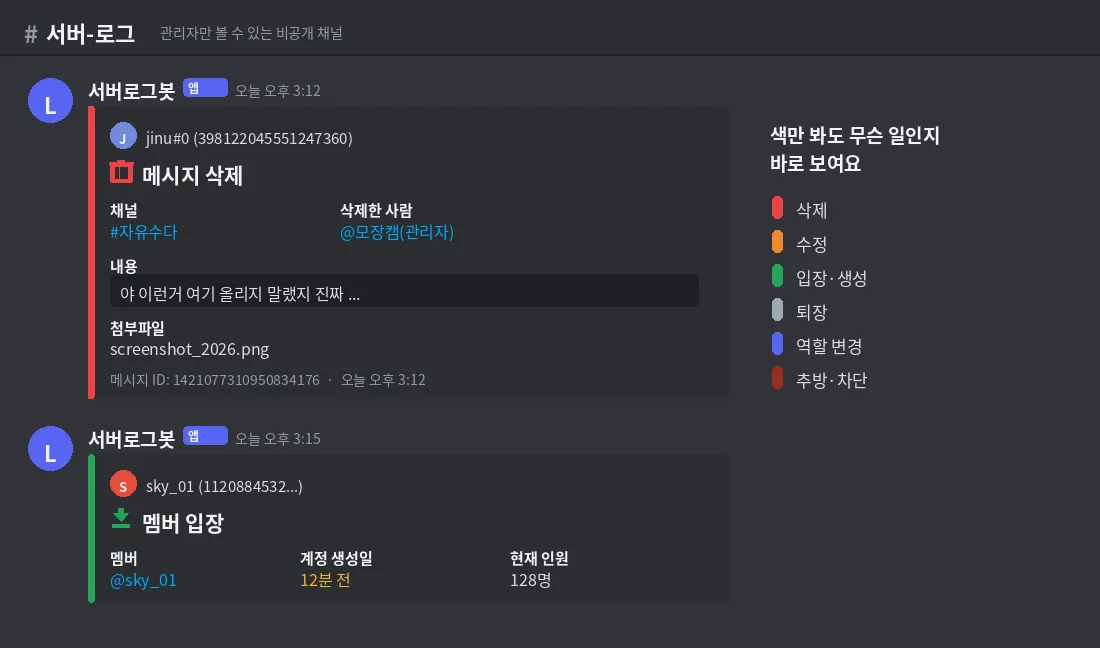
Hi there! It's Mojangcam 😎
Last time, in #31, we built a Temp Voice bot that creates a voice channel automatically when you join a lobby and removes it once it's empty. This episode covers a feature every server admin ends up looking for sooner or later: "Who deleted this?"
Here's what today's log bot will do.
- When someone deletes a message, the content from before the delete stays in the log channel
- If an admin deleted someone else's message, it also records who deleted it
- When a member joins, you get their account creation date (spot alts and bots!), and when they leave, the roles they had
- Kicks and bans are logged in real time, including the moderator and the reason
Why do you need a bot for this? 🧠 Discord does have a Server Settings → Audit Log menu, but it doesn't show the content of deleted messages. It only goes as far as "someone deleted N messages." When a dispute comes up and you need to prove "that person swore and then deleted it," the only way is to have a bot record it ahead of time.
The log bot in this episode works together with #21 banned-word filter and #25 error handling as the operational transparency module of our "all-in-one community management bot."
📌 What you need
- Python 3.9 or later (3.10+ recommended) — it runs from 3.9 because it uses the
dict[str, int]syntax - discord.py 2.7.1 (latest on PyPI as of 2026-09-25) —
on_audit_log_entry_createwas added in 2.2, so upgrade if you're on an older version - python-dotenv 1.x
- A bot created in the Discord Developer Portal and invited to your server (permissions: View Audit Log, Send Messages, Embed Links)
pip install -U discord.py python-dotenvCreate a .env file in your project folder and put your token in it (replace the placeholder with your bot token). Writing the token straight into your code is the perfect way to leak it when you push to GitHub 😱
token=여기에_봇_토큰💡 Make sure to add .env to your .gitignore. (echo .env >> .gitignore)
⚠️ This episode needs two Privileged Intents. In the Developer Portal → Bot tab, turn on Message Content Intent (required to see the content of deleted messages) and Server Members Intent (to detect joins/leaves and role changes). Without them, your delete logs will show empty content, or the join/leave events won't fire at all.
🧩 What the log bot will record
Today's bot logs 6 kinds of events. We'll color-code them so you can tell what happened just by scrolling.
| Event | What gets logged | Embed color |
|---|---|---|
| Message delete | Author, channel, content before deletion, attachment names, who deleted it | Red |
| Message edit | Content before and after, jump link to the message | Orange |
| Join / leave | Account creation date (spot new accounts), join date, roles they had | Green / Gray |
| Nickname / role change | Before and after, roles added or removed | Blue |
| Kick / ban / unban | Moderator, target, reason | Dark red |
| Channel create / delete | Channel name and type | Green / Red |
📌 Step 1 - Basic setup and 3 intents
# discord.py 2.7.1 / Python 3.9+ / python-dotenv 1.x
import os
import json
import asyncio

import discord
from discord import app_commands
from discord.ext import commands
from dotenv import load_dotenv

load_dotenv()
token = os.getenv("token")

CONFIG_FILE = "log_config.json"   # {guildID(str): logChannelID(int)}
MAX_CONTENT = 1000                # embed field max is 1024 chars → trim with some headroom

intents = discord.Intents.default()
intents.message_content = True   # required to see the 'content' of deleted messages (privileged intent)
intents.members = True           # detect joins/leaves and nickname/role changes (privileged intent)
intents.moderation = True        # kicks/bans + audit log events

bot = commands.Bot(command_prefix="!", intents=intents, max_messages=5000)

log_channels: dict[str, int] = {}
lock = asyncio.Lock()
Let's break it down 💡
- intents.message_content : Lets the bot see the content of messages other people write. If it's off,
contentcomes in as an empty string in your delete logs. It's a privileged intent, so you also have to turn it on in the portal. - intents.members :
on_member_join/on_member_remove/on_member_updateare tied to this intent. Also a privileged intent. - intents.moderation :
on_member_ban/on_member_unbanand today's star,on_audit_log_entry_create, belong here. It's not privileged, so turning it on in code is enough. (It's the same thing as the oldintents.bans.) - max_messages=5000 : How many messages the bot keeps in memory. The default is 1000, but you can only see a deleted message's content if it's in this cache, so we raised it generously.
📌 Step 2 - Saving the log channel and a shared embed helper
Each server has its own log channel, so we save {guildID: channelID} to JSON. Same pattern as #31.
def save():
    with open(CONFIG_FILE, "w", encoding="utf-8") as f:
        json.dump(log_channels, f, ensure_ascii=False, indent=2)


def load():
    global log_channels
    if os.path.exists(CONFIG_FILE):
        with open(CONFIG_FILE, encoding="utf-8") as f:
            log_channels = json.load(f)


def get_log_channel(guild: discord.Guild):
    cid = log_channels.get(str(guild.id))
    return guild.get_channel(cid) if cid else None


def make_embed(title: str, color: discord.Color, user=None) -> discord.Embed:
    embed = discord.Embed(title=title, color=color, timestamp=discord.utils.utcnow())
    if user is not None:
        embed.set_author(name=f"{user} ({user.id})", icon_url=user.display_avatar.url)
    return embed


async def send_log(guild: discord.Guild, embed: discord.Embed):
    channel = get_log_channel(guild)
    if channel is None:
        return
    try:
        await channel.send(embed=embed)
    except discord.Forbidden:
        print(f"⚠️ {guild.name}: no permission to send messages in the log channel.")


def cut(text: str) -> str:
    text = text or "(no content — embed/attachment only, or not in cache)"
return text if len(text) <= MAX_CONTENT else text[:MAX_CONTENT] + " …(trimmed)"- timestamp=discord.utils.utcnow() : A time like "Today at 3:12 PM" shows up automatically at the bottom of the embed, in the viewer's own time zone. Time is the most important thing in a log, right?
- set_author(name, icon_url) : Pins the profile picture +
name (ID)to the top of the embed. We keep the ID because even if they change their nickname or leave the server later, the ID never changes. - try/except in send_log : If someone changes the log channel's permissions, the bot can crash with
Forbidden. As we learned in #25, we catch it, print it to the console, and move on. - cut() : Embed field values have a 1024-character limit. Going over gives you a
400 Bad Request, so we trim ahead of time.
📌 Step 3 - The core! Catching message deletes and edits
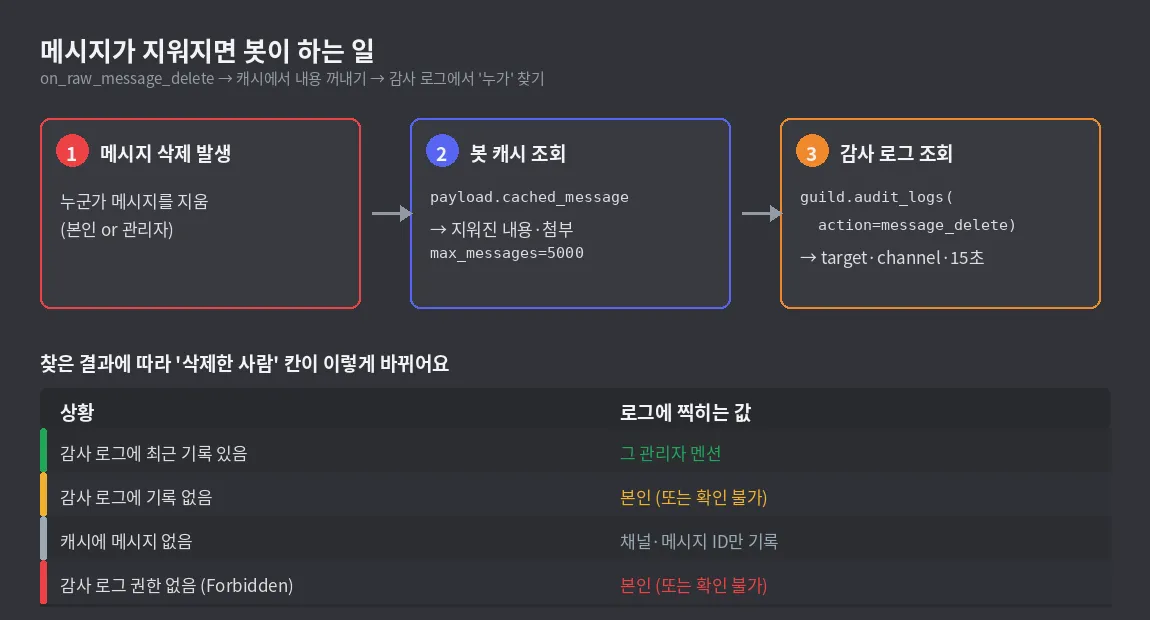
This is where raw events come in. on_message_delete only tells you about messages in the cache, but on_raw_message_delete still tells you "this message ID was deleted in this channel" even when it's not cached.
async def find_deleter(guild: discord.Guild, author_id: int, channel_id: int):
    """Find the moderator who just deleted this user's message in this channel, using the audit log."""
    try:
        async for entry in guild.audit_logs(limit=5, action=discord.AuditLogAction.message_delete):
            same_target = entry.target is not None and entry.target.id == author_id
            same_channel = entry.extra.channel.id == channel_id
            recent = (discord.utils.utcnow() - entry.created_at).total_seconds() < 15
            if same_target and same_channel and recent:
                return entry.user
    except discord.Forbidden:
        return None
    return None


@bot.event
async def on_raw_message_delete(payload: discord.RawMessageDeleteEvent):
    if payload.guild_id is None:      # ignore DMs
        return
    guild = bot.get_guild(payload.guild_id)
    msg = payload.cached_message

    embed = make_embed("🗑️ Message Deleted", discord.Color.red(), msg.author if msg else None)
    embed.add_field(name="Channel", value=f"<#{payload.channel_id}>", inline=True)

    if msg is None:
        embed.add_field(name="Content", value="Not in cache (sent before the bot started)", inline=False)
        embed.set_footer(text=f"Message ID: {payload.message_id}")
    else:
        if msg.author.bot:
            return
        deleter = await find_deleter(guild, msg.author.id, payload.channel_id)
        who = deleter.mention if deleter else "Self (or unknown)"
        embed.add_field(name="Deleted by", value=who, inline=True)
        embed.add_field(name="Content", value=cut(msg.content), inline=False)
        if msg.attachments:
            files = "\n".join(a.filename for a in msg.attachments)
            embed.add_field(name="Attachments", value=files, inline=False)
        embed.set_footer(text=f"Message ID: {msg.id}")

    await send_log(guild, embed)


@bot.event
async def on_raw_message_edit(payload: discord.RawMessageUpdateEvent):
    if payload.guild_id is None:
        return
    before = payload.cached_message
    after = payload.message
    if before is None or after.author.bot:
        return
    if before.content == after.content:      # filter out 'fake edits' such as link preview embeds
        return

    guild = bot.get_guild(payload.guild_id)
    embed = make_embed("✏️ Message Edited", discord.Color.orange(), after.author)
    embed.add_field(name="Channel", value=after.channel.mention, inline=True)
    embed.add_field(name="Link", value=f"[Jump to message]({after.jump_url})", inline=True)
    embed.add_field(name="Before", value=cut(before.content), inline=False)
    embed.add_field(name="After", value=cut(after.content), inline=False)
    await send_log(guild, embed)


@bot.event
async def on_raw_bulk_message_delete(payload: discord.RawBulkMessageDeleteEvent):
    if payload.guild_id is None:
        return
    guild = bot.get_guild(payload.guild_id)
    embed = make_embed("🧹 Bulk Message Delete", discord.Color.dark_red())
    embed.add_field(name="Channel", value=f"<#{payload.channel_id}>", inline=True)
    embed.add_field(name="Count", value=f"{len(payload.message_ids)} messages", inline=True)
    await send_log(guild, embed)
Let's break it down 💡
- payload.cached_message : If the deleted message was in the bot's cache, you get a
Messageobject; otherwiseNone. Messages posted before the bot started aren't in the cache, so we log "content unavailable" but still keep the channel and message ID. That still helps with an investigation. - guild.audit_logs(limit=5, action=...) : An async iterator that walks the server's audit log from newest to oldest. You have to loop over it with
async for, notfor. If the bot doesn't have the View Audit Log permission you'll getForbidden, so we wrapped it in a try. - entry.target / entry.extra.channel / entry.created_at : For a
message_deleteentry, target is the person who wrote the message,extra.channelis the channel it was deleted from, andextra.countis how many were deleted. If all three match and the entry was created within 15 seconds, itsentry.user(the moderator) is the one who deleted it. - "Self (or unknown)" : When someone deletes their own message, nothing is recorded in the audit log at all. So if we can't find it in the audit log, we treat it as a self-delete. One catch: when the same moderator deletes the same person's messages back to back, Discord just bumps the count on the existing entry instead of creating a new one, so the 15-second check can miss it. Just keep in mind it isn't 100% accurate.
- payload.message (edit event) : The message after the edit (added in 2.5). The version before the edit comes from
cached_message. When you post a link, Discord sends one more edit event while it builds the preview embed, so we skip it whencontentis the same to keep the log clean. - on_raw_bulk_message_delete : When a moderator does a bulk delete (purge) like "delete 100 messages," this fires once instead of individual delete events. Logging every message would flood the log, so we only record the count.
📌 Step 4 - Joins, leaves, nickname and role changes
@bot.event
async def on_member_join(member: discord.Member):
    embed = make_embed("📥 Member Joined", discord.Color.green(), member)
    embed.add_field(name="Member", value=member.mention, inline=True)
    embed.add_field(name="Account created", value=discord.utils.format_dt(member.created_at, "R"), inline=True)
    embed.add_field(name="Member count", value=f"{member.guild.member_count} members", inline=True)
    await send_log(member.guild, embed)


@bot.event
async def on_member_remove(member: discord.Member):
    embed = make_embed("📤 Member Left", discord.Color.light_grey(), member)
    embed.add_field(name="Member", value=f"{member} ({member.mention})", inline=True)
    if member.joined_at:
        embed.add_field(name="Joined", value=discord.utils.format_dt(member.joined_at, "R"), inline=True)
    roles = [r.mention for r in member.roles if r != member.guild.default_role]
    if roles:
        embed.add_field(name="Roles they had", value=" ".join(roles), inline=False)
    await send_log(member.guild, embed)


@bot.event
async def on_member_update(before: discord.Member, after: discord.Member):
    if before.nick != after.nick:
        embed = make_embed("🏷️ Nickname Changed", discord.Color.blue(), after)
        embed.add_field(name="Before", value=before.nick or "(none)", inline=True)
        embed.add_field(name="After", value=after.nick or "(none)", inline=True)
        await send_log(after.guild, embed)

    added = [r for r in after.roles if r not in before.roles]
    removed = [r for r in before.roles if r not in after.roles]
    if added or removed:
        embed = make_embed("🎭 Roles Changed", discord.Color.blurple(), after)
        if added:
            embed.add_field(name="➕ Added", value=" ".join(r.mention for r in added), inline=False)
        if removed:
            embed.add_field(name="➖ Removed", value=" ".join(r.mention for r in removed), inline=False)
await send_log(after.guild, embed)- format_dt(time, "R") : Converts it to the
<t:1790291186:R>format so Discord shows relative times like "3 days ago" or "2 years ago". If the account creation date in a join log says "12 minutes ago"? There's a good chance it's a bot or an alt account. This is the field admins love most 👀 - on_member_remove : Leaving on your own, getting kicked, getting banned — all of them come through this event. That's why "why they left" gets logged separately by the audit log event in the next step.
- Comparing before.roles / after.roles :
on_member_updatefires when anything changes: nickname, roles, timeout, server profile picture, and more. So you have to compare "what changed" yourself inside the handler. We use the difference between the role lists to tell additions from removals.
📌 Step 5 - Kicks and bans via audit log events (who and why)
MOD_ACTIONS = {
    discord.AuditLogAction.kick: ("👢 Kick", discord.Color.dark_orange()),
    discord.AuditLogAction.ban: ("🔨 Ban", discord.Color.dark_red()),
    discord.AuditLogAction.unban: ("🕊️ Unban", discord.Color.teal()),
}


@bot.event
async def on_audit_log_entry_create(entry: discord.AuditLogEntry):
    if entry.action not in MOD_ACTIONS:
        return
    title, color = MOD_ACTIONS[entry.action]
    embed = make_embed(title, color, entry.user)
    target = entry.target
    embed.add_field(name="Target", value=f"{target} (<@{target.id}>)" if target else "(unknown)", inline=True)
    embed.add_field(name="Moderator", value=entry.user.mention if entry.user else "(unknown)", inline=True)
    embed.add_field(name="Reason", value=entry.reason or "(no reason given)", inline=False)
await send_log(entry.guild, embed)- on_audit_log_entry_create : Called in real time the moment a new entry is added to the server's audit log (discord.py 2.2+, requires
Intents.moderation, and the bot must have the View Audit Log permission). Instead of digging through the log after the fact like in Step 3, Discord tells you first, so it's far more accurate. - entry.action : An
AuditLogActionenum that says what kind of action it was. Today we only picked kick, ban, and unban, but there are dozens more, likechannel_create,role_update, andmember_role_update. Add one line to the dictionary and you've got a new log type. - entry.user / entry.target / entry.reason : These are the moderator who did it, the person it happened to, and the reason the moderator typed when kicking. If no reason was given it's
None, so we swap in "(no reason given)".
💡 Moderator shows up as None? That can happen when the user isn't in the cache. entry.user_id (2.2+) is always filled in, so you can just mention them with f"<@{entry.user_id}>".
📌 Step 6 - Channel create/delete + log channel setup commands
@bot.event
async def on_guild_channel_create(channel: discord.abc.GuildChannel):
    embed = make_embed("📁 Channel Created", discord.Color.green())
    embed.add_field(name="Channel", value=f"{channel.mention} (`{channel.name}`)", inline=True)
    embed.add_field(name="Type", value=str(channel.type), inline=True)
    await send_log(channel.guild, embed)


@bot.event
async def on_guild_channel_delete(channel: discord.abc.GuildChannel):
    embed = make_embed("🗂️ Channel Deleted", discord.Color.red())
    embed.add_field(name="Channel", value=f"`{channel.name}`", inline=True)
    embed.add_field(name="Type", value=str(channel.type), inline=True)
    await send_log(channel.guild, embed)


@bot.tree.command(name="로그설정", description="[Admin] Choose the channel to send server logs to")
@app_commands.describe(채널="Text channel where the logs will pile up")
@app_commands.checks.has_permissions(administrator=True)
async def set_log(interaction: discord.Interaction, 채널: discord.TextChannel):
    me = interaction.guild.me
    perms = 채널.permissions_for(me)
    if not (perms.send_messages and perms.embed_links):
        return await interaction.response.send_message(
            f"❌ I don't have **Send Messages / Embed Links** permission in {채널.mention}.", ephemeral=True)
    async with lock:
        log_channels[str(interaction.guild.id)] = 채널.id
        save()
    await interaction.response.send_message(f"✅ From now on, I'll log server events in {채널.mention}!", ephemeral=True)
    await 채널.send(embed=make_embed("🟢 Set as the log channel", discord.Color.green(), interaction.user))


@bot.tree.command(name="로그해제", description="[Admin] Stop recording server logs")
@app_commands.checks.has_permissions(administrator=True)
async def unset_log(interaction: discord.Interaction):
    async with lock:
        log_channels.pop(str(interaction.guild.id), None)
        save()
    await interaction.response.send_message("⏹️ Logging turned off.", ephemeral=True)


@bot.tree.error
async def on_app_command_error(interaction: discord.Interaction, error: app_commands.AppCommandError):
    if isinstance(error, app_commands.MissingPermissions):
        await interaction.response.send_message("❌ Only admins can use this command.", ephemeral=True)
    else:
        raise error


@bot.event
async def on_ready():
    load()
    await bot.tree.sync()
    print(f"✅ Logged in: {bot.user} / servers with logging: {len(log_channels)}")


bot.run(token)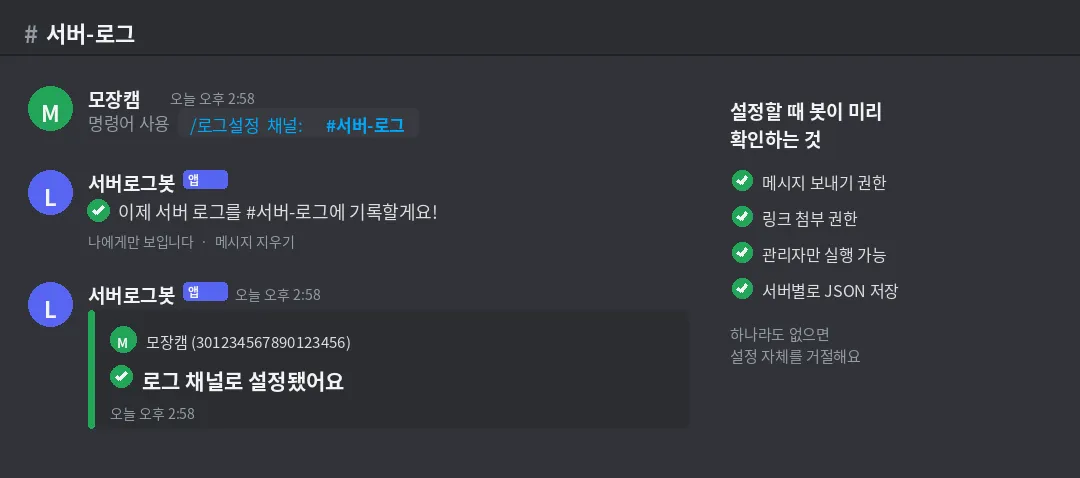
- 채널: discord.TextChannel : If you type a slash command argument as a channel, Discord shows a channel picker UI. It's the same feature we saw in the #15 command groups post.
- 채널.permissions_for(me) : Checks at setup time whether the bot can actually post in the log channel. Telling the admin right now is much friendlier than failing silently later when an event fires.
- bot.tree.error : When a non-admin runs the command you get
MissingPermissions, and if you don't catch it, the user only sees the unhelpful "This interaction failed" message. Same pattern we used in #25.
📎 Paste the code blocks from Steps 1–6 together in order and you have the finished bot. Save it as logbot.py and run it right away.
📌 Results
- Run
python logbot.py→ the console shows✅ Logged in: BotName / servers with logging: 0 - An admin creates a private channel like
#서버-로그(server-log) and runs/로그설정 채널:#서버-로그(the log settings command) → a green "🟢 Set as the log channel" embed arrives. - Post a message in any channel and delete it → a red 🗑️ embed keeps the deleted content exactly as it was. If an admin deletes someone else's message, "Deleted by" shows the admin's mention.
- Edit a message → an orange ✏️ embed shows before and after side by side, and the link jumps you to that message.
- Join and leave the server with an alt account → you'll see 📥 join (account created "N minutes ago"!) → 📤 leave, and if you kick someone, a 👢 kick embed with the moderator and reason follows the 📤 leave.
💡 Always lock the log channel so only admins can see it. It keeps deleted message content verbatim, so if regular members can see it you'll get complaints like "I deleted that, why is it still there?" And don't forget to clean up old logs about once a month.
💡 Bonus - Adding more log types
Just add entries to the MOD_ACTIONS dictionary to log more audit log types. Here are some common ones.
discord.AuditLogAction.member_update: ("⏳ Timeout/Nickname Changed", discord.Color.gold()),
discord.AuditLogAction.role_create: ("🎨 Role Created", discord.Color.green()),
discord.AuditLogAction.role_delete: ("🎨 Role Deleted", discord.Color.red()),
discord.AuditLogAction.message_bulk_delete: ("🧹 Bulk Delete (Moderator)", discord.Color.dark_red()),
If you print entry.changes.before / entry.changes.after, you can pull out detailed changes too, like "role name changed from A to B" or "timeout until when." For voice channel join/leave logs, just add one embed line to the on_voice_state_update we used in #31 and you're done.
📌 Common errors
- The delete log only shows "(no content)" → Cause: Message Content Intent isn't enabled in the Developer Portal, or
intents.message_content = Trueis missing from your code → Fix: turn on both and restart the bot. Messages posted before the bot started aren't in the cache, so it's normal that you can't see them. - on_member_join / on_member_remove never fire → Cause: Server Members Intent isn't set → Fix: turn it on in the portal's Bot tab and check
intents.members = True. Without it, the events silently never fire with no error, which is confusing. discord.errors.Forbidden: 403 Forbidden (error code: 50013): Missing Permissions→ Cause: the bot's role doesn't have the View Audit Log permission → Fix: Server Settings → Roles → check "View Audit Log" on the bot's role.on_audit_log_entry_createwon't fire without this permission either.HTTPException: 400 Bad Request (error code: 50035): Invalid Form Body—In embeds.0.fields.2.value: Must be 1024 or fewer in length→ Cause: you put more than 1024 characters in an embed field → Fix: trim it likecut()in the example. If long messages are common, attaching the content as a text file withdiscord.Fileis another good option.TypeError: 'async_generator' object is not iterable→ Cause: you looped overguild.audit_logs()withfor→ Fix: switch toasync for. It's an async iterator.- The edit log shows up twice every time a link is posted → Cause: Discord sends one more edit event when it attaches the link preview (embed) → Fix: skip it when
before.content == after.content, like in the example. - The bot won't even start because of
discord.errors.PrivilegedIntentsRequired→ Cause: you enabled privileged intents in code but not in the portal → Fix: portal Bot tab → Privileged Gateway Intents, turn both ON.
🙌 Wrapping up
Today we combined three things — raw events + audit log lookups + on_audit_log_entry_create — to finish a log bot that records everything from message deletes and edits to joins/leaves, role changes, kicks, and bans as embeds in one channel. To sum up:
- You can only see deleted message content if it's in the cache → set
max_messagesgenerously and turn on both privileged intents - Find who deleted it in
guild.audit_logs()by target, channel, and time (self-deletes leave no record) - Get kicks and bans in real time, including the moderator and reason, with
on_audit_log_entry_create - Mind the 1024-character embed field limit, and lock the log channel to admins only
Next time, we'll do the Temp Voice expansion teased in #31 — transferring ownership, kicking members, invite-only (whitelist) rooms, and "party rooms" that come with their own text channel. Stay tuned 🙌
What kind of log does your server need most? Let me know in the comments and I'll try adding it to the bonus section 😎
📚 Related posts
- Discord Bot Tutorial #30 - Build a Poll & Survey Bot
- Discord Bot Tutorial #28 - Build a Level & XP System
- Discord Bot Tutorial #25 - Keep Your Bot Alive! Setting Up Error Handling & Logging
- Discord Bot Tutorial #21 - Build Keyword Auto-Responses & a Banned-Word Filter
- Mastering Discord Embeds - Methods & Limits Cheat Sheet
- Top 10 Common discord.py Errors
- Discord Bot Tutorial Series Roadmap - The Full Reading Order
Series · Part 31 of 32
Discord Bot Tutorial
- #1Discord Bot Tutorial - Mastering Slash Commands!
- #2Adding Options (Arguments) to Slash Commands!
- #3Adding Subcommands to Slash Commands!
- #4Sending Embeds with Slash Commands!
- #5Implementing Button Interactions!
- #6Implementing a Dropdown (Select Menu)!
- #7Getting User Input with a Modal (Python Example)
- #8Styling Embeds with Images and Fields (Python Example)
- #9Connecting AI (Claude & ChatGPT API) to Your Bot! (Python Example)
- #10Adding Multi-Language (i18n) Support! (Python Example)
- #11Building a Web Dashboard with Flask! (Python Example)
- #12Managing Command Cooldowns and Permissions! (Python Example)
- #13Automating Roles and Channels to Manage Your Server! (Python Example)
- #14Saving Data! JSON vs SQLite (Python Example)
- #15슬래시 명령어 그룹(Group)으로 명령어 정리하기! (파이썬 예제) (Korean)
- #16리마인더·알림 기능 만들기! 봇이 먼저 말 걸게 하기 (파이썬 예제) (Korean)
- #17RAG로 문서 기반 답변봇 만들기! 우리 서버 전용 FAQ 봇 (파이썬 예제) (Korean)
- #18투표(Poll) 기능 만들기! 다수결로 정하는 서버 규칙 (파이썬 예제) (Korean)
- #19Cog로 코드 쪼개기! 1000줄 봇도 안 더러워지는 구조 (파이썬 예제) (Korean)
- #20자동 환영 메시지·온보딩 만들기! 규칙 동의 버튼으로 자동 역할 부여 (파이썬 예제) (Korean)
- #21키워드 자동응답·금지어 필터 만들기! 경고 누적으로 자동 제재까지 (파이썬 예제) (Korean)
- #22슬래시 명령어 자동완성(Autocomplete) 만들기! 금지어를 골라서 추가·삭제 (파이썬 예제) (Korean)
- #23aiosqlite로 비동기 DB 제대로 설계하기! JSON 탈출 (파이썬 예제) (Korean)
- #24채널 난독화(Channel Obfuscation) 대응하기! 11/16부터 안 보이는 채널이 생겨요 (파이썬 예제) (Korean)
- #25봇이 죽지 않게! 에러 핸들링·로깅 체계 잡기 (파이썬 예제) (Korean)
- #26티켓(Ticket) 문의 시스템 만들기! 버튼 하나로 1:1 상담 채널 자동 생성 (파이썬 예제) (Korean)
- #27티켓 담당자 배정·우선순위 만들기! 스태프가 여러 명이어도 안 꼬이게 (파이썬 예제) (Korean)
- #28레벨·경험치(XP) 시스템 만들기! 채팅할수록 레벨업, 랭킹판까지 (파이썬 예제) (Korean)
- #29화폐·상점(Economy) 시스템 만들기! 코인 벌어서 아이템 사기 (파이썬 예제) (Korean)
- #30Build a Poll & Survey Bot! Native Polls + Buttons with Real-Time Tallies (Python Example) 🗳️
- #32Build a Server Log & Audit Log Channel! Auto-Log Message Deletes, Edits, Joins/Leaves, and Kicks (Python Example) 🕵️You are here
- #33임시 음성방 확장, 파티방 만들기! 방장 위임·강퇴·초대 전용(비공개) 방 + 전용 채팅방 자동 생성 (파이썬 예제) 🎉 (Korean)
Show all 32Collapse
