
Category: Python
Python 3.15 Final Is 13 Days Away! Check Whether Your Code Will Break - UTF-8 by Default (Goodbye cp949) & Lazy Import Migration Checklist 🐍
 Author: Mojangcam
This post was translated from the Korean original.
Contents12 sections
Hi there! It's Mojangcam 😎
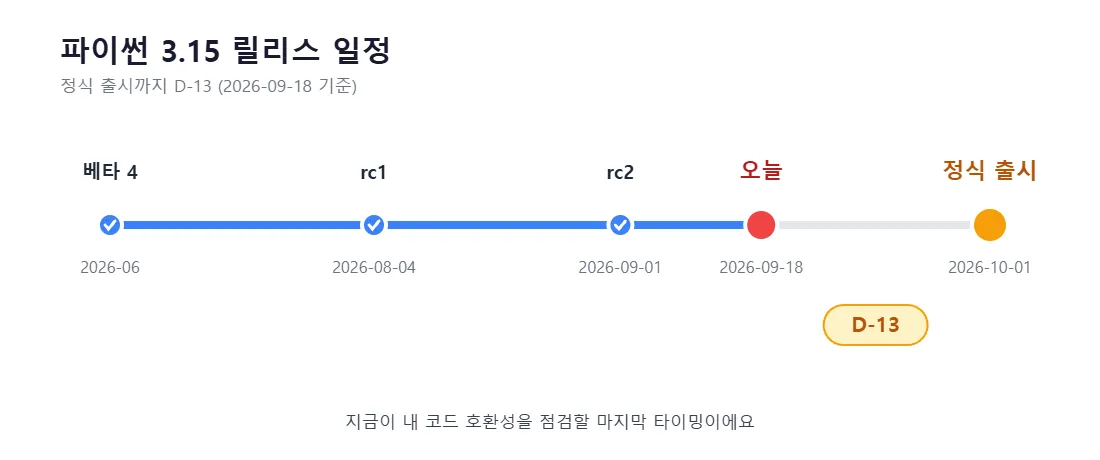
Finally, the Python 3.15 final release lands on October 1, 2026. Today is September 18, so that's exactly D-13, 13 days to go.
So far on this blog, I've covered 3.15 in the beta 4, rc1, and rc2 posts, mostly focusing on "what's new." Today, let's change direction a bit. Instead of touring new features, this post is about checking "Will the code I'm running right now break on 3.15?"
This 3.15 release is a really big deal, especially for people using Python in Korea. The infamous cp949 encoding hell is finally over. But in exchange, code that has been relying on cp949 all this time can now break in the opposite direction. 😅
📌 What You'll Need
- Python 3.15.0rc2 (released 2026-09-01, the last rc before the final)
- Your existing Python 3.13 or 3.14 (good to keep installed side by side for comparison)
- A few text files for testing (ideally one Korean text file saved in cp949)
- Your favorite editor (VS Code recommended)
The goal is to try things out before the final release, so don't uninstall your existing version. Install 3.15 separately. On Windows, the py launcher is installed along with Python, so you can pick a version with py -3.15 script.py.
# Check installed Python versions (Windows)
py --list

# Run with 3.15
py -3.15 test.py

# macOS/Linux
python3.15 test.py
🧠 Why Should You Check Now?
A lot of people think, "I'll deal with it when the final comes out." But this time is a little different.
PEP 686 in 3.15 changes the default for how files are opened in the first place. What makes this scary is that things can break silently, without any error. The program runs fine, but the Korean text in your CSV shows up as ?????, or you open a log file and it's full of gibberish.
This is especially true for scripts that run automatically every day (Excel automation, crawling, sending emails, and so on). Nobody checks the results every time, so you only find out days later. That's why you need to check ahead of time.
🧩 Change 1 - Files Now Always Open as UTF-8 (PEP 686)
Let's start with the most important change.
Up to 3.14, if you didn't specify an encoding in open(), Python used the OS locale encoding. On Korean Windows, that was cp949 (the euc-kr family). On macOS and Linux, it was UTF-8. That's where the famous problem came from: the same code breaks on Windows but works perfectly on a Mac.
Starting with 3.15, it's always UTF-8, no matter the OS.
# Python 3.15 / What if you don't specify an encoding?

with open("메모.txt") as f:      # 3.14 and earlier (Windows) → cp949
    print(f.read())               # 3.15 → UTF-8 (regardless of OS)
Let's break it down 💡
- Default encoding of open(): fixed to UTF-8 starting with 3.15. That holds even if you don't touch environment variables like PYTHONUTF8.
- subprocess(text=True): this also works on a UTF-8 basis now.
- encoding="locale": if you want to explicitly say "follow the OS locale" like before, use this special value.
- locale.getencoding(): a function for finding out what the current OS locale encoding actually is.
🛠️ How to Check Whether Your Code Is at Risk in 30 Seconds
The fastest way is to find every open() call that leaves out the encoding. Python has had a warning option for exactly this all along.
# Shows warnings for code that relies on the default encoding
py -3.15 -X warn_default_encoding my_script.py
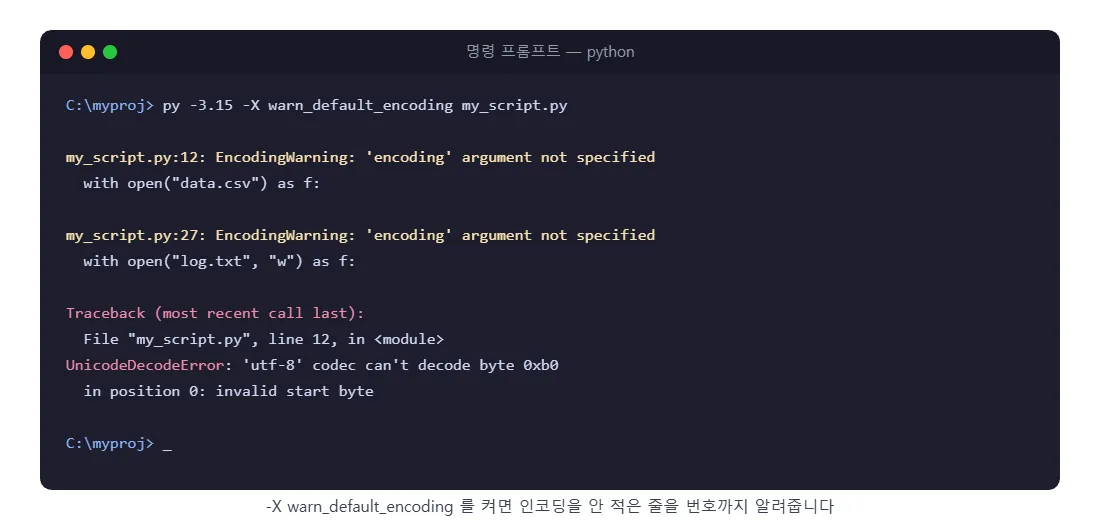
Run it like this and you'll get an EncodingWarning that tells you which line is the problem. The lines it flags are the candidates whose behavior will change on 3.15.
🛠️ Pick One of Three Fixes
① Most recommended - specify the encoding yourself
# Files you create from now on: standardize on UTF-8
with open("result.txt", "w", encoding="utf-8") as f:
    f.write("안녕하세요")

# When reading a file you saved in cp949 in the past
with open("old_data.csv", encoding="cp949") as f:
    print(f.read())
This is the most reliable option. It behaves the same no matter which version you're on. The right answer is to make "always specify the encoding" a habit.
② If you want to keep the old behavior
# Explicitly say "follow the OS locale" (cp949 on Korean Windows)
with open("legacy.txt", encoding="locale") as f:
    print(f.read())
③ In a hurry? Roll everything back (a temporary fix)
# Turn off UTF-8 mode with an environment variable
set PYTHONUTF8=0        # Windows CMD

# Or with a command-line option
py -3.15 -X utf8=0 my_script.py
Option ③ is a temporary fix. Python's move to UTF-8 isn't going to be reversed, so use it to buy some time, and in the end fix things properly with ①.
💡 Garbled Korean Text in Excel Is a Slightly Different Story
This case comes up a lot in automation posts. When you save a CSV as UTF-8 but the Korean text is garbled when you open it in Excel, that's a separate issue that has existed for a long time and has nothing to do with 3.15. Excel doesn't reliably recognize UTF-8 without a BOM.
import csv

# For a CSV you'll open by double-clicking in Excel, use utf-8-sig
with open("보고서.csv", "w", encoding="utf-8-sig", newline="") as f:
    w = csv.writer(f)
    w.writerow(["이름", "부서", "점수"])
w.writerow(["홍길동", "영업", 92])utf-8-sig: an encoding that's UTF-8 but adds a BOM marker at the very start of the file. Excel sees it and goes, "Ah, this is UTF-8."
🧩 Change 2 - Lazy Import Is Here for Real (PEP 810)
The second change is explicit lazy imports. It was finalized during the rc stage and goes into the final release as is.
# Python 3.15+
lazy import json
lazy from pathlib import Path
An import marked with lazy doesn't load the module until the moment you actually use that name. If your script lists a bunch of heavy libraries at the top but only uses them in certain commands, startup gets noticeably faster.
Let's break it down 💡
- lazy: it's not a reserved word but a soft keyword. So existing code that uses lazy as a variable name won't break.
- Only allowed at module top level: using it inside a function, a class, or a try/except/finally block raises a SyntaxError.
- Combinations that don't work: lazy from module import * and lazy from __future__ import ... are not allowed.
- sys.lazy_modules: lazily loaded modules are listed here instead of in sys.modules.
- -X lazy_imports=all: a command-line option that makes every import lazy without touching your source. On the other hand, normal (the default) only respects the lazy keyword.
⚠️ Watch Out Here
With lazy imports, import failures blow up later. Normally you'd get a ModuleNotFoundError as soon as the program starts, but now it's raised the first time you use that module.
If you're running something like a 24/7 Discord bot, a program that must not quietly die in the middle of the night, I recommend using lazy imports sparingly and setting up error handling and logging alongside them. (Related posts: "Python Office Automation #13 - Building a Logging, Retry, and Failure Alert System", "Discord Bot Tutorial #25 - Setting Up Error Handling and Logging")
One more thing: remember that this is syntax that only works on 3.15. If you write lazy in code that has to run on 3.14 or earlier, it's simply a syntax error. If you need to support both versions, you can use __lazy_modules__.
# Lazy on 3.15, simply ignored on earlier versions
__lazy_modules__ = ["json", "pathlib"]

import json      # behaves lazily on 3.15
📌 Migration Checklist (Copy-Paste OK)
Before the final release, run through these steps once, in this order.
# 1) After installing 3.15rc2, confirm it coexists with your existing version
py --list

# 2) Find all code that relies on the default encoding
py -3.15 -X warn_default_encoding my_script.py

# 3) If you have tests, run them all with warnings turned on
py -3.15 -X warn_default_encoding -m pytest

# 4) Check whether your key libraries support 3.15
py -3.15 -m pip install -r requirements.txt
Then go through the items below by eye.
- Are there any places left where open() has no encoding=?
- Do you have code that reads files you saved in cp949 in the past? → specify encoding="cp949"
- Do you create CSVs that will be opened in Excel? → encoding="utf-8-sig"
- Do you capture Windows command output with subprocess.run(..., text=True)? → check whether Korean output gets garbled
- Have the libraries in your requirements.txt published wheels for 3.15? (Packages with C extensions can be slow to support new versions)
- Have you decided when to upgrade the Python version on your deployment servers and GitHub Actions?
📌 Common Errors
1. UnicodeDecodeError: 'utf-8' codec can't decode byte 0xb0 in position 0
- Cause: 3.15 tried to read the file as UTF-8, but it's actually a Korean text file saved in cp949. This is the classic case where code that worked fine on 3.14 breaks for the first time on 3.15.
- Fix: specify open(path, encoding="cp949"). Re-saving the file itself as UTF-8 is even cleaner.
2. UnicodeDecodeError: 'cp949' codec can't decode byte ...
- Cause: the exact opposite of the above. You opened a UTF-8 file without an encoding on Windows with 3.14 or earlier.
- Fix: specify encoding="utf-8". If you hit this error often, simply upgrading to 3.15 will make many of them go away.
3. SyntaxError: lazy import is only allowed at module level
- Cause: you used lazy inside a function or a try block.
- Fix: move it to the top of the file. If you need to import conditionally, just use a regular import inside the function like before.
4. The program runs fine, but only the Korean text in the output file is garbled (no error)
- Cause: the read and write encodings differ, but no exception was raised. This is the hardest type to track down.
- Fix: specify the encoding on both the reading and writing sides, and sweep your code with -X warn_default_encoding to make sure nothing is missed.
5. ERROR: Could not build wheels for ... (while installing on 3.15)
- Cause: the library hasn't published a build for 3.15 yet. This is common for a few weeks right after a final release.
- Fix: if it's not urgent, wait. For work environments, it's safer not to upgrade the moment the final comes out, and to move over only after your key dependencies have published 3.15 wheels.
📌 Wrapping Up
Here's today's summary 🙌
- Python 3.15 final releases on October 1. D-13 as of today
- PEP 686: the default encoding of open() is unified to UTF-8 regardless of OS → the biggest change for Korean Windows users
- To roll back: encoding="locale", PYTHONUTF8=0, -X utf8=0 — but these are temporary fixes
- PEP 810: lazy import speeds up startup. But only at module top level, and it's 3.15-only syntax
- The one thing to do right now — use -X warn_default_encoding to find the places without an encoding and fill them in
In the next post, I'm planning to cover the actual process of moving to 3.15 in time for the final release: creating a fresh virtual environment, checking library compatibility, and moving automation scripts over without downtime. Stay tuned! 💬
📚 Related Posts
- Python 3.15 New Features Roundup - lazy import, frozendict, UTF-8 by Default (as of Beta 4)
- Python 3.15 rc1 Released! lazy import Finalized - Everything That Changed Since Beta 4
- Python 3.15 rc2 Released! Last Check Before the Final (Oct 1) - Everything That Changed Since rc1
- Python 3.15 Final D-13 Migration Checklist ← You're reading it!
- Python Virtual Environments (venv) Complete Guide - From Creating to Activating and Deleting
