
Category: Discord Bot Tutorials
Discord Bot Tutorial#14Saving Data! JSON vs SQLite (Python Example)
 Author: Mojangcam
This post was translated from the Korean original.
Contents11 sections
Hi there! This is Mojangcam 😎
In Part #13, we handed server management over to the bot entirely with role and channel automation. But there was one catch. Data you keep only in variables, like #13's temp_channels, disappears the moment the bot restarts.
So in this part, #14, we're going to give the bot a memory. We'll build an attendance check + points + ranking bot in two ways using JSON and SQLite, both built into Python, and make it crystal clear when to use which.
Attendance checks, point (economy) systems, levels, warning counts… every popular feature on community servers needs "a bot that remembers data." Once you get past this hurdle today, the list of features you can build grows a lot!

🧠 Why Do You Need to Save Data?
Python variables live only in memory (RAM). The moment you restart the bot, your VPS reboots, or the bot crashes with an error, all the points and records in those variables are reset without a trace. That's why you need to leave the data in a file and read it back when the bot starts. The fancy word for this is persistence.
🧩 JSON vs SQLite: What's the Difference?
Let me give you the conclusion first! Use JSON for small, simple data like settings, and SQLite for data that keeps piling up and needs searching or ranking.
| Aspect | JSON | SQLite |
|---|---|---|
| What it is | A text file (saves a dict as is) | A real database in a single file |
| Install | Not needed (built-in json module) |
Not needed (built-in sqlite3 module) |
| Reading and writing | The whole file, every time | Only the rows you need |
| Search and sort | Write it yourself in Python | One line of SQL (ORDER BY, etc.) |
| As data grows | Gets slower and slower | Stays fast thanks to indexes |
| If something goes wrong mid-save | The file can get corrupted | Safe thanks to transactions |
| Best for | Bot settings, small records | Data that keeps piling up, like points, economy, and logs |
JSON is just a Python dict moved into a file, so it's intuitive, and its biggest strength is that you can open it in Notepad and check it with your own eyes. The downside is that it rewrites the whole file on every save, so it gets slower as the data grows. SQLite is a real database that runs from a single file with no server to install, so you can read only the data you need and leave sorting and aggregation to SQL.
📌 What You Need
- Python 3.8 or later
- discord.py 2.x (any recent 2.x version works)
- The
jsonandsqlite3modules — they're built into Python, so there's nothing extra to install!
pip install -U discord.pyWe'll use prefix commands (!출석, "check-in"), so go to the Discord Developer Portal → Bot tab and turn on Message Content Intent. (If this setting is new to you, check out the earlier parts of the series!)
📌 Step 1 - JSON Basics: load & save Functions
The JSON approach comes down to just two functions: one that reads a dict from a file and one that saves a dict to a file.
import json
import os

DATA_FILE = "points.json"

def load_data():
    """If the file exists, read it; otherwise return an empty dict."""
    if not os.path.exists(DATA_FILE):
        return {}
    with open(DATA_FILE, "r", encoding="utf-8") as f:
        return json.load(f)

def save_data(data):
    """Save the whole dict to the JSON file in one go."""
    with open(DATA_FILE, "w", encoding="utf-8") as f:
        json.dump(data, f, ensure_ascii=False, indent=2)
Let's break it down 💡
- json.load(f) : Reads the file's contents and turns them into a Python dict.
- json.dump(data, f) : Turns a dict into JSON text and writes it to the file.
- encoding="utf-8" + ensure_ascii=False : The combo that keeps Korean (non-ASCII) text from breaking. Leave out either one and the text gets saved as alien gibberish like
\uD55C\uAE00. - indent=2 : Adds indentation so the file is easy for people to read.
One warning! JSON keys can only be strings. User IDs are originally numbers, but it's safer to always convert them to strings when saving, like str(ctx.author.id).
📌 Step 2 - Finishing the JSON Attendance and Points Bot
Put three commands (!출석 check-in, !포인트 points, !랭킹 ranking) on top of those two functions and you're done. This code is a complete version you can run as is.
# discord.py 2.x / Python 3.8+ / json is built into Python
import json
import os
from datetime import date

import discord
from discord.ext import commands

TOKEN = "YOUR_BOT_TOKEN_HERE"
DATA_FILE = "points.json"

def load_data():
    if not os.path.exists(DATA_FILE):
        return {}
    with open(DATA_FILE, "r", encoding="utf-8") as f:
        return json.load(f)

def save_data(data):
    with open(DATA_FILE, "w", encoding="utf-8") as f:
        json.dump(data, f, ensure_ascii=False, indent=2)

intents = discord.Intents.default()
intents.message_content = True  # for prefix commands

bot = commands.Bot(command_prefix="!", intents=intents)

@bot.event
async def on_ready():
    print(f"✅ Logged in as {bot.user}!")

@bot.command(name="출석")
async def attend(ctx: commands.Context):
    data = load_data()
    uid = str(ctx.author.id)
    today = date.today().isoformat()   # e.g. '2026-07-30'

    user = data.get(uid, {"points": 0, "last_check": ""})
    if user["last_check"] == today:
        await ctx.send(f"{ctx.author.mention} You already checked in today! 😅")
        return

    user["points"] += 10
    user["last_check"] = today
    data[uid] = user
    save_data(data)
    await ctx.send(f"✅ {ctx.author.mention} Check-in complete! +10P (total {user['points']}P)")

@bot.command(name="포인트")
async def my_points(ctx: commands.Context):
    data = load_data()
    user = data.get(str(ctx.author.id))
    total = user["points"] if user else 0
    await ctx.send(f"💰 Points for {ctx.author.mention}: {total}P")

@bot.command(name="랭킹")
async def ranking(ctx: commands.Context):
    data = load_data()
    if not data:
        await ctx.send("Nobody has checked in yet. Your chance to be first! 🏃")
        return

    top = sorted(data.items(), key=lambda x: x[1]["points"], reverse=True)[:5]
    medals = ["🥇", "🥈", "🥉", "4️⃣", "5️⃣"]
    lines = [f"{medals[i]} <@{uid}> — {info['points']}P"
             for i, (uid, info) in enumerate(top)]
    embed = discord.Embed(title="🏆 Points Ranking TOP 5",
                          description="\n".join(lines),
                          color=0x5865F2)
    await ctx.send(embed=embed)

bot.run(TOKEN)
Let's break it down 💡
- date.today().isoformat() : Turns today's date into a string like
2026-07-30. Comparing it withlast_checkis the key to allowing one check-in per day. - data.get(uid, default) : For a user checking in for the first time, it creates a default dict that starts at 0 points.
- sorted(..., reverse=True)[:5] : To build the ranking, we loaded all the data into Python and sorted it ourselves. This is the weak spot of the JSON approach! Compare it with SQLite later on.
- <@USER_ID> mentions inside an embed : Mentions inside an embed don't send a notification (ping), so they're perfect for displaying a ranking.
Run it and type !출석, and a points.json file appears in your bot folder. Open it in Notepad and it looks like this.
{
  "123456789012345678": {
    "points": 30,
    "last_check": "2026-07-30"
  }
}
For around 10 users, this is plenty. But once you have hundreds of users and the records pile up, problems start. The structure rewrites the whole file for every single check-in and reads the whole thing again for every ranking. On top of that, if the bot is force-quit in the middle of saving, the entire file can get corrupted. That's when you need SQLite!
📌 Step 3 - Upgrading the Same Bot to SQLite
You can use SQLite right away with Python's built-in sqlite3 module. First, connect to a DB file and create a table.
import sqlite3

con = sqlite3.connect("points.db")   # created automatically if the file doesn't exist!
con.execute("""
CREATE TABLE IF NOT EXISTS points (
    user_id    TEXT PRIMARY KEY,
    points     INTEGER NOT NULL DEFAULT 0,
    last_check TEXT    NOT NULL DEFAULT ''
)
""")
con.commit()
The check-in command changes like this.
@bot.command(name="출석")
async def attend(ctx: commands.Context):
    uid = str(ctx.author.id)
    today = date.today().isoformat()

    row = con.execute(
        "SELECT last_check FROM points WHERE user_id = ?", (uid,)
    ).fetchone()
    if row is not None and row[0] == today:
        await ctx.send(f"{ctx.author.mention} You already checked in today! 😅")
        return

    con.execute("INSERT OR IGNORE INTO points (user_id) VALUES (?)", (uid,))
    con.execute(
        "UPDATE points SET points = points + 10, last_check = ? WHERE user_id = ?",
        (today, uid),
    )
    con.commit()
Let's break it down 💡
- sqlite3.connect("points.db") : Connects to the DB file. If the file doesn't exist, it creates one for you.
- CREATE TABLE IF NOT EXISTS : Creates the table only if it doesn't exist yet. That's why it's safe no matter how many times you restart the bot.
- PRIMARY KEY : The main key that stops
user_idfrom being duplicated. - Question mark (?) placeholders : Pass values safely instead of gluing them straight into the SQL statement. If you build SQL with f-strings, you can be hit by SQL injection attacks, so always use
?! - INSERT OR IGNORE → UPDATE : "Create it if it's missing, leave it if it's there," then add the points. This is the most beginner-proof pattern.
- con.commit() : Commits the changes to the file. Forget this and nothing gets saved!
What about the ranking? With JSON we loaded everything and sorted it in Python, but with SQLite it takes just one line of SQL.
rows = con.execute(
    "SELECT user_id, points FROM points ORDER BY points DESC LIMIT 5"
).fetchall()
ORDER BY points DESC LIMIT 5 — it means "sort by points in descending order and give me just the top 5." Even with 100,000 users, the DB picks them out for you. That's the power of a database! 💪
📌 Full Code (Copy-Paste OK)
Here's the finished SQLite version. Just change TOKEN and it runs right away. (For the finished JSON version, use the Step 2 code above as is.)
# discord.py 2.x / Python 3.8+ / sqlite3 is built into Python
import sqlite3
from datetime import date

import discord
from discord.ext import commands

TOKEN = "YOUR_BOT_TOKEN_HERE"
DB_FILE = "points.db"

# ── DB setup ──────────────────────────
con = sqlite3.connect(DB_FILE)
con.execute("""
CREATE TABLE IF NOT EXISTS points (
    user_id    TEXT PRIMARY KEY,
    points     INTEGER NOT NULL DEFAULT 0,
    last_check TEXT    NOT NULL DEFAULT ''
)
""")
con.commit()

intents = discord.Intents.default()
intents.message_content = True  # for prefix commands

bot = commands.Bot(command_prefix="!", intents=intents)

@bot.event
async def on_ready():
    print(f"✅ Logged in as {bot.user}!")

@bot.command(name="출석")
async def attend(ctx: commands.Context):
    uid = str(ctx.author.id)
    today = date.today().isoformat()

    row = con.execute(
        "SELECT last_check FROM points WHERE user_id = ?", (uid,)
    ).fetchone()
    if row is not None and row[0] == today:
        await ctx.send(f"{ctx.author.mention} You already checked in today! 😅")
        return

    con.execute("INSERT OR IGNORE INTO points (user_id) VALUES (?)", (uid,))
    con.execute(
        "UPDATE points SET points = points + 10, last_check = ? WHERE user_id = ?",
        (today, uid),
    )
    con.commit()

    total = con.execute(
        "SELECT points FROM points WHERE user_id = ?", (uid,)
    ).fetchone()[0]
    await ctx.send(f"✅ {ctx.author.mention} Check-in complete! +10P (total {total}P)")

@bot.command(name="포인트")
async def my_points(ctx: commands.Context):
    row = con.execute(
        "SELECT points FROM points WHERE user_id = ?", (str(ctx.author.id),)
    ).fetchone()
    total = row[0] if row else 0
    await ctx.send(f"💰 Points for {ctx.author.mention}: {total}P")

@bot.command(name="랭킹")
async def ranking(ctx: commands.Context):
    rows = con.execute(
        "SELECT user_id, points FROM points ORDER BY points DESC LIMIT 5"
    ).fetchall()
    if not rows:
        await ctx.send("Nobody has checked in yet. Your chance to be first! 🏃")
        return

    medals = ["🥇", "🥈", "🥉", "4️⃣", "5️⃣"]
    lines = [f"{medals[i]} <@{uid}> — {pts}P"
             for i, (uid, pts) in enumerate(rows)]
    embed = discord.Embed(title="🏆 Points Ranking TOP 5",
                          description="\n".join(lines),
                          color=0x5865F2)
    await ctx.send(embed=embed)

bot.run(TOKEN)
📌 Results
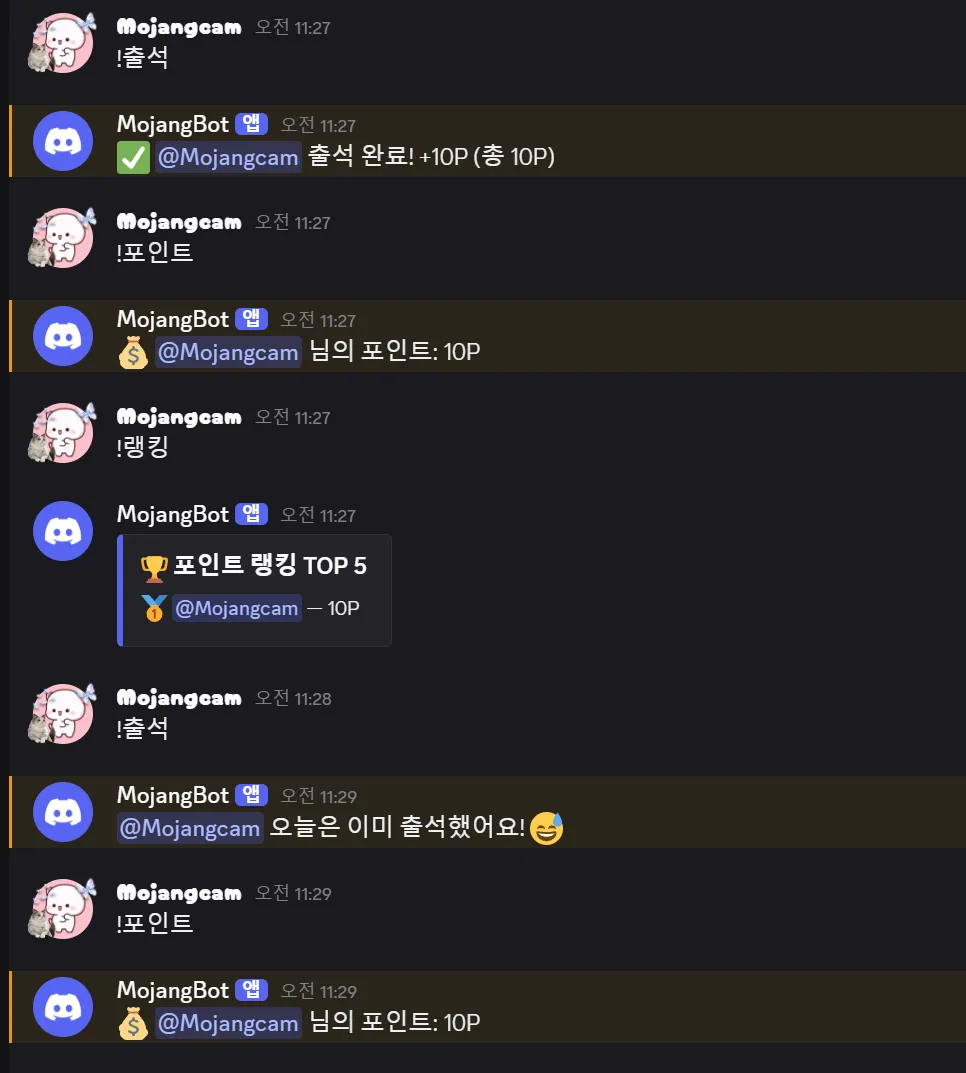
Turn on the bot and check each command in your server.
- Type
!출석→ the bot replies "✅ Check-in complete! +10P (total 10P)". Type it again the same day and you get "You already checked in today! 😅" - Type
!포인트→ it shows your total points. - Type
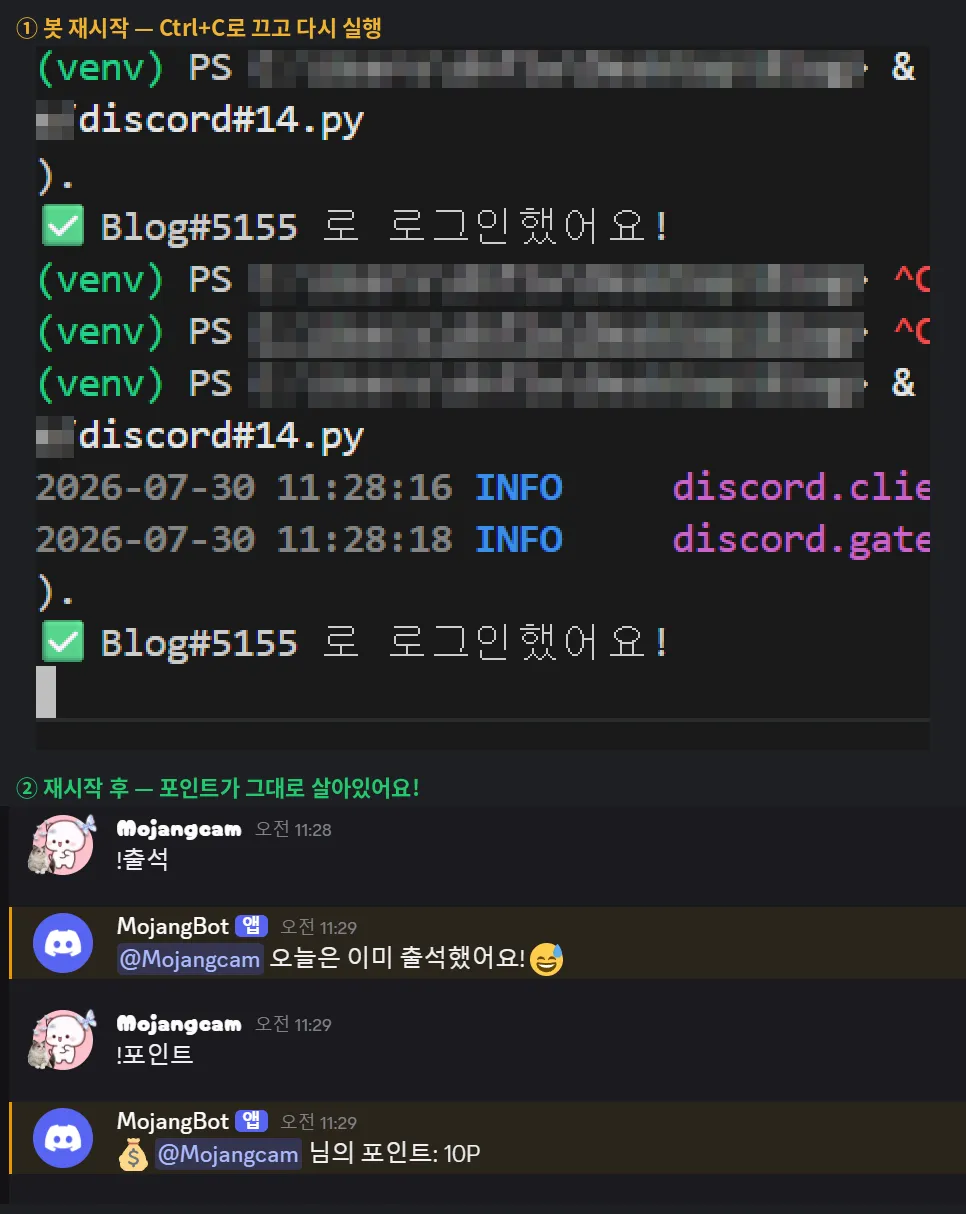
!랭킹→ a TOP 5 embed with 🥇🥈🥉 medals pops up. - Now for the real highlight! Turn the bot off and back on again. Type
!포인트and your points are still there. That's because the memory is saved in thepoints.db(orpoints.json) file in your bot folder. 🎉
📌 Common Errors
1. json.decoder.JSONDecodeError: Expecting value: line 1 column 1
Cause: points.json is an empty file, or the bot was force-quit in the middle of saving and the file got corrupted.
Fix: Delete the file and run the bot again, and a new one will be created. If you don't want to lose the data, open it in Notepad and fix the broken part. To prevent this, shut the bot down normally with a single Ctrl+C when it isn't in the middle of saving.
2. Korean text gets saved as alien gibberish like \uc548\ub155
Cause: You left out ensure_ascii=False in json.dump.
Fix: json.dump(data, f, ensure_ascii=False, indent=2) — and always add encoding="utf-8" when opening the file, too.
3. sqlite3.OperationalError: no such table: points
Cause: You ran a SELECT before CREATE TABLE, or you ran the bot from a different folder, so a new empty DB file was created in the wrong place.
Fix: Make sure the DB setup code (CREATE TABLE) runs before bot.run(), and use cd in the terminal to move into the bot folder before running it.
4. sqlite3.OperationalError: database is locked
Cause: A DB viewer program is holding points.db, or another connection that hasn't called commit() is hanging on to the file.
Fix: Close the DB viewer, and get in the habit of always adding con.commit() after any code that changes data.
💡 Bonus Tips
- Stop check-in spamming : On top of the once-a-day limit, add the cooldown from Part #12 and you'll block spam completely.
- Backup is a single file copy : Just copy the
points.dbfile and your backup is done! If you're running the bot 24/7 on a VPS, check-in dates follow the server's clock, so if your VPS is overseas, set its time zone to Seoul (Asia/Seoul). - If your data gets really big :
sqlite3is synchronous, so very large operations can make the bot freeze for a moment. You won't notice it at beginner scale, but later in the series we plan to cover how to move to the async library aiosqlite!
📌 Wrapping Up
Today we learned data storage, which gives your bot a memory. Small, simple data goes in JSON; data that keeps piling up and needs searching or ranking goes in SQLite — that one rule is all you need to remember. You've now built an attendance, points, and ranking bot both ways, so you can apply it to anything, whether it's a level system or warning counts!
In the next part, we'll cover slash command groups (Group) to neatly organize a bot that has a lot of commands. Stay tuned! 🙌
📚 Discord Bot Tutorial Series
- #5 - Button Interactions
- #6 - Dropdown (Select Menu)
- #7 - Getting Input with a Modal
- #8 - Styling Embeds
- #9 - Connecting AI (Claude & ChatGPT API)
- #10 - Adding Multi-Language (i18n) Support
- #11 - Flask Web Dashboard
- #12 - Managing Command Cooldowns and Permissions
- #13 - Role and Channel Automation
- #14 - Saving Data (JSON vs SQLite) ← You are here!
Series · Part 14 of 32
Discord Bot Tutorial
- #1Discord Bot Tutorial - Mastering Slash Commands!
- #2Adding Options (Arguments) to Slash Commands!
- #3Adding Subcommands to Slash Commands!
- #4Sending Embeds with Slash Commands!
- #5Implementing Button Interactions!
- #6Implementing a Dropdown (Select Menu)!
- #7Getting User Input with a Modal (Python Example)
- #8Styling Embeds with Images and Fields (Python Example)
- #9Connecting AI (Claude & ChatGPT API) to Your Bot! (Python Example)
- #10Adding Multi-Language (i18n) Support! (Python Example)
- #11Building a Web Dashboard with Flask! (Python Example)
- #12Managing Command Cooldowns and Permissions! (Python Example)
- #13Automating Roles and Channels to Manage Your Server! (Python Example)
- #14Saving Data! JSON vs SQLite (Python Example)You are here
- #15슬래시 명령어 그룹(Group)으로 명령어 정리하기! (파이썬 예제) (Korean)
- #16리마인더·알림 기능 만들기! 봇이 먼저 말 걸게 하기 (파이썬 예제) (Korean)
- #17RAG로 문서 기반 답변봇 만들기! 우리 서버 전용 FAQ 봇 (파이썬 예제) (Korean)
- #18투표(Poll) 기능 만들기! 다수결로 정하는 서버 규칙 (파이썬 예제) (Korean)
- #19Cog로 코드 쪼개기! 1000줄 봇도 안 더러워지는 구조 (파이썬 예제) (Korean)
- #20자동 환영 메시지·온보딩 만들기! 규칙 동의 버튼으로 자동 역할 부여 (파이썬 예제) (Korean)
- #21키워드 자동응답·금지어 필터 만들기! 경고 누적으로 자동 제재까지 (파이썬 예제) (Korean)
- #22슬래시 명령어 자동완성(Autocomplete) 만들기! 금지어를 골라서 추가·삭제 (파이썬 예제) (Korean)
- #23aiosqlite로 비동기 DB 제대로 설계하기! JSON 탈출 (파이썬 예제) (Korean)
- #24채널 난독화(Channel Obfuscation) 대응하기! 11/16부터 안 보이는 채널이 생겨요 (파이썬 예제) (Korean)
- #25봇이 죽지 않게! 에러 핸들링·로깅 체계 잡기 (파이썬 예제) (Korean)
- #26티켓(Ticket) 문의 시스템 만들기! 버튼 하나로 1:1 상담 채널 자동 생성 (파이썬 예제) (Korean)
- #27티켓 담당자 배정·우선순위 만들기! 스태프가 여러 명이어도 안 꼬이게 (파이썬 예제) (Korean)
- #28레벨·경험치(XP) 시스템 만들기! 채팅할수록 레벨업, 랭킹판까지 (파이썬 예제) (Korean)
- #29화폐·상점(Economy) 시스템 만들기! 코인 벌어서 아이템 사기 (파이썬 예제) (Korean)
- #30Build a Poll & Survey Bot! Native Polls + Buttons with Real-Time Tallies (Python Example) 🗳️
- #32Build a Server Log & Audit Log Channel! Auto-Log Message Deletes, Edits, Joins/Leaves, and Kicks (Python Example) 🕵️
- #33임시 음성방 확장, 파티방 만들기! 방장 위임·강퇴·초대 전용(비공개) 방 + 전용 채팅방 자동 생성 (파이썬 예제) 🎉 (Korean)
Show all 32Collapse
