
Category: Minecraft Plugins
Building a Minecraft Server with an AI Team#213 Modules in One Plugin! The Core Structure and the '1000029 Damage' Incident 🧩
 Author: Mojangcam
This post was translated from the Korean original.
At a glance
This server puts core and 13 modules into a single plugin jar. Modules never call each other directly; they connect only through core services. Here are two bugs that actually broke in this setup, plus the reload and restart features that re-read config without shutting the server down.
- Paper 1.21.11 · Java · 1 plugin jar = core + 13 modules · actually fixed 2026-09-29 to 09-30
- Modules never depend on each other directly and connect only through core services (interfaces) — that's why the teams could develop in parallel
- Making a module shut down entirely when it breaks the permission-node prefix rule was an intentional safety net
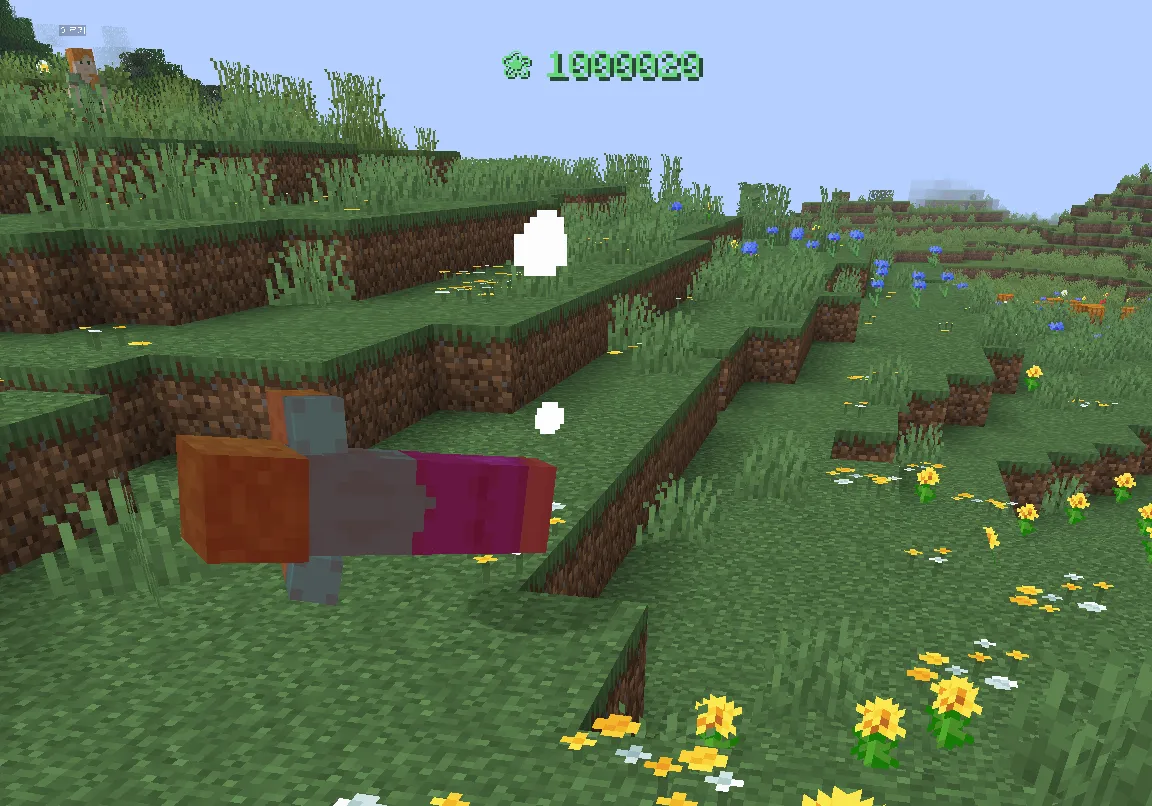
- Damage 1000029 = 'remaining HP 29 + 1,000,000 for the kill.' The math was fine; the display was the bug
Contents9 sections
Hi there! It's Mojangcam 😎
Last time, in #1, I showed how I work with Claude as the team lead and 15 scheduled tasks as team members. This episode is about the structure of the plugin itself that those teams build.
Our server runs exactly one jar file of our own plugin. Inside it, features like levels, combat, skills, quests, shops, and mobs are split into 13 modules. In this episode, I'll go over
- 🧩 Why I set up the core + module structure this way
- 🔒 The incident where one permission name shut down two entire modules
- 💥 The incident where killing a mob showed
1000029damage - 🔄
/리로드(reload), which re-reads config without shutting the server down, and/재시작(restart), which brings the server back up on its own
one by one.
📌 What You Need (Environment)
- Server: Paper 1.21.11, Java 21 or later
- Build: Gradle multi-project (one subproject per module → bundled into a single final jar)
- DB: MariaDB (stores progress)
- Only the bare minimum of external plugins: LuckPerms (permissions) · EssentialsX · WorldEdit
📌 Step 1 - Why "One Jar + 13 Modules" 🧠
At first, I thought about making a separate plugin for each feature. But levels, combat, skills, and items constantly pass numbers back and forth. With separate plugins, load order, version matching, and API sharing all turn into headaches.
So here's what I decided.
| Layer | Role |
|---|---|
| core | Config files · messages · DB connection · permission registration · command registration · service registry · virtual HP · HUD |
| 13 modules | economy · quest · job · level · combat · skill · item · companion · world · mob · log · storage, etc. |
| Rule | Modules never directly import another module's classes. Anything they need goes only through interfaces (services) in core |
For example, if the combat module wants to know a weapon's attack power, it doesn't call the item module. It looks up the ItemService registered in core and uses that. If the item module is turned off, the service simply isn't there, and the combat module falls back to default values.
Thanks to this rule, 13 teams could develop at the same time. Each team only had to trust the interfaces.
📌 Step 2 - The Incident Where One Permission Name Shut Down Entire Modules 🔒
When I started the server, lines like these showed up in the log (summarized).
[MyServer] quest 모듈 켜기 실패: 권한 노드는 'myserver.quest.' 로 시작해야 합니다 — myserver.qnpc.console
[MyServer] world 모듈 켜기 실패: 권한 노드는 'myserver.world.' 로 시작해야 합니다 — myserver.region.admin
Core's permission registration function checks the rule "permission names must start with myserver.<모듈>." (myserver. followed by the module name) and throws an exception if it's broken. When that exception is thrown, the module doesn't enable at all.
The quest team used myserver.qnpc.… for NPC commands, and the world team used myserver.region.… for region protection. The names looked perfectly reasonable even to a human, so they slipped through review.
Let's break it down 💡
- Why so strict? : With 13 modules, permission names collide easily. Enforcing a prefix lets you grant all of a module's permissions in LuckPerms with a single line:
myserver.quest.*. - Why shut the module down instead of just warning? : If it keeps running with wrongly registered permissions, admin-only commands could end up open to regular players. A safety net is better when it stops for sure.
The fix was just renaming two names. But to keep the same accident from happening again, I added a one-line automatic check before merging to the team lead's procedure.
# On a module/<team> branch, find permission nodes that break the prefix rule (passes only if the output is empty)
m=quest
git grep -hoE 'registerPermission\([^;]*' module/$m -- "$m/src/main" \
  | grep -oE '"myserver\.[a-z_]+\.' | awk -F. -v m=$m '$2!=m'
📌 Step 3 - The 1000029 Damage Incident 💥
The moment I killed a mob in-game, an absurd number like 1000029 popped up above its head. But the mob didn't die in one hit. The earlier attacks showed normal numbers; only the final blow was weird.
Cause: "Virtual HP" and "Making Sure It Dies"
On this server, HP goes up into the thousands or even tens of thousands. Vanilla HP (max 1024) isn't enough, so core manages virtual HP separately. When virtual HP hits 0, core also has to make sure the mob really dies on the vanilla side, and this is how it did that.
// core: when virtual HP hits 0, make sure it dies in vanilla too
e.damage(e.getHealth() + 1_000_000, damageSource);   // internal damage for death handling
From vanilla's point of view, the mob took "remaining HP + 1,000,000" damage. And the combat module, which shows damage numbers, picked up this internal damage event too and displayed it as is. Remaining vanilla HP 29 + 1,000,000 = 1000029. The numbers add up perfectly 😂
Fix: Don't Display Death-Handling Damage
This internal damage has the damage type GENERIC_KILL. I added just one line to the combat module.
// combat: damage number display listener (MONITOR)
if (event.getDamageSource().getDamageType() == DamageType.GENERIC_KILL) return; // don't show internal death-handling damage as a number
double shown = event.getFinalDamage();
The actual damage calculation was correct from the start; only the display was wrong. You spot a bug like this the moment you see it in-game, but it's hard to catch with unit tests. The role I described in #1, "humans jump into the game, look, and report back," really paid off here.
📌 Step 4 - Changing Config Without Shutting Down the Server: /리로드 (reload) · /재시작 (restart) 🔄
With the AI teams editing config and jars several times a day, shutting the server down and starting it back up every time got way too tedious. So I added two things to core.
| Command | What it does |
|---|---|
/리로드 (/myserver reload) |
Re-reads the config files of core → every enabled module, with a ✓/✗ summary per module. If a config is wrong, only that module fails and keeps its previous config |
/리로드 level |
Re-reads just that module |
/재시작 60 |
60-second countdown (chat + boss bar), then the server shuts down → comes back up automatically |
| (automatic) | Re-reads config files on its own when they change; notifies admins when a new jar lands in plugins/update |
"Comes back up automatically" isn't possible with server-side code alone. Right before shutting down, the plugin creates a marker file, and the batch file that starts the server sees that file and starts it again.
@echo off
chcp 65001 > nul
cd /d "%~dp0"
:loop
if exist "plugins\MyServer\.restart" del /q "plugins\MyServer\.restart"
java -Xmx8G -jar server.jar nogui
if exist "plugins\MyServer\.restart" (
  echo 재시작 요청 확인 - 5초 뒤 다시 켭니다. 중지하려면 Ctrl+C
  timeout /t 5
  goto loop
)
echo 서버가 종료되었습니다.
pause
Let's break it down 💡
- The
.restartfile :/재시작creates it. If you just shut down with/stop, there's no file, so the server doesn't come back up. - Deleting it at the start of the loop : This stops a leftover from the previous restart from causing an endless restart loop.
- Memory (
-Xmx) : Adjust it to match your server's specs.
📌 Common Errors
- A module won't enable — "permission node must start with …" (권한 노드는 … 로 시작해야 합니다)
Cause: the permission name breaks the prefix rule → Fix: rename it to
myserver.<모듈>.…(myserver. followed by the module name) - After
/리로드, only one module shows ✗ Cause: a JSON syntax error in that module's config → Fix: check the line number in the log, fix it, then run/리로드again. Until then, the module keeps running on its previous config - The server doesn't come back up after a restart
Cause: you started it directly with
java -jarinstead of the batch file → Fix: start it with the loop batch file
📌 Wrapping Up
Today I went over the plugin structure and two real incidents.
- One jar + 13 modules, with modules connected only through core services
- The permission prefix rule is a safety net that shuts the module down + an automatic check before merging
1000029was internal death-handling damage showing up as a number- With
/리로드·/재시작, running the server got much easier even with the AI teams making frequent changes
Next time, it's all about number balance: how I scaled HP and damage 10x all at once, the "level 30 in 12 hours" XP curve, and the surprising cause the planning-team AI found by simulating 6 classes. Stay tuned 🙌
I set the direction for this post and wrote it up together with Claude. This server is a personal project; it isn't official Minecraft content and isn't affiliated with Mojang or Microsoft.
Series · Part 2 of 5
Building a Minecraft Server with an AI Team
- #11 AI Team Lead + 15 Team Members Building an MMORPG Plugin! 🤖
- #213 Modules in One Plugin! The Core Structure and the '1000029 Damage' Incident 🧩You are here
- #3Numbers ×10, a 12-Hour XP Curve, and Simulating 6 Classes! 📊
- #4A Resource Pack Pipeline Where ChatGPT Draws and Claude Reviews! 🎨
- #5Running the Dev Team with a Discord Bot! Decision Forum, Command List & Resource Pack Channel 🤝
