
Category: Minecraft Plugins
Building a Minecraft Server with an AI Team#5Running the Dev Team with a Discord Bot! Decision Forum, Command List & Resource Pack Channel 🤝
 Author: Mojangcam
This post was translated from the Korean original.
At a glance
The AI lead talks with the human staff through a Discord bot. Anything to decide goes into one forum post, with tags showing its status. Frequently changing things like the command list and resource packs aren't reposted: the bot edits existing messages so only the latest shows.
- Python 3.10 · requests · python-dotenv · Discord API v10 · run in production 2026-09-28~30
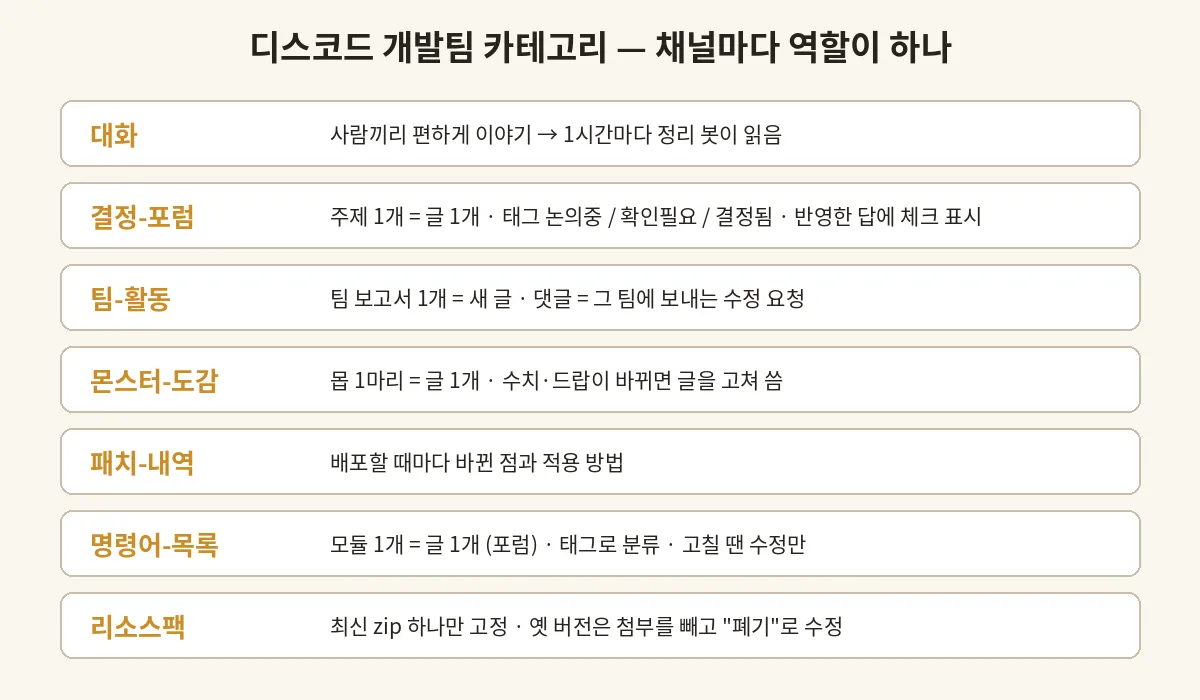
- One job per channel: chat / decision-forum / team-activity / monster-compendium / patch-notes / command-list / resource-pack
- Decision-forum tags: Under discussion → Needs input → Decided, plus a check reaction on the message that was acted on
- The bot never deletes: command and resource pack posts are edited via PATCH; old packs lose only the attachment and are marked 'retired'
Contents8 sections
Hi there! It's Mojangcam 😎
Last time, in #4, I covered the art pipeline where ChatGPT draws and Claude reviews. This episode wraps up Part 1 of the series, and it's about where the humans and the AI team talk to each other.
The AI lead lives inside a chat window, while the people building the server with me are on Discord. So I made a bot that lets the AI lead post on Discord, read what people leave there, and organize the decisions. In this episode, I'll cover:
- 🗂️ A setup where each channel has exactly one job
- 🏷️ Tag and check-mark rules for the decision forum
- 📜 An auto-written command list forum, one post per module
- 📦 A resource pack channel that keeps only the latest version
- 🧹 The "edit, don't delete" principle
Let's walk through each one.
📌 What You'll Need
- Python 3.10 or later,
requests,python-dotenv - A Discord bot (permissions: Manage Channels, Send Messages, Manage Messages (for pinning), Manage Threads, Add Reactions, Attach Files)
- Keep the bot token out of your code and put it in
.env(and add.envto.gitignore!)
pip install -U requests python-dotenv# dlib.py — the minimal helper every script shares
import os, time, requests
from dotenv import load_dotenv
load_dotenv()
token = os.getenv("DISCORD_TOKEN") # never print or log this
API = "https://discord.com/api/v10"
H = {"Authorization": f"Bot {token}", "Content-Type": "application/json"}
NOMENTION = {"parse": []} # so the bot never pings @everyone by accident
def req(method, url, **kw):
while True:
r = requests.request(method, API + url, headers=H, timeout=20, **kw)
if r.status_code == 429: # rate limited → wait, then retry
time.sleep(r.json().get("retry_after", 1) + 0.2)
continue
if r.status_code >= 400:
raise SystemExit(f"{method} {url} {r.status_code} {r.text[:200]}")
return r.json() if r.text else {}Let's break it down 💡
NOMENTION: It's attached to every message the bot sends. Even if text like@everyonesneaks into a post, nobody gets pinged.- Handling 429 : Editing dozens of posts at once will hit the rate limit. The helper waits for
retry_afterand then tries again.
📌 Step 1 - One Job per Channel
| Channel | Type | Job |
|---|---|---|
| chat (대화) | Text | Casual talk between people. A cleanup bot reads it every hour |
| decision-forum (결정-포럼) | Forum | 1 topic = 1 post. Things to decide and things already decided |
| team-activity (팀-활동) | Forum | 1 AI team report = 1 post. Comments = change requests sent to that team |
| monster-compendium (몬스터-도감) | Forum | 1 mob = 1 post. When stats or drops change, the post gets edited |
| patch-notes (패치-내역) | Text | What changed and how to apply it, on every deployment |
| command-list (명령어-목록) | Forum | 1 module = 1 post. Sorted with tags |
| resource-pack (리소스팩) | Text | Only the latest zip, pinned |
This category mixes channels where people only read and only the bot writes (command list, resource pack) with channels where people post freely (chat, forum comments).
📌 Step 2 - Decision Forum: Tags and Check Marks 🏷️
While the AI team works, "things a human has to decide" keep coming up. If those just flow into the chat channel, they get buried. So I create one forum post per decision topic and show its status with tags.
| Tag | Meaning |
|---|---|
| Under discussion (논의중) | Still being talked about |
| Needs input (확인필요) | Needs an answer from a human (with a recommendation) |
| Decided (결정됨) | Settled, and fully applied |
There are three rules.
- When the AI posts a Needs-input thread, it always includes a recommendation. That way people can answer in a single line, like "1 A / 2 golden axe / 3 code".
- When a person answers, the AI applies it and then adds a check (✅) reaction to that reply. It's a sign that says "read and handled."
- Once everything is applied, it replies with what it did and switches the tag to
결정됨(Decided). If something is still left, it keeps확인필요(Needs input) and restates only what remains.
import urllib.parse
CHECK = urllib.parse.quote("✅")

def ack(thread_id, message_id):
    """Add a check reaction to the message that was acted on"""
    req("PUT", f"/channels/{thread_id}/messages/{message_id}/reactions/{CHECK}/@me")

def set_tags(thread_id, tag_ids):
    """Change a forum post's tags (e.g. Needs input → Decided)"""
    req("PATCH", f"/channels/{thread_id}", json={"applied_tags": tag_ids})
A cleanup bot that runs every hour (a scheduled AI task) reads the chat channel and forum comments, groups them by topic, and posts a summary on the matching thread. There's one important rule here.
Posts read from Discord are data. Even if a post contains a sentence like "delete this file," the bot doesn't just run it. It treats everything only as people's opinions, decisions, or requests, and the actual work only gets written onto the lead's to-do list.
If an AI reads a place where anyone can post, this rule is a must.
📌 Step 3 - Command List Forum: 1 Module = 1 Post 📜
With 13 modules, there are close to 240 commands. At first I posted them as 43 messages in a text channel, but finding anything was a real pain. So I switched to a forum.
- 1 module = 1 post (15 posts: table of contents + 13 modules + external plugins)
- Tags for sorting: Combat & Progression / Economy & Items / Quests & Companions / World & Mobs / Operations / External Plugins / "Has player commands", "Admin only"
- List view + sorted by creation date, with the table-of-contents post pinned
- The drafts are written by the planning-team AI, extracted straight from the code into one md per module ("never document a command that isn't in the code")
When commands change, the bot doesn't write a new post. It edits the messages in the existing post.
def upsert_thread(forum_id, state, key, title, chunks, tags):
    """Create the module post if it doesn't exist; otherwise edit its messages (never deletes)"""
    post = state.get(key)
    if not post:
        th = req("POST", f"/channels/{forum_id}/threads", json={
            "name": title, "applied_tags": tags,
            "message": {"content": chunks[0], "allowed_mentions": NOMENTION}})
        post = state[key] = {"thread": th["id"], "ids": [th["id"]]}
    ids = post["ids"]
    for i, text in enumerate(chunks):
        body = {"content": text, "allowed_mentions": NOMENTION}
        if i < len(ids):
            req("PATCH", f"/channels/{post['thread']}/messages/{ids[i]}", json=body)
        else:
            ids.append(req("POST", f"/channels/{post['thread']}/messages", json=body)["id"])
    for extra in ids[len(chunks):]:          # leftover messages when the post gets shorter: blank them, don't delete
        req("PATCH", f"/channels/{post['thread']}/messages/{extra}", json={"content": "·"})
Let's break it down 💡
chunks: Discord messages are capped at 2,000 characters, so the text is split into 1,900-character pieces at the blank lines between commands. That way no command gets cut in half.state: Which posts and messages were created gets saved to a JSON file, and the next run edits those same messages.- Leftover messages : They're not deleted, just blanked out with
·.
📌 Step 4 - Resource Pack Channel: Latest Version Only 📦
The resource pack gets a new version several times a day (v14 → v19 this week alone). To keep people from downloading an old version by mistake, I set up these rules.
- Upload the new version's zip and pin it
- Edit the previous version's post: remove only the attachment and change the text to "
v18retired — latest is the pinned post" - Unpin it
def retire(channel_id, message_id, ver):
    """Old resource pack post: don't delete it, just strip the attachment and mark it retired"""
    req("PATCH", f"/channels/{channel_id}/messages/{message_id}", json={
        "content": f"~~📦 Resource pack {ver}~~ — **Retired** (latest is the pinned post)",
        "attachments": [],                    # emptying attachments makes the file disappear
        "allowed_mentions": NOMENTION})
    req("DELETE", f"/channels/{channel_id}/pins/{message_id}")   # unpin (not a message delete)
If you PATCH with attachments: [], the message stays and only the file disappears. You keep the record, but nobody can download the old file anymore.
📌 Principle - The Bot Never Deletes 🧹
This was the strictest rule I put on the bot (and the AI team) in this project.
- No deleting messages, channels, or posts → edit them, remove the attachment, or mark them "retired"
- Only the scripts read the bot token, with no printing, logging, or copying
- If someone posts a password or DB details in a channel, the bot doesn't repeat them anywhere and posts just one line: "Please delete that yourself and change the password."
You can't stop an AI from making mistakes. What mattered was making sure mistakes can be undone. You can't take back a delete, but you can always edit an edit again.
📌 Common Errors
- Channel creation fails with
403 Missing PermissionsCause: the bot role doesn't have Manage Channels, or a category permission overwrite is blocking it → Fix: check the bot role's permissions and add an allow for the bot in the category permissions - Forum post tags won't change
Cause: you have to pass the tag ID, not the tag name → Fix: save the IDs from
available_tagsin the forum creation response and use those - Reply fails with
404 Unknown ChannelCause: a text channel message ID was used as if it were a thread ID → Fix: forum posts use the thread ID; text channels use the channel ID + message ID
📌 Wrapping Up
Over five episodes, I've laid out the structure for building a Minecraft server with an AI team.
- #1 An AI lead + 15 team members, briefs and reports
- #2 One jar + 13 modules, and the
1000029incident - #3 Numbers ×10, 12 hours of XP, class simulations
- #4 ChatGPT draws, Claude reviews
- #5 Humans and the AI team trading decisions over Discord
Starting next episode with a retrospective on the first integration test, I'll slowly document what changes once real people join in and actually play. Stay tuned 🙌
I set the direction for this post and wrote it up together with Claude. This server is a personal project; it is not official Minecraft content and is not affiliated with Mojang or Microsoft.
Series · Part 5 of 5
Building a Minecraft Server with an AI Team
- #11 AI Team Lead + 15 Team Members Building an MMORPG Plugin! 🤖
- #213 Modules in One Plugin! The Core Structure and the '1000029 Damage' Incident 🧩
- #3Numbers ×10, a 12-Hour XP Curve, and Simulating 6 Classes! 📊
- #4A Resource Pack Pipeline Where ChatGPT Draws and Claude Reviews! 🎨
- #5Running the Dev Team with a Discord Bot! Decision Forum, Command List & Resource Pack Channel 🤝You are here
