
Category: Discord Bot Tutorials
Discord Bot Tutorial#9Connecting AI (Claude & ChatGPT API) to Your Bot! (Python Example)
 Author: Mojangcam
This post was translated from the Korean original.
Contents8 sections
Hi there! This is Mojangcam 😎
In Part #8, we learned how to make your bot's messages look nicer with Embeds. This time, we're finally adding the feature a lot of you have been waiting for: connecting AI to your bot! We'll build a bot where you type /ai 질문 and Claude or ChatGPT answers you.
Your server members can ask the AI anything they like, and one bot can handle things like explaining server rules, translating, and answering coding questions, so it's genuinely useful.
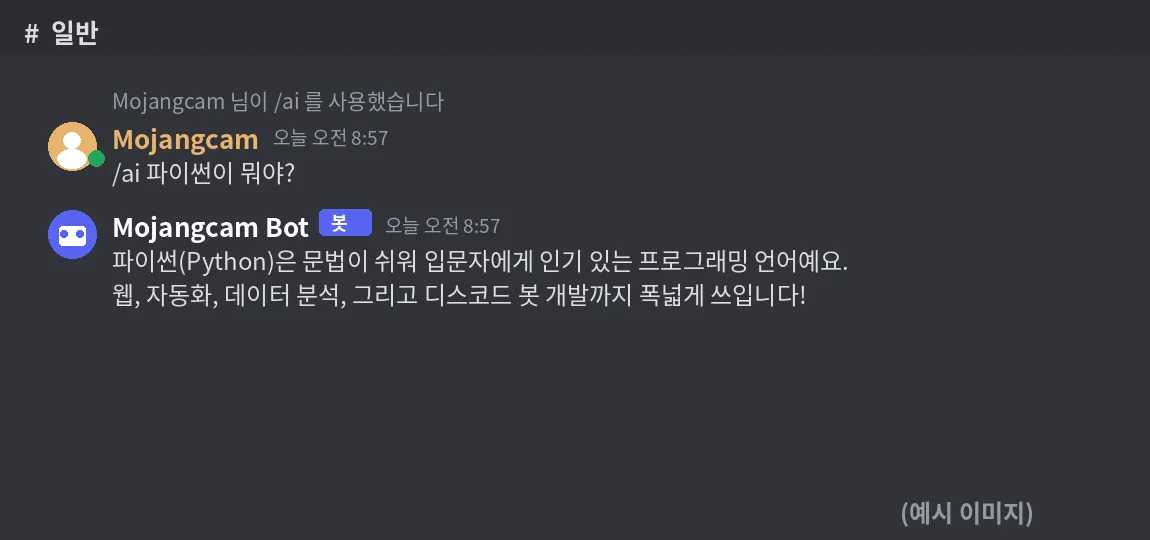
※ The image above isn't a real run. I haven't topped up my API credits yet, so instead of an actual response I've attached a mock-up example image. I'll replace it with a real screenshot once I add credits!
⚠️ One thing before we start: unlike the bot itself or the libraries, an AI API is a paid service that charges small amounts based on usage. That said, for a bot on a personal server, a lightweight model costs only a few hundred won (less than a dollar) a month, so it's pretty affordable.
📌 What You Need
- Python 3.8+
- discord.py 2.x
- The anthropic library (for the Claude API) or the openai library (for ChatGPT)
- An API key: get one at platform.claude.com for Claude, or platform.openai.com for ChatGPT (you'll need to add a small amount of credit)
pip install -U discord.py anthropic python-dotenvThis post uses the Claude API, and at the end I'll also show you the ChatGPT (OpenAI) version.
📌 Step 1 - Storing Your API Key Safely in .env
The same goes for your bot token, but an AI API key is tied to paid billing, so a leak can be a really big deal. Always keep it separate in a .env file.
# .env
DISCORD_TOKEN=봇토큰
ANTHROPIC_API_KEY=sk-ant-...
📌 Step 2 - Calling Claude with the /ai Command
import discord
from discord import app_commands
from anthropic import AsyncAnthropic

ai = AsyncAnthropic()  # Picks up the ANTHROPIC_API_KEY env var automatically

@tree.command(name="ai", description="Ask the AI a question")
async def ai_command(interaction: discord.Interaction, 질문: str):
    await interaction.response.defer()  # ⭐ Key part! See the explanation below
    result = await ai.messages.create(
        model="claude-haiku-4-5",
        max_tokens=1000,
        system="You are a friendly helper on a Discord server. Keep your answers short.",
        messages=[{"role": "user", "content": 질문}],
    )
    answer = result.content[0].text
    await interaction.followup.send(answer[:2000])
Let's break it down 💡
- AsyncAnthropic : discord.py runs asynchronously (async), so you must use the async client. If you just use
Anthropic(), your whole bot freezes while the AI is answering! - defer() : Discord treats a slash command as failed if it doesn't get a response within 3 seconds. AI responses usually take longer than 3 seconds, so you need defer to put it in a "thinking..." state
- model : The example uses claude-haiku-4-5, which is fast and cheap. If you need smarter answers, switch to claude-sonnet-5 (it costs more)
- system : This sets the bot's personality and role. Change it however you like to fit your server's vibe
- [:2000] : Discord messages are limited to 2,000 characters, so you need to cut the text to avoid errors
📌 Step 3 - Making It Remember the Conversation (Optional)
The code above starts a new conversation every time, so it can't remember the previous question. Let's make it remember the last 10 messages per channel.
from collections import defaultdict

history = defaultdict(list)  # Conversation history per channel ID

async def ask_ai(channel_id: int, 질문: str) -> str:
    history[channel_id].append({"role": "user", "content": 질문})
    result = await ai.messages.create(
        model="claude-haiku-4-5",
        max_tokens=1000,
        system="You are a friendly helper on a Discord server.",
        messages=history[channel_id][-10:],  # Send only the last 10
    )
    answer = result.content[0].text
    history[channel_id].append({"role": "assistant", "content": answer})
    return answer
Let's break it down 💡
- history[channel_id][-10:] : If you send the whole conversation, your token costs keep growing. Trimming it to the last 10 is the key to saving money!
- Saving the assistant role : You also need to put the AI's answers into the history, so follow-up questions like "about what you said earlier" work
📌 Full Code (Copy & Paste OK)
# discord.py 2.x / latest anthropic / Python 3.8+
import os
import discord
from discord import app_commands
from collections import defaultdict
from anthropic import AsyncAnthropic
from dotenv import load_dotenv

load_dotenv()

intents = discord.Intents.default()
client = discord.Client(intents=intents)
tree = app_commands.CommandTree(client)
ai = AsyncAnthropic()
history = defaultdict(list)

@client.event
async def on_ready():
    await tree.sync()
    print(f"{client.user} logged in!")

@tree.command(name="ai", description="Ask the AI a question")
async def ai_command(interaction: discord.Interaction, 질문: str):
    await interaction.response.defer()
    try:
        history[interaction.channel_id].append({"role": "user", "content": 질문})
        result = await ai.messages.create(
            model="claude-haiku-4-5",
            max_tokens=1000,
            system="You are a friendly helper on a Discord server. Keep your answers short.",
            messages=history[interaction.channel_id][-10:],
        )
        answer = result.content[0].text
        history[interaction.channel_id].append({"role": "assistant", "content": answer})
        await interaction.followup.send(answer[:2000])
    except Exception as e:
        await interaction.followup.send(f"⚠️ Something went wrong: {e}")

client.run(os.getenv("DISCORD_TOKEN"))
💡 Want to use ChatGPT (OpenAI) instead? Just swap out the call part like this (pip install openai, environment variable OPENAI_API_KEY).
from openai import AsyncOpenAI
ai = AsyncOpenAI()

result = await ai.chat.completions.create(
    model="gpt-4o-mini",
    messages=[{"role": "system", "content": "You are a friendly helper."},
              {"role": "user", "content": 질문}],
)
answer = result.choices[0].message.content
The only difference is that OpenAI puts the system message inside messages too. Otherwise, the structure is almost the same.
📌 Result
Start the bot and type /ai 파이썬이 뭐야? ("What is Python?") in your server. A "thinking..." indicator shows up for a moment, then the AI's answer gets posted in the channel. If you keep asking questions in the same channel, it remembers the earlier conversation when it answers!
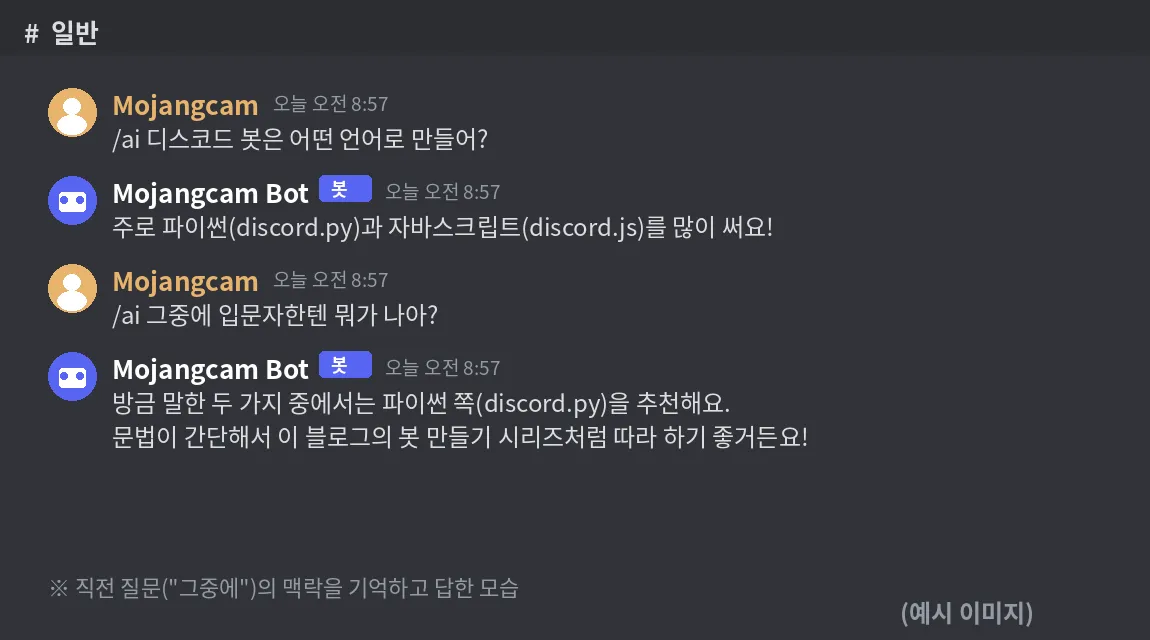
※ This conversation image is also a mock-up example I made because of API costs. (Not a real run)
📌 Common Errors
- 404 Not Found or Unknown interaction — Cause: You called
response.send_messagedirectly without responding within 3 seconds. Fix: Always calldefer()first → then reply withfollowup.send() - authentication_error (401) — Cause: The API key has a typo, is missing, or has expired. Fix: Double-check the key in
.env, and check your credit balance in the console too - HTTPException: Must be 2000 or fewer in length — Cause: The AI's answer is over 2,000 characters. Fix: Cut it with
[:2000]like in the example, or split long answers into several messages - rate_limit_error (429) — Cause: Too many requests in a short time. Fix: Adding a cooldown to the command helps — we'll cover how to build cooldowns in the next part!
📌 Wrapping Up
Today we connected the Claude and ChatGPT APIs to our bot and built a real "AI bot." Use defer to get around the 3-second limit, add per-channel conversation memory, and it really comes to life. In the next part, we'll cover cooldowns and permission management to stop people from abusing the AI command. Stay tuned 🙌
📚 Discord Bot Tutorial Series
- #1 ~ #4 The Basics
- #5 Button Interactions
- #6 Dropdown (Select Menu)
- #7 Getting Input with a Modal
- #8 Styling Embeds with Images and Fields
- #9 Connecting AI (Claude & ChatGPT API) ← You are here!
- Bonus: Free 24/7 Hosting Roundup
Series · Part 9 of 32
Discord Bot Tutorial
- #1Discord Bot Tutorial - Mastering Slash Commands!
- #2Adding Options (Arguments) to Slash Commands!
- #3Adding Subcommands to Slash Commands!
- #4Sending Embeds with Slash Commands!
- #5Implementing Button Interactions!
- #6Implementing a Dropdown (Select Menu)!
- #7Getting User Input with a Modal (Python Example)
- #8Styling Embeds with Images and Fields (Python Example)
- #9Connecting AI (Claude & ChatGPT API) to Your Bot! (Python Example)You are here
- #10Adding Multi-Language (i18n) Support! (Python Example)
- #11Building a Web Dashboard with Flask! (Python Example)
- #12Managing Command Cooldowns and Permissions! (Python Example)
- #13Automating Roles and Channels to Manage Your Server! (Python Example)
- #14Saving Data! JSON vs SQLite (Python Example)
- #15슬래시 명령어 그룹(Group)으로 명령어 정리하기! (파이썬 예제) (Korean)
- #16리마인더·알림 기능 만들기! 봇이 먼저 말 걸게 하기 (파이썬 예제) (Korean)
- #17RAG로 문서 기반 답변봇 만들기! 우리 서버 전용 FAQ 봇 (파이썬 예제) (Korean)
- #18투표(Poll) 기능 만들기! 다수결로 정하는 서버 규칙 (파이썬 예제) (Korean)
- #19Cog로 코드 쪼개기! 1000줄 봇도 안 더러워지는 구조 (파이썬 예제) (Korean)
- #20자동 환영 메시지·온보딩 만들기! 규칙 동의 버튼으로 자동 역할 부여 (파이썬 예제) (Korean)
- #21키워드 자동응답·금지어 필터 만들기! 경고 누적으로 자동 제재까지 (파이썬 예제) (Korean)
- #22슬래시 명령어 자동완성(Autocomplete) 만들기! 금지어를 골라서 추가·삭제 (파이썬 예제) (Korean)
- #23aiosqlite로 비동기 DB 제대로 설계하기! JSON 탈출 (파이썬 예제) (Korean)
- #24채널 난독화(Channel Obfuscation) 대응하기! 11/16부터 안 보이는 채널이 생겨요 (파이썬 예제) (Korean)
- #25봇이 죽지 않게! 에러 핸들링·로깅 체계 잡기 (파이썬 예제) (Korean)
- #26티켓(Ticket) 문의 시스템 만들기! 버튼 하나로 1:1 상담 채널 자동 생성 (파이썬 예제) (Korean)
- #27티켓 담당자 배정·우선순위 만들기! 스태프가 여러 명이어도 안 꼬이게 (파이썬 예제) (Korean)
- #28레벨·경험치(XP) 시스템 만들기! 채팅할수록 레벨업, 랭킹판까지 (파이썬 예제) (Korean)
- #29화폐·상점(Economy) 시스템 만들기! 코인 벌어서 아이템 사기 (파이썬 예제) (Korean)
- #30Build a Poll & Survey Bot! Native Polls + Buttons with Real-Time Tallies (Python Example) 🗳️
- #32Build a Server Log & Audit Log Channel! Auto-Log Message Deletes, Edits, Joins/Leaves, and Kicks (Python Example) 🕵️
- #33임시 음성방 확장, 파티방 만들기! 방장 위임·강퇴·초대 전용(비공개) 방 + 전용 채팅방 자동 생성 (파이썬 예제) 🎉 (Korean)
Show all 32Collapse
