
Category: Discord Bot Tutorials
Discord Bot Tutorial#12Managing Command Cooldowns and Permissions! (Python Example)
 Author: Mojangcam
This post was translated from the Korean original.
Contents12 sections
Hi there! This is Mojangcam 😎
In Part #11, we built a web dashboard with Flask to check on the bot's status. The bot has plenty of features now, but once you actually put it on a server, this is bound to happen.
Someone spams /뽑기 (draw) 10 times a second and floods the channel, or anyone at all hits /청소 (clean) and wipes out everyone else's conversation. 😱
So in this part, we'll learn command cooldowns and permission and role checks. Set up just these two, and your bot suddenly feels like a "properly run bot"!
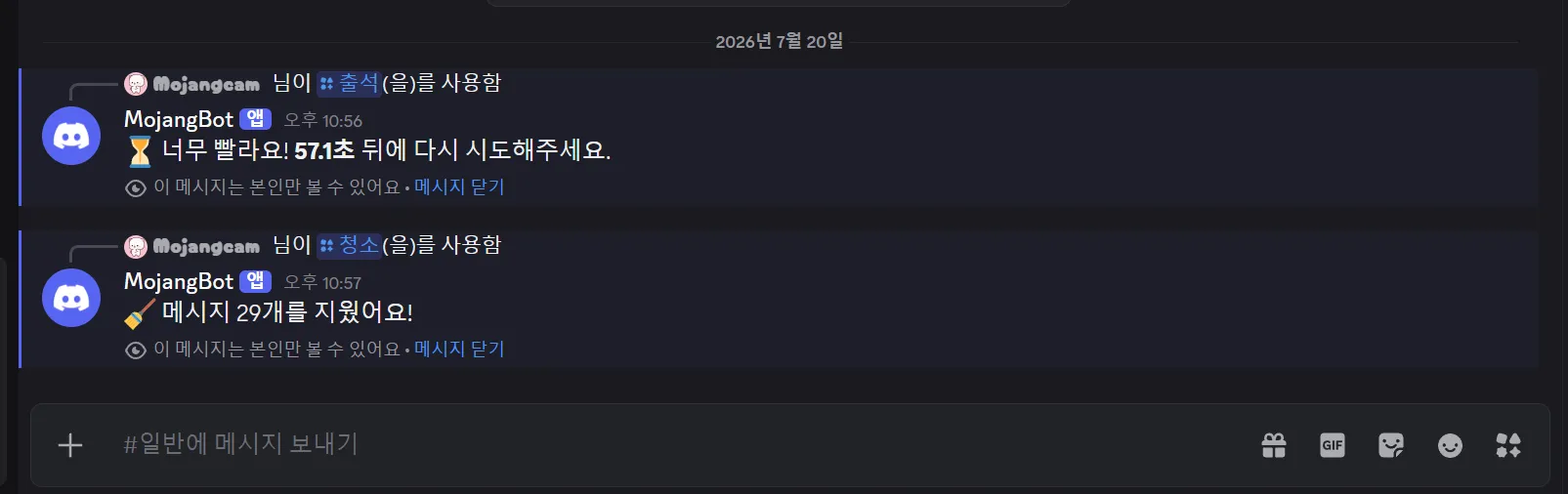
🧠 Why Do You Need Cooldowns and Permissions?
- Spam prevention : When spamming floods the API with requests, you hit Discord's rate limit and the whole bot stops responding.
- Balance : Commands with rewards, like check-ins, draws, and XP, are pointless without a cooldown.
- Accident prevention : If anyone can use commands like
/청소or/밴(ban), your server will fall apart in a day. - Error handling : If the bot stays silent when a check fails, users think "Is the bot broken?" and spam it again. You really need a message that tells them what happened.
📌 What You Need
- Python 3.8 or later (3.10+ recommended)
- discord.py 2.x — this post is based on the latest version, 2.7.1
- A Discord bot token (if you don't have one yet, start with Part #1 Mastering Slash Commands!)
- A Discord server for testing (one where you can create roles freely)
pip install -U discord.pyHere's how to check your version.
python -c "import discord; print(discord.__version__)"
# 2.7.1
⚠️ Version 1.x does not support slash commands. If your version doesn't start with
2., be sure to upgrade with the-Uoption.
📌 Step 1 - Adding a Cooldown
Adding a cooldown to a slash command takes just one decorator line.
import discord
from discord import app_commands
from discord.ext import commands

intents = discord.Intents.default()
bot = commands.Bot(command_prefix="!", intents=intents)

@bot.tree.command(name="출석", description="Daily check-in, once a day!")
@app_commands.checks.cooldown(1, 60.0, key=lambda i: (i.guild_id, i.user.id))
async def attend(interaction: discord.Interaction):
    await interaction.response.send_message(
        f"{interaction.user.mention}, you're checked in! ✅"
    )
Let's break it down 💡
app_commands.checks.cooldown(rate, per, *, key): A cooldown decorator just for slash commands.- rate : How many times the command can be used within
perseconds. The code above uses1, so that's once. - per : The length of the cooldown (in seconds). It's
60.0, so once every 60 seconds. - key : A function that decides "who the count is based on." Any hashable return value works.
key=lambda i: (i.guild_id, i.user.id): This combines server + user, so even the same person gets a separate cooldown on a different server.
💡 If you leave out
keyentirely, the default is per user ID (shared across all servers). On the other hand, if you passkey=None, you get a global cooldown shared by everyone. Perfect for server-wide event commands!
Also, decorator order matters. @bot.tree.command() must always come at the very top. If you put it below the others, it won't be registered as a command.
📌 Step 2 - Telling Users When They Hit the Cooldown
If you run only the Step 1 code, the bot does nothing at all when someone hits the cooldown. From the user's point of view, it's just a broken bot. Let's add an error handler.
@attend.error
async def attend_error(interaction: discord.Interaction, error: app_commands.AppCommandError):
    if isinstance(error, app_commands.CommandOnCooldown):
        await interaction.response.send_message(
            f"⏳ Too fast! Please try again in **{error.retry_after:.1f} seconds**.",
            ephemeral=True,
        )
Let's break it down 💡
@명령어이름.error(your command's name + .error) : Registers an error handler just for that command. It must take exactly 2 parameters:(interaction, error).app_commands.CommandOnCooldown: The exception raised when someone hits the cooldown.error.retry_after: A float that tells you how many more seconds to wait. We trimmed it neatly to one decimal place with:.1f.ephemeral=True: A message only the person who ran the command can see. It keeps the channel from getting flooded with notices.
💡 By the way, you can also pull out the original settings (
rate,per) witherror.cooldown. It's handy when you want a message like "This command can only be used once every 60 seconds."
📌 Step 3 - Checking Permissions
Now let's lock down a dangerous command. A message delete command should only be usable by people with the Manage Messages permission, right?
@bot.tree.command(name="청소", description="Delete channel messages in one go")
@app_commands.describe(amount="Number of messages to delete (1-100)")
@app_commands.default_permissions(manage_messages=True)
@app_commands.checks.has_permissions(manage_messages=True)
@app_commands.checks.bot_has_permissions(manage_messages=True)
@app_commands.guild_only()
async def clean(interaction: discord.Interaction, amount: app_commands.Range[int, 1, 100]):
    await interaction.response.defer(ephemeral=True)
    deleted = await interaction.channel.purge(limit=amount)
    await interaction.followup.send(f"🧹 Deleted {len(deleted)} messages!", ephemeral=True)
Let's break it down 💡
has_permissions(manage_messages=True): Checks whether the user has the permission. If not, aMissingPermissionsexception is raised.bot_has_permissions(manage_messages=True): Checks whether the bot has the permission. If not, you getBotMissingPermissions. Skip this, and the command blows up halfway through deleting!default_permissions(manage_messages=True): Hides the command from the command list entirely for people without the permission.guild_only(): Blocks the command from being used in DMs.app_commands.Range[int, 1, 100]: Limits the input to 1–100. Discord filters it for you.
⚠️ Don't rely on
default_permissionsalone! The official docs clearly state that it only "serves as a hint." Server admins can change this value in Discord's settings. So if you really want to block it, you must usehas_permissionsas well. Also,default_permissionsis ignored on subcommands, and since it's handled on Discord's server side, your error handler isn't called either.
📌 Step 4 - Restricting by Role
You'll often want to restrict commands with roles you created on your server, like a "staff role," instead of permissions.
@bot.tree.command(name="공지", description="Send a server announcement")
@app_commands.describe(message="Announcement text")
@app_commands.checks.has_any_role("Admin", "Staff")
@app_commands.guild_only()
async def notice(interaction: discord.Interaction, message: str):
    embed = discord.Embed(title="📢 Announcement", description=message, color=0x5865F2)
    embed.set_footer(text=f"Posted by: {interaction.user.display_name}")
    await interaction.response.send_message(embed=embed)
Let's break it down 💡
has_role("이름")(the role name goes in the quotes) : Requires one specific role. If it's missing, you getMissingRole.has_any_role("A", "B"): Passes if the user has at least one of the listed roles. If not, you getMissingAnyRole.- You can pass roles as IDs (integers) instead of names (strings). Names break easily with typos or renames, so IDs are recommended for a real bot.
@app_commands.checks.has_any_role(123456789012345678, 987654321098765432)💡 Bonus - Exempting VIPs from the Cooldown (dynamic_cooldown)
You can also do things like "shorter cooldowns for the supporter role." Just use dynamic_cooldown.
from typing import Optional

VIP_ROLE_ID = 123456789012345678  # ID of the role exempt from the cooldown

def vip_cooldown(interaction: discord.Interaction) -> Optional[app_commands.Cooldown]:
    user = interaction.user
    if isinstance(user, discord.Member) and user.get_role(VIP_ROLE_ID):
        return None                          # Returning None means no cooldown!
    return app_commands.Cooldown(1, 30.0)    # Regular users: once every 30 seconds

@bot.tree.command(name="뽑기", description="Run a random draw")
@app_commands.checks.dynamic_cooldown(vip_cooldown, key=lambda i: (i.guild_id, i.user.id))
async def draw(interaction: discord.Interaction):
    await interaction.response.send_message(f"🎲 Result: **{random.randint(1, 100)} points**!")
The key point is that returning None exempts that user from the cooldown completely. Depending on your conditions, just build and return a Cooldown(rate, per) object yourself.
📌 Full Code (Copy & Paste OK)
# discord.py 2.7.1 / Python 3.8+
import random
import traceback
from typing import Optional

import discord
from discord import app_commands
from discord.ext import commands

TOKEN = "PUT_YOUR_BOT_TOKEN_HERE"
VIP_ROLE_ID = 123456789012345678  # ID of the role exempt from the cooldown

intents = discord.Intents.default()
bot = commands.Bot(command_prefix="!", intents=intents)

@bot.event
async def on_ready():
    await bot.tree.sync()
    print(f"✅ Logged in: {bot.user}")

# ── 1) Cooldown: once every 60 seconds per server and user ──────
@bot.tree.command(name="출석", description="Daily check-in, once a day!")
@app_commands.checks.cooldown(1, 60.0, key=lambda i: (i.guild_id, i.user.id))
async def attend(interaction: discord.Interaction):
    await interaction.response.send_message(
        f"{interaction.user.mention}, you're checked in! ✅"
    )

# ── 2) Permission check: only users with Manage Messages ──────
@bot.tree.command(name="청소", description="Delete channel messages in one go")
@app_commands.describe(amount="Number of messages to delete (1-100)")
@app_commands.default_permissions(manage_messages=True)
@app_commands.checks.has_permissions(manage_messages=True)
@app_commands.checks.bot_has_permissions(manage_messages=True)
@app_commands.guild_only()
async def clean(interaction: discord.Interaction, amount: app_commands.Range[int, 1, 100]):
    await interaction.response.defer(ephemeral=True)
    deleted = await interaction.channel.purge(limit=amount)
    await interaction.followup.send(f"🧹 Deleted {len(deleted)} messages!", ephemeral=True)

# ── 3) Role check: only 'Admin' or 'Staff' ───────────────────
@bot.tree.command(name="공지", description="Send a server announcement")
@app_commands.describe(message="Announcement text")
@app_commands.checks.has_any_role("Admin", "Staff")
@app_commands.guild_only()
async def notice(interaction: discord.Interaction, message: str):
    embed = discord.Embed(title="📢 Announcement", description=message, color=0x5865F2)
    embed.set_footer(text=f"Posted by: {interaction.user.display_name}")
    await interaction.response.send_message(embed=embed)

# ── 4) Bonus: VIPs skip the cooldown ────────────────────────
def vip_cooldown(interaction: discord.Interaction) -> Optional[app_commands.Cooldown]:
    user = interaction.user
    if isinstance(user, discord.Member) and user.get_role(VIP_ROLE_ID):
        return None
    return app_commands.Cooldown(1, 30.0)

@bot.tree.command(name="뽑기", description="Run a random draw")
@app_commands.checks.dynamic_cooldown(vip_cooldown, key=lambda i: (i.guild_id, i.user.id))
async def draw(interaction: discord.Interaction):
    await interaction.response.send_message(f"🎲 Result: **{random.randint(1, 100)} points**!")

# ── 5) Global error handler (shared by all commands) ─────────
@bot.tree.error
async def on_app_command_error(interaction: discord.Interaction, error: app_commands.AppCommandError):
    if isinstance(error, app_commands.CommandOnCooldown):
        msg = f"⏳ Too fast! Please try again in **{error.retry_after:.1f} seconds**."
    elif isinstance(error, app_commands.MissingPermissions):
        msg = "🚫 You don't have permission to use this command."
    elif isinstance(error, app_commands.BotMissingPermissions):
        msg = "🤖 The bot is missing permissions! Check the bot's permissions in Server Settings → Roles."
    elif isinstance(error, app_commands.MissingAnyRole):
        msg = "🎭 This command requires the Admin or Staff role."
    elif isinstance(error, app_commands.CheckFailure):
        msg = "❌ The conditions for running this command aren't met."
    else:
        msg = "⚠️ An unknown error occurred. Please try again in a moment."
        traceback.print_exception(type(error), error, error.__traceback__)

    if interaction.response.is_done():
        await interaction.followup.send(msg, ephemeral=True)
    else:
        await interaction.response.send_message(msg, ephemeral=True)

bot.run(TOKEN)
💡 In the full code, I intentionally left out the
@attend.errorfrom Step 2. I'll explain why in Common Error #3 right below!
📌 Result
Turn on the bot and try each command on your server, and here's how they behave.
First, type /출석 (check-in) and you get the check-in message. But what if you type it again right away? The cooldown notice shows up only for you.
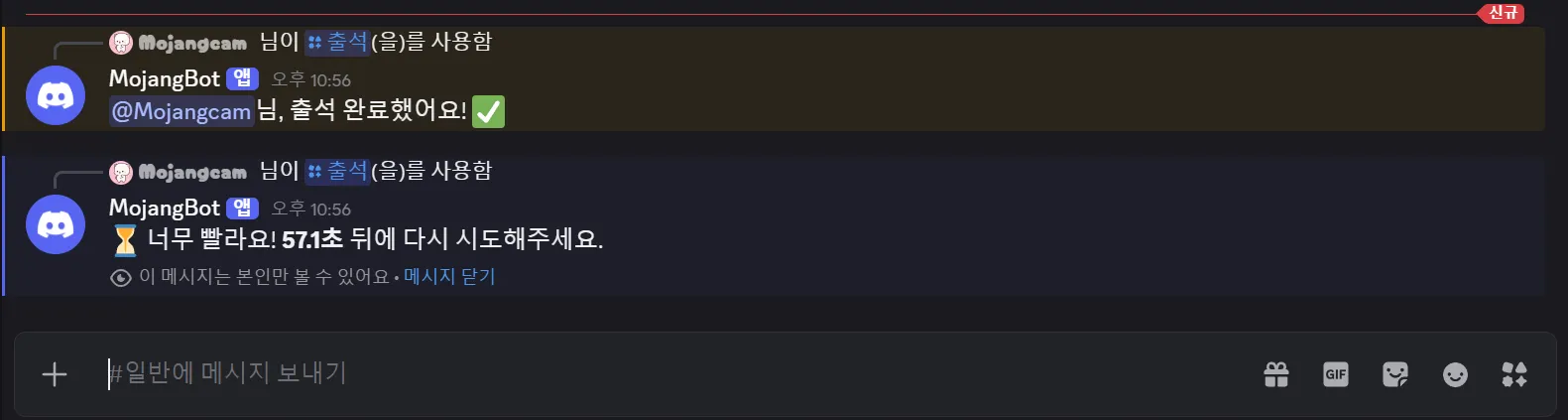
See the "Only you can see this (이 메시지는 본인만 볼 수 있어요)" line under the notice? That's exactly what ephemeral=True does. It leaves no trace in the channel.
The difference in permissions shows up right in the command list. It's the same server and the same bot, but it looks different depending on the account's permissions.
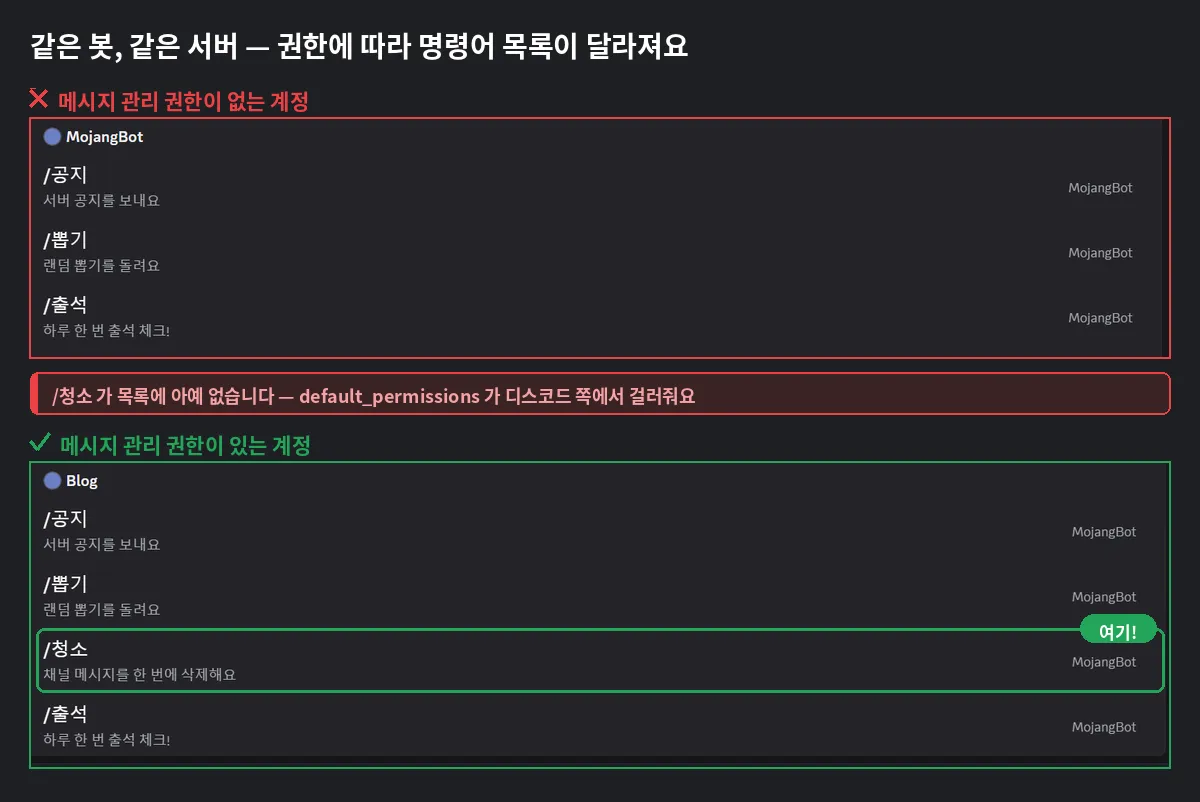
For an account without the Manage Messages permission, /청소 doesn't show up at all. That's because default_permissions filters it on Discord's server side. And even if a server admin opens up the permission settings so the command becomes visible, has_permissions blocks it one more time, so you get "🚫 You don't have permission".
In the same way, /공지 (notice) is rejected with "🎭 ...requires the Admin or Staff role" if you don't have the Admin or Staff role, and if you spam /뽑기 from an account with the VIP role, it keeps going with no cooldown.
📌 Common Errors
1. TypeError: error handler must have 2 parameters
- Cause : Your error handler function doesn't have exactly 2 parameters. This happens when you added
selfor took only one. - Fix : Always make it exactly 2, like
async def handler(interaction, error):. Inside a Cog, includingselfmakes it 3, so overridecog_app_command_errorin a Cog instead.
2. The bot says nothing when someone hits the cooldown
- Cause : You didn't add an error handler. Even when
CommandOnCooldownis raised, if nothing catches it, it only shows up in the logs and the user gets nothing. - Fix : Make sure to register a global
@bot.tree.errorhandler. (Block 5 in the full code)
3. The notice shows up twice, or you get an InteractionResponded error
- Cause : You registered both a per-command handler (
@명령어.error) and a global handler (@bot.tree.error). discord.py always calls the global handler, even after running the per-command handler. So it tries to respond again to an interaction that was already answered, andInteractionRespondedblows up. - Fix : Use only one of them. I recommend sticking with the global handler, like in the full code. If you really need both, just bail out inside the global handler with
if interaction.response.is_done(): return.
4. MissingPermissions shows up even for admins
- Cause :
has_permissionslooks at the actual permissions calculated per channel. If the permission is denied in a channel permission override, even a server admin can be blocked. - Fix : In Channel Settings → Permissions, check that the role's permission isn't switched off with ❌.
5. /청소 stops partway through
- Cause : The bot doesn't have the Manage Messages permission, or it tried to delete messages older than 14 days. Discord doesn't allow bulk deleting messages older than 14 days.
- Fix : Filter with
bot_has_permissionsfirst, and test with a smaller count in older channels.
💬 Wrapping Up
Today we added cooldowns and permission and role checks to our Discord bot. Here's the recap 🙌
checks.cooldown(rate, per, key=...)→ spam prevention, withkeyletting you choose the basis freelychecks.has_permissions/bot_has_permissions→ check user and bot permissionschecks.has_any_role→ restrict by server role (IDs recommended)default_permissions→ hide from the list, but it's only a hint, so never use it alone@bot.tree.error→ manage all your notices in one place
In the next part, we'll cover Discord Bot Data Storage - JSON vs SQLite. It's a must if you want check-in records or points to survive even when the bot shuts down. Stay tuned! 🙌
If you have questions or get stuck anywhere, leave a comment 💬
📚 Discord Bot Tutorial Series
- #1 - Mastering Slash Commands
- #2 - Adding Options (Arguments) to Slash Commands
- #3 - Adding Subcommands
- #4 - Sending Embeds with Slash Commands
- #5 - Implementing Button Interactions
- #6 - Implementing a Dropdown (Select Menu)
- #7 - Getting User Input with a Modal
- #8 - Styling Embeds with Images and Fields
- #9 - Connecting AI (Claude & ChatGPT API)
- #10 - Adding Multi-Language (i18n) Support
- #11 - Building a Web Dashboard with Flask
- #12 - Managing Command Cooldowns and Permissions ← You are here!
👉 Also worth reading: Discord Bot Error Fix Guide - From intents and token errors to a bot that won't respond!
Series · Part 12 of 32
Discord Bot Tutorial
- #1Discord Bot Tutorial - Mastering Slash Commands!
- #2Adding Options (Arguments) to Slash Commands!
- #3Adding Subcommands to Slash Commands!
- #4Sending Embeds with Slash Commands!
- #5Implementing Button Interactions!
- #6Implementing a Dropdown (Select Menu)!
- #7Getting User Input with a Modal (Python Example)
- #8Styling Embeds with Images and Fields (Python Example)
- #9Connecting AI (Claude & ChatGPT API) to Your Bot! (Python Example)
- #10Adding Multi-Language (i18n) Support! (Python Example)
- #11Building a Web Dashboard with Flask! (Python Example)
- #12Managing Command Cooldowns and Permissions! (Python Example)You are here
- #13Automating Roles and Channels to Manage Your Server! (Python Example)
- #14Saving Data! JSON vs SQLite (Python Example)
- #15슬래시 명령어 그룹(Group)으로 명령어 정리하기! (파이썬 예제) (Korean)
- #16리마인더·알림 기능 만들기! 봇이 먼저 말 걸게 하기 (파이썬 예제) (Korean)
- #17RAG로 문서 기반 답변봇 만들기! 우리 서버 전용 FAQ 봇 (파이썬 예제) (Korean)
- #18투표(Poll) 기능 만들기! 다수결로 정하는 서버 규칙 (파이썬 예제) (Korean)
- #19Cog로 코드 쪼개기! 1000줄 봇도 안 더러워지는 구조 (파이썬 예제) (Korean)
- #20자동 환영 메시지·온보딩 만들기! 규칙 동의 버튼으로 자동 역할 부여 (파이썬 예제) (Korean)
- #21키워드 자동응답·금지어 필터 만들기! 경고 누적으로 자동 제재까지 (파이썬 예제) (Korean)
- #22슬래시 명령어 자동완성(Autocomplete) 만들기! 금지어를 골라서 추가·삭제 (파이썬 예제) (Korean)
- #23aiosqlite로 비동기 DB 제대로 설계하기! JSON 탈출 (파이썬 예제) (Korean)
- #24채널 난독화(Channel Obfuscation) 대응하기! 11/16부터 안 보이는 채널이 생겨요 (파이썬 예제) (Korean)
- #25봇이 죽지 않게! 에러 핸들링·로깅 체계 잡기 (파이썬 예제) (Korean)
- #26티켓(Ticket) 문의 시스템 만들기! 버튼 하나로 1:1 상담 채널 자동 생성 (파이썬 예제) (Korean)
- #27티켓 담당자 배정·우선순위 만들기! 스태프가 여러 명이어도 안 꼬이게 (파이썬 예제) (Korean)
- #28레벨·경험치(XP) 시스템 만들기! 채팅할수록 레벨업, 랭킹판까지 (파이썬 예제) (Korean)
- #29화폐·상점(Economy) 시스템 만들기! 코인 벌어서 아이템 사기 (파이썬 예제) (Korean)
- #30Build a Poll & Survey Bot! Native Polls + Buttons with Real-Time Tallies (Python Example) 🗳️
- #32Build a Server Log & Audit Log Channel! Auto-Log Message Deletes, Edits, Joins/Leaves, and Kicks (Python Example) 🕵️
- #33임시 음성방 확장, 파티방 만들기! 방장 위임·강퇴·초대 전용(비공개) 방 + 전용 채팅방 자동 생성 (파이썬 예제) 🎉 (Korean)
Show all 32Collapse
